<?xml version="1.0" encoding="utf-8"?><feed xmlns="http://www.w3.org/2005/Atom" ><generator uri="https://jekyllrb.com/" version="3.10.0">Jekyll</generator><link href="https://blog.sixeyed.com/rss" rel="self" type="application/atom+xml" /><link href="https://blog.sixeyed.com/" rel="alternate" type="text/html" /><updated>2025-10-23T10:55:39+00:00</updated><id>https://blog.sixeyed.com/rss</id><title type="html">Elton’s Blog</title><subtitle>Notes from the field of freelance IT consultant and trainer Elton Stoneman -  15x Microsoft MVP, Docker Captain and author for Pluralsight and Manning.</subtitle><author><name>Elton Stoneman</name><uri>/l/ps-home</uri></author><entry><title type="html">Why Would You Write a Book About Docker in 2025?</title><link href="https://blog.sixeyed.com/why-would-you-write-a-book-about-docker-in-2025/" rel="alternate" type="text/html" title="Why Would You Write a Book About Docker in 2025?" /><published>2025-10-22T09:00:00+00:00</published><updated>2025-10-22T09:00:00+00:00</updated><id>https://blog.sixeyed.com/why-would-you-write-a-book-about-docker-in-2025</id><content type="html" xml:base="https://blog.sixeyed.com/why-would-you-write-a-book-about-docker-in-2025/"><![CDATA[<h1 id="why-would-you-write-a-book-about-docker-in-2025">Why Would You Write a Book About Docker in 2025?</h1>

<p>Docker is everywhere. It’s the most sensible way to package and run applications. Every cloud platform supports it, every CI/CD pipeline uses it, any laptop can run it, and pretty much every development team has adopted or is adopting it.</p>

<p class="notice--info">So why did I write a second edition of <a href="https://www.manning.com/books/learn-docker-in-a-month-of-lunches-second-edition">Learn Docker in a Month of Lunches</a>?</p>

<p>This is why: most engineers learn Docker on the job. You need to containerize an app, so you cobble together a Dockerfile from Stack Overflow. You need to run multiple containers, so you get Claude to write you a Docker Compose file. It works, you ship it, and you move on. But that doesn’t get you an understanding of how Docker works or what it can do.</p>

<h2 id="the-reality-of-learning-docker-in-production">The Reality of Learning Docker in Production</h2>

<p>I’ve trained hundreds of people on Docker and Kubernetes, and there’s a common pattern. People know enough to get by, but they’re missing the fundamentals that would make their lives easier. They’re running containers without health checks. They’re building 2GB images when they could be 50MB. They’re not using multi-stage builds, or security scanning their images, or understanding how layer caching saves build time and data transfer costs.</p>

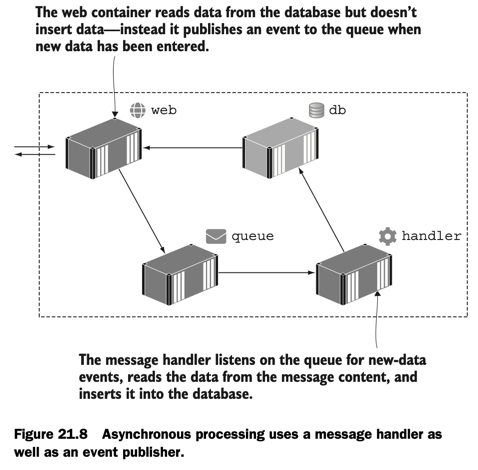
<p>You might know how to <code class="language-plaintext highlighter-rouge">docker build</code> and <code class="language-plaintext highlighter-rouge">docker run</code>, but do you really understand Docker volumes and why data in containers isn’t permanent? Can you configure application settings across different environments without rebuilding images? Do you know how containers enable advanced patterns like HTTP traffic management with reverse proxies or asynchronous messaging with queues?</p>

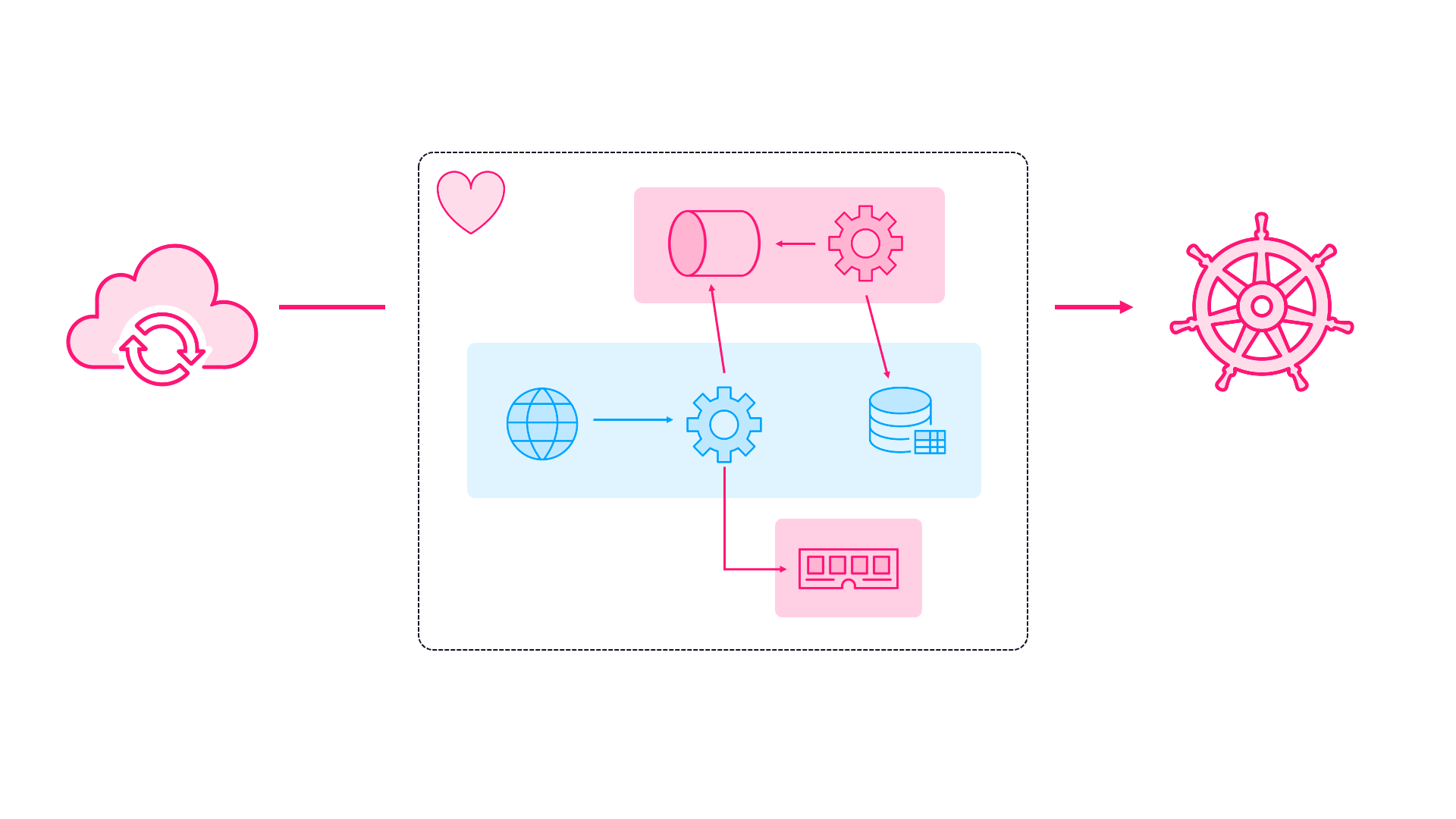
<p alt="Diagram showing asynchronous messaging architecture using Docker containers with message queues connecting multiple services for event-driven communication patterns"><img src="/content/images/2025/10/diamol-async.png" alt="Async messaging with containers" /></p>

<p>Learn Docker in a Month of Lunches (Second Edition) has got you covered. It walks you through Docker with a practical hands-on approach, giving you experience in everything from the fundamentals to image optimization and cross-platform delivery. But you don’t have to follow the journey - every chapter is independent. Already comfortable with basic Dockerfiles? Jump straight to Chapter 17 on optimizing images for size, speed, and security. Need to understand networking? Chapter 7 walks through Docker Compose and how Docker plugs containers together. Want to finally master volumes on Windows AND Linux? Chapter 6 has you covered.</p>

<h2 id="whats-new-in-the-second-edition">What’s New in the Second Edition</h2>

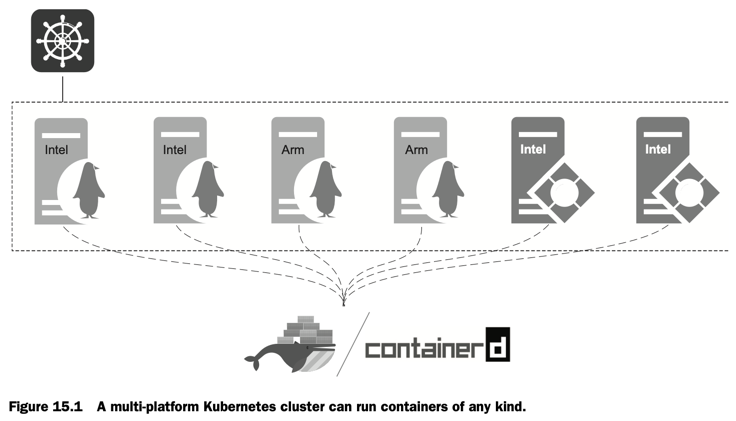
<p>The first edition came out in 2021, and although the core concepts haven’t changed the book content is new with every exercise rewritten and tested for the latest releases. Everything works cross-platform: Linux, Windows, Intel, and ARM. You can follow along on your Apple Silicon, your Windows 11 laptop, or a Ubuntu server you’re running in the cloud. There’s a whole chapter on replatforming legacy Windows apps - because yes, those old .NET Framework applications deserve a new home in containers.</p>

<p>The runtime chapters of the book are a complete refresh, covering all the options you have to run containers in production. Azure Container Apps and Google Cloud Run for serverless containers in the cloud, a primer on Kubernetes, and GitHub Actions for CI/CD.</p>

<h2 id="from-basics-to-production">From Basics to Production</h2>

<p>The book’s structured to take you from zero to production-ready. Part 1 covers the fundamentals - understanding containers and images, building multi-stage Dockerfiles for Java, Node.js, and Go apps, and sharing images through registries.</p>

<p>Part 2 gets into the real-world stuff: running distributed applications with Docker Compose, implementing health checks and dependency checks, adding observability with Prometheus and Grafana, and building a proper CI/CD pipeline that only needs Docker.</p>

<p>Part 3 shows you how to run containers anywhere - multi-platform builds that work on ARM and Intel, managed container services in Azure and Google Cloud, and yes, Kubernetes.</p>

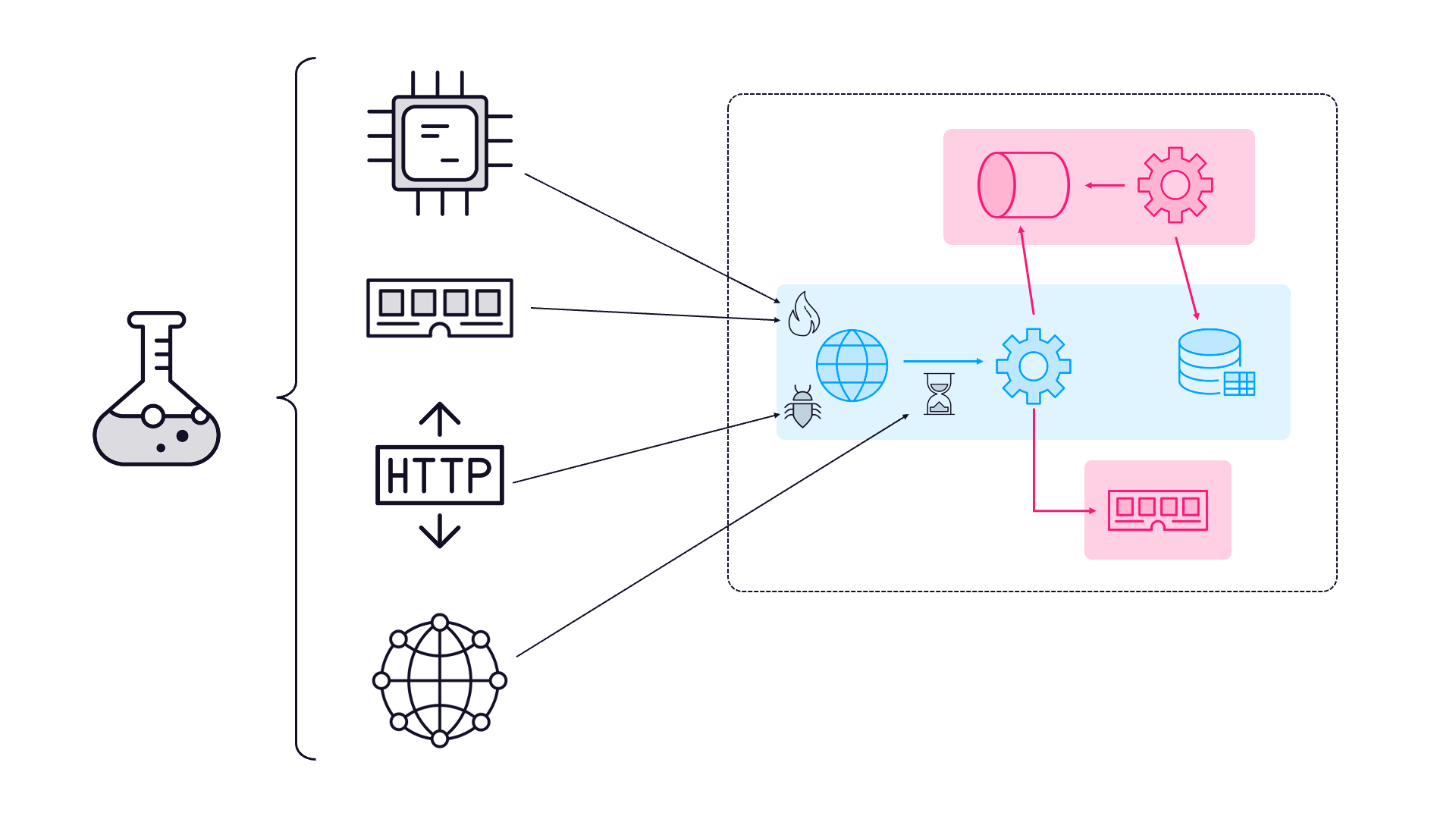
<p alt="Screenshot of a Kubernetes cluster running on multiple platforms including ARM and Intel architectures with Linux and Windows nodes deployed across different cloud environments"><img src="/content/images/2025/10/diamol-k8s-cluster.png" alt="A multi-platform Kubernetes cluster" /></p>

<p>Part 4 is where it gets really interesting - production patterns like configuration management, centralized logging, reverse proxies for traffic control, and message queues for asynchronous communication.</p>

<h2 id="the-practical-approach">The Practical Approach</h2>

<p>Each chapter is a “lunch” - about an hour of focused learning that you can actually complete in a lunch break.</p>

<p>Every topic is grounded in real problems I’ve seen teams struggle with. Application configuration management across environments? Chapter 18. Writing and managing logs properly? Chapter 19. Getting containers production-ready with proper optimization? Chapter 17. These aren’t theoretical exercises - they’re solutions to actual problems you’ll face.</p>

<h2 id="getting-started">Getting Started</h2>

<p>The second edition of Learn Docker in a Month of Lunches is available now from <a href="https://www.manning.com/books/learn-docker-in-a-month-of-lunches-second-edition">Manning</a> and another book-selling website called <a href="https://www.amazon.com//dp/1633438465">Amazon</a>. Whether you’re fixing those knowledge gaps or starting fresh, it’s the practical guide to Docker that focuses on what you actually need to know to be productive.</p>

<p>Docker might be ubiquitous in 2025, but that doesn’t mean everyone’s using it well. This book helps you join the group that is.</p>]]></content><author><name>Elton Stoneman</name><uri>/l/ps-home</uri></author><category term="docker" /><category term="learning" /><category term="books" /><category term="containers" /><summary type="html"><![CDATA[Docker is established tech now - so why would anyone buy a book about it? Because most people only learn a fraction of what Docker can do from their day job, and it pays to learn it all.]]></summary></entry><entry><title type="html">My New SRE Course: Resiliency and Automation (2025)</title><link href="https://blog.sixeyed.com/sre-resiliency-course/" rel="alternate" type="text/html" title="My New SRE Course: Resiliency and Automation (2025)" /><published>2025-08-18T09:00:00+00:00</published><updated>2025-08-18T09:00:00+00:00</updated><id>https://blog.sixeyed.com/sre-resiliency-course</id><content type="html" xml:base="https://blog.sixeyed.com/sre-resiliency-course/"><![CDATA[<h1 id="my-new-sre-course-resiliency-and-automation-">My New SRE Course: Resiliency and Automation 🚀</h1>

<p>My latest Pluralsight course is out!</p>

<p class="notice--info"><a href="/l/ps-sre-resiliency">SRE: Resiliency and Automation</a></p>

<p>It’s the third course in the <a href="/l/ps-sre-path">Site Reliability Engineering learning path</a>, and it’s all about building systems that survive the chaos of production.</p>

<p>This course came from a simple observation: most teams think their systems are reliable because they work perfectly in test environments. But production is hostile. Pods crash, nodes fail, dependencies timeout, and cloud services have outages. The question isn’t whether these failures will happen - it’s whether your system will survive them. 💪</p>

<h2 id="sre-resiliency-the-story-">SRE Resiliency: The Story 📖</h2>

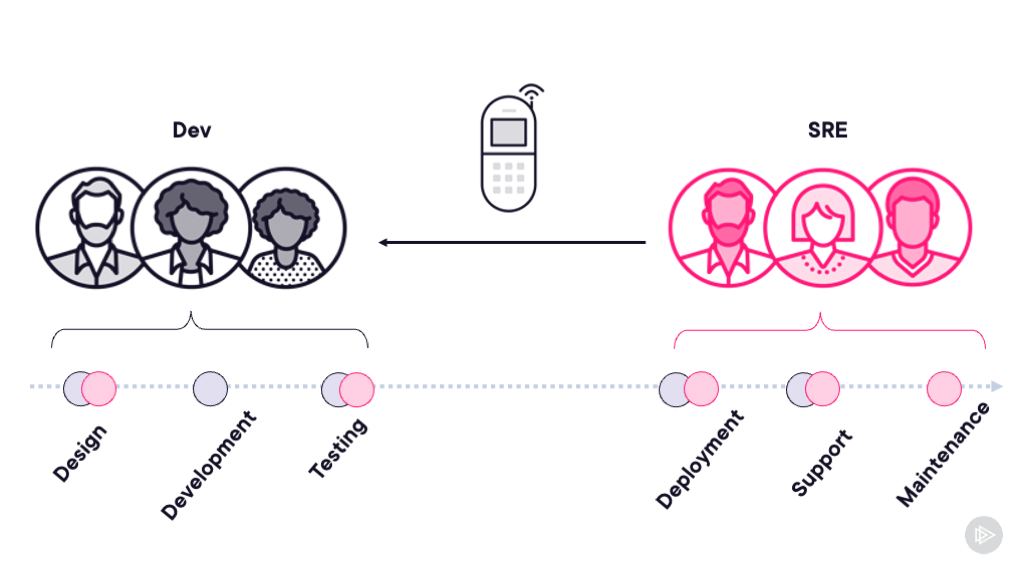
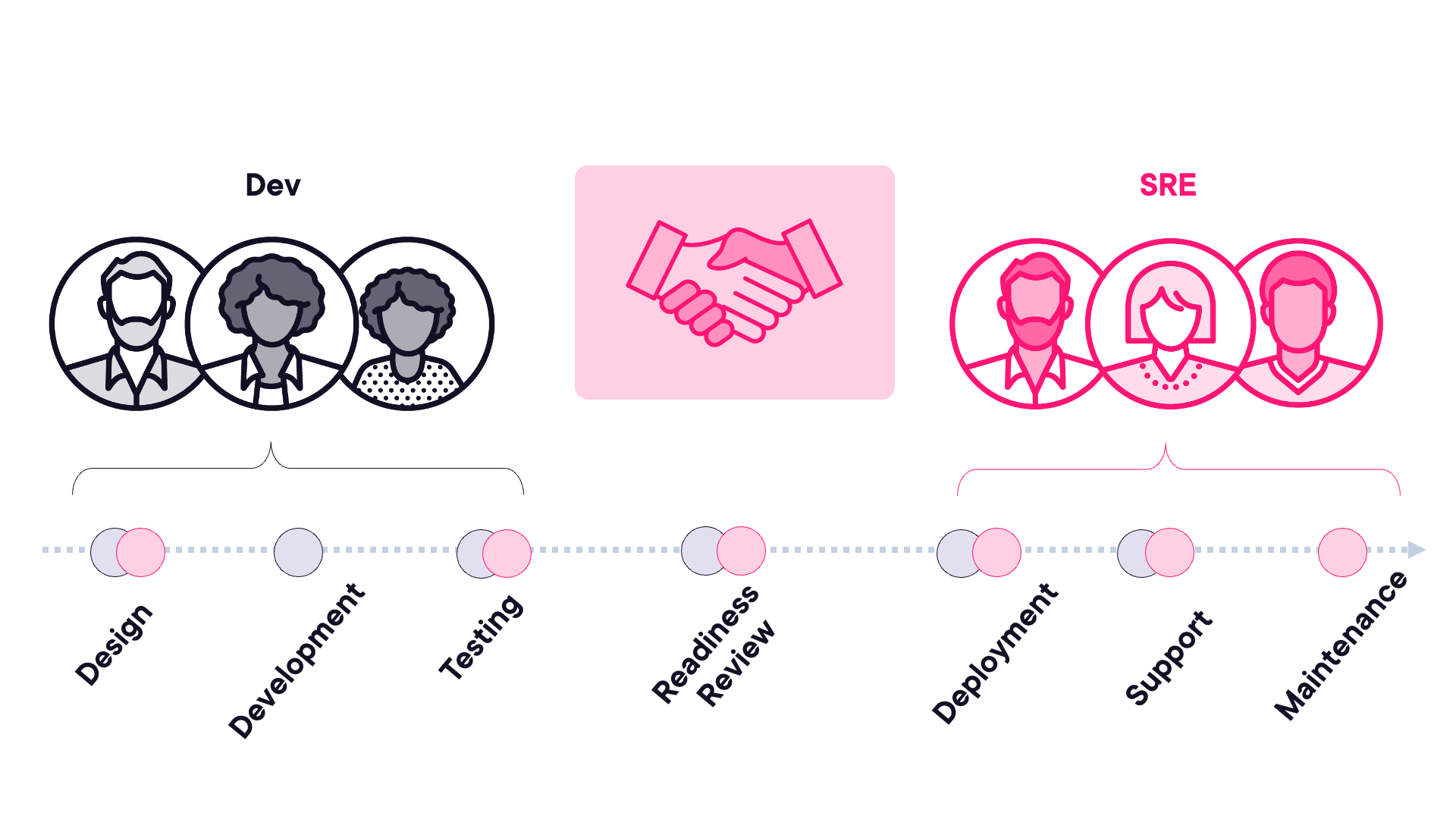
<p>The course follows an SRE team that’s had enough. They’re handing back the pager to the development team because the application is consuming their entire toil budget with constant incidents. But this isn’t about blame - it’s about partnership. The SRE team walks the developers through exactly what needs to change before they’ll take operational responsibility back.</p>

<p alt="SRE team handing back the pager to the development team"><img src="/content/images/2025/08/sre-hand-back-pager.png" alt="SRE team handing back the pager" /></p>

<p>We use this narrative to explore the core practices that transform hope-based reliability into evidence-based confidence. You’ll follow two fictional SREs, Carlos and Keiko, as they help steer the app to production reliability. You’ll see Carlos demonstrating the problems with traditional approaches, then Keiko showing how SRE teams solve these issues at scale.</p>

<h2 id="sre-skills-youll-master">SRE Skills You’ll Master</h2>

<p>The course covers five essential areas that every production system needs:</p>

<p><strong>Architectural Resilience</strong> - You’ll see why synchronous architectures create operational nightmares and how patterns like distributed caching and async messaging provide the graceful degradation that production demands. We take an app that’s failing under normal load and transform it into something that maintains its SLOs.</p>

<p><strong>GitOps and Automation</strong> - Manual deployments don’t scale to multiple releases per day. You’ll learn how Infrastructure as Code with Terraform, application modeling with Helm, and continuous reconciliation with <a href="https://argo-cd.readthedocs.io/">ArgoCD</a> create self-healing systems that fix themselves at 3 AM while you sleep. 😴</p>

<p alt="GitOps workflow diagram showing Infrastructure as Code with Terraform, Helm charts, and ArgoCD continuous reconciliation for automated deployments"><img src="/content/images/2025/08/gitops-argocd-workflow.png" alt="GitOps workflow with ArgoCD" /></p>

<p><strong>Capacity Planning and Autoscaling</strong> - Pre-production sizing is guesswork. The course shows how to build systems that discover their own capacity needs through horizontal pod autoscaling, cluster autoscaling, and <a href="https://keda.sh/">KEDA</a>. Start small, measure everything, and let reality drive your scaling. 📊</p>

<p><strong>Chaos Engineering</strong> - Perfect test environments create dangerous blind spots. You’ll see how to use <a href="https://chaos-mesh.org/">Chaos Mesh</a> to deliberately break things, proving your system can handle pod failures, node crashes, and dependency outages before they happen in production. 🔨</p>

<p alt="Chaos Mesh dashboard showing chaos engineering experiments including pod failures, node crashes, and network latency injection for testing system resilience"><img src="/content/images/2025/08/chaos-mesh-experiments.png" alt="Chaos engineering with Chaos Mesh" /></p>

<p><strong>Disaster Recovery</strong> - Even the most resilient system can’t survive everything. The final module covers how SRE teams classify applications by business criticality and implement appropriate DR strategies for regional failures.</p>

<h2 id="real-problems-real-solutions-">Real Problems, Real Solutions 🎯</h2>

<p>Every demo in the course reproduces actual production problems. When you see timeouts, cascading failures, and manual deployment disasters, these aren’t theoretical examples - they’re recreations of the issues that force SRE teams to hand back the pager.</p>

<p>The solutions aren’t exotic either. These are the standard infrastructure patterns that emerge from running hundreds of services at scale. Distributed caching with <a href="https://redis.io/">Redis</a>, message queuing for async processing, GitOps with ArgoCD - the tools and techniques that working SRE teams use every day.</p>

<h2 id="target-audience-for-sre-professionals">Target Audience for SRE Professionals</h2>

<p>This course is perfect if you’re:</p>

<ul>
  <li>A developer working with SRE teams who wants to understand their requirements</li>
  <li>An operations engineer looking to move into SRE</li>
  <li>An architect designing systems that need to run reliably at scale</li>
</ul>

<p>You’ll need basic knowledge of distributed systems and cloud platforms, plus an understanding of SRE fundamentals from <a href="https://blog.sixeyed.com/sre-learning-path-pluralsight/">the earlier courses in the SRE learning path</a>. The demo application runs in Kubernetes, but you don’t need to be an expert - the principles and approaches are the key things you’ll learn here, not just the technology implementation.</p>

<h2 id="the-sre-partnership-model-">The SRE Partnership Model 🤝</h2>

<p>One thing I really wanted to emphasize in this course is that SRE isn’t about one team imposing rules on another. It’s about partnership. Development teams bring deep application knowledge and feature expertise. SRE teams bring operational experience from running systems at scale. Together, they build something neither could achieve alone.</p>

<p>When the SRE team hands back the pager in module one, it’s not a failure - it’s a recognition that the application needs architectural changes that only the dev team can implement. When they take it back after the improvements, both teams win. Developers get faster deployments and more autonomy. SRE teams get sustainable operations with manageable toil.</p>

<p alt="SRE partnership model diagram illustrating collaboration between development teams and SRE teams, showing shared responsibilities for application reliability and operational excellence"><img src="/content/images/2025/08/sre-team-collaboration.png" alt="SRE partnership model" /></p>

<h2 id="next-steps-️">Next Steps ➡️</h2>

<p><a href="/l/ps-sre-resiliency">SRE: Resiliency and Automation</a> is available now on Pluralsight. It’s about 90 minutes of content split across five modules, each with practical demos you can follow along with.</p>

<p>If you haven’t started the SRE learning path yet, begin with <a href="/l/ps-sre-concepts">SRE: Concepts and Principles</a> for the fundamentals, then move through the path to build your expertise.</p>

<p>The SRE approach transforms how we build and run systems. Instead of hoping things won’t break, we prove they can survive. Instead of firefighting the same issues repeatedly, we build systems that heal themselves. It’s a better way to work for everyone - developers, operators, and especially the users who depend on our services. 🎉</p>

<p>Happy learning!</p>]]></content><author><name>Elton Stoneman</name><uri>/l/ps-home</uri></author><category term="sre" /><category term="pluralsight" /><category term="kubernetes" /><category term="devops" /><category term="resiliency" /><category term="automation" /><category term="gitops" /><category term="chaos-engineering" /><category term="disaster-recovery" /><category term="argocd" /><summary type="html"><![CDATA[Learn how SRE teams build resilient production systems with my new Pluralsight course. Master GitOps, chaos engineering, automation patterns, and disaster recovery strategies that survive production chaos.]]></summary></entry><entry><title type="html">10 Essential Claude Code Tips: Boost Your AI Coding Productivity in 2025</title><link href="https://blog.sixeyed.com/ten-tips-claude-code/" rel="alternate" type="text/html" title="10 Essential Claude Code Tips: Boost Your AI Coding Productivity in 2025" /><published>2025-07-15T09:00:00+00:00</published><updated>2025-07-15T09:00:00+00:00</updated><id>https://blog.sixeyed.com/ten-tips-claude-code</id><content type="html" xml:base="https://blog.sixeyed.com/ten-tips-claude-code/"><![CDATA[<p><a href="https://www.anthropic.com/claude-code">Claude Code</a> is Anthropic’s agentic coding tool that transforms AI pair programming. It lets you delegate development tasks directly from your VS Code terminal - you describe what you want, and a team of Claudes build it while you focus on the bigger picture.</p>

<p>My journey with Claude Code went like this:</p>
<ul>
  <li><em>mildly skeptical</em> 🤔</li>
  <li><em>pleasantly surprised</em> 😯</li>
  <li><em>thoroughly impressed</em> 🤯</li>
  <li><em>cannot live without</em> 🚀</li>
</ul>

<p>This Claude Code tutorial covers 10 battle-tested tips from real projects that will help you work like a tech lead with an AI development team at your command.</p>

<blockquote>
  <p><strong>Quick Summary</strong>: Claude Code transforms you from a coder into a development director. These 10 Claude Code best practices will help you manage multiple AI coding agents, maintain code quality, and dramatically increase productivity. Time required: 5 minutes to read, hours of new free time to fill.</p>
</blockquote>

<h2 id="getting-started-with-claude-code">Getting Started with Claude Code</h2>

<p>Setting up is straightforward: <a href="https://claude.ai/login">create a free account</a>, install the <a href="https://docs.anthropic.com/en/docs/claude-code/ide-integrations">Claude Code extension in VS Code</a>, authenticate and you’re ready. Open a terminal, type <code class="language-plaintext highlighter-rouge">claude</code> and start describing what you need. The real power comes from understanding how to work with it effectively.</p>

<blockquote>
  <p>I used Claude Code to build an entire <a href="https://github.com/sixeyed/multi-cloud-demo">multi-cloud AKS/EKS demo application</a>. With a few hours of guidance, Claude completed what would have taken me at least 3 days to write myself.</p>
</blockquote>

<h2 id="1-run-multiple-claude-instances-multitask-like-a-manager">1. Run Multiple Claude Instances: Multitask Like a Manager</h2>

<p>Run multiple Claude instances across different terminal sessions. While one’s building your API endpoints, another can work on the frontend, and a third can write your deployment scripts. Switch between them to provide guidance - it’s like having a team of developers who are extremely eager and who know <em>everything</em>.</p>

<p>Make sure you have plenty of things on the go - work, pet projects, blogs, tech explorations. And don’t be afraid to let it loop - prompts like “keep iterating on the build: fix any issues with the terraform config and deployment scripts, run the script, watch the outcome and repeat until it works” will keep Claude busy.</p>

<p class="notice--info">It’s the new ABC: <strong>Always Be Clauding</strong>.</p>

<h2 id="2-delegate-debugging-let-claude-do-the-work">2. Delegate Debugging: Let Claude Do the Work</h2>

<p>When something’s broken, resist the urge to fix it yourself. That’s not why you’re here. Describe the problem and let Claude handle the implementation. If you’re diving into the code to make changes, you’re going too deep. Stay at the design level where you add the most value.</p>

<p>Claude will use all the same debugging tools you use to find issues (it asks permission first and stores the permissions you’ve granted). If you see an error log, just give it to Claude and it will use <code class="language-plaintext highlighter-rouge">kubectl</code> to examine your Pods and Services, <code class="language-plaintext highlighter-rouge">curl</code> to test endpoints, <code class="language-plaintext highlighter-rouge">nslookup</code> for DNS queries and so on.</p>

<h2 id="3-code-review-mindset-roll-with-ai-generated-code">3. Code Review Mindset: Roll With AI-Generated Code</h2>

<p>Claude’s code isn’t going to look like yours. That’s fine. Treat it like you’re reviewing someone’s PR - does it meet the requirements? Is it maintainable? If you have standards, enforce them in the repo. Don’t get hung up on style differences. The goal is working software, not perfect alignment with your own preferences.</p>

<h2 id="4-rapid-prototyping-design-and-iterate-on-the-fly">4. Rapid Prototyping: Design and Iterate on the Fly</h2>

<p>Coding is cheap now. Really cheap. Need to refactor the entire architecture? Just ask. Want to switch from REST to GraphQL? Claude can handle it. Don’t overthink the initial design - build something that works, then iterate. It’s liberating when a complete redesign takes minutes, not days.</p>

<h2 id="5-git-best-practices-stay-in-control-of-commits">5. Git Best Practices: Stay in Control of Commits</h2>

<p>Claude can commit code and write commit messages, but don’t let it run on autopilot. Review the diffs, commit frequently, and keep your Git history clean. You want to understand what’s changing - that’s how you maintain ownership of the codebase.</p>

<p>Ready to try this? <a href="https://www.anthropic.com/claude-code">Start with Claude Code free</a> and experience the power of AI-assisted development.</p>

<h2 id="6-beyond-application-code-let-claude-handle-infrastructure">6. Beyond Application Code: Let Claude Handle Infrastructure</h2>

<p>Don’t just use it for application code. Claude can write your <a href="/learn-docker-in-a-month-of-lunches/">Dockerfiles</a>, <a href="/learn-kubernetes-in-a-month-of-lunches/">Kubernetes</a> manifests, <a href="https://www.terraform.io/">Terraform</a> configs, CI/CD pipelines, test suites, documentation. It will even give you guidance on architecture and tech stack. Push the boundaries - you’ll be surprised at what it can do. It has memorized the entire Internet, after all (probably).</p>

<h2 id="7-troubleshooting-complex-tasks-be-persistent">7. Troubleshooting Complex Tasks: Be Persistent</h2>

<p>Some tasks are harder for Claude than others. I’ve had situations where it took a dozen prompts to get a local LGTM stack running, or to authenticate to a new EKS cluster. When it struggles, approach from different angles. Rephrase your requirements, break complex tasks into steps, feed in error messages, or provide examples.  Like any team member, Claude sometimes needs extra guidance to get unstuck.</p>

<p>Unlike most team members, Claude sometimes gives up. It will say something like “success! I’ve got it all working except the things you really wanted”. But that doesn’t mean it can’t do it, it’s just reached the end of the road for that prompt - try again.</p>

<h2 id="8-claudemd-best-practices-provide-context-upfront">8. CLAUDE.md Best Practices: Provide Context Upfront</h2>

<p>Create a <a href="https://docs.anthropic.com/en/docs/claude-code/memory"><code class="language-plaintext highlighter-rouge">CLAUDE.md</code> file</a> in your project root. This is where Claude documents everything it needs to know - architecture decisions, tech preferences, naming conventions, project structure, and coding standards. Claude Code automatically reads this at the start of each session, so you don’t need to repeat yourself.</p>

<p>A good <code class="language-plaintext highlighter-rouge">CLAUDE.md</code> is like a comprehensive onboarding doc for a new developer - and you can ask Claude to update it at the end of a session with new learnings, which it will pick up next time. Here’s what it looks like - create it with the <code class="language-plaintext highlighter-rouge">/init</code> command when you bring Claude onto the project and keep it current with prompts:</p>

<div class="language-plaintext highlighter-rouge"><div class="highlight"><pre class="highlight"><code># CLAUDE.md - AI Assistant Memory File

## Project Overview
This is a multi-cloud Kubernetes demo application showcasing how containerized .NET applications can be deployed consistently across different cloud providers. The application demonstrates modern microservices patterns, message queuing, database persistence, and Kubernetes deployment best practices.

## Architecture

### Components
- **WebApp**: ASP.NET Core web application with Razor Pages
  - Form for message submission
  - Messages page displaying processed data from SQL Server
  - Modern gradient UI design with 3rem font sizes
  - Antiforgery tokens disabled for demo simplicity
</code></pre></div></div>

<h2 id="9-async-work-queue-batch-your-changes">9. Async Work Queue: Batch Your Changes</h2>

<p>While Claude is working on a longer task, queue up your next prompts. If you know you’ll need API tests after the endpoints are done, type that prompt and hit enter - Claude will pick it up when ready. This keeps Claude productive while you check on your other instances. It’s like having a queue of work that you can fill ahead of time.</p>

<h2 id="10-knowledge-management-capture-and-reuse-prompts">10. Knowledge Management: Capture and Reuse Prompts</h2>

<p>Ask Claude to dump all the prompts from your session to a text file in the repo. It’s incredibly useful to see how the development evolved - what worked, what needed clarification, how you refined requirements. These prompt histories become scaffolding for your next similar project. You’ll build up a library of effective prompts that you can reuse and adapt.</p>

<h2 id="claude-code-pricing-and-usage-limits">Claude Code Pricing and Usage Limits</h2>

<p>Don’t get too hung up on the details - which model you’re using or which plan you’re on. I use the more advanced <a href="https://docs.anthropic.com/en/docs/claude-code/settings#model-selection">Opus 4 model</a> by default, but Claude automatically switches to Sonnet 4 when you’re running low on credits, and it’s perfectly capable.</p>

<p>The <a href="https://docs.anthropic.com/en/docs/claude-code/costs">usage restrictions</a> are very fair - when you hit the limits, they reset after a period. More expensive plans have higher limits and shorter reset periods. Just focus on being productive with whatever you have.</p>

<h2 id="frequently-asked-questions">Frequently Asked Questions</h2>

<p><strong>Q: Is Claude Code free to use?</strong><br />
A: Claude Code offers a free tier with limited usage. Paid plans provide higher limits and access to more powerful models like Opus 4.</p>

<p><strong>Q: Does Claude Code work with any language?</strong><br />
A: Yes! Claude Code supports all major programming languages including Python, Java, C#, Go, Rust, and more.</p>

<p><strong>Q: Can Claude Code work with existing codebases?</strong><br />
A: Absolutely. Claude Code can analyze and modify existing code. The CLAUDE.md file helps it understand your project structure and conventions.</p>

<p><strong>Q: How does Claude Code compare to GitHub Copilot?</strong><br />
A: While Copilot offers inline suggestions, Claude Code works at a higher level - managing entire features and projects through conversation. It’s more like having an AI pair programming partner who can handle complex, multi-file tasks.</p>

<p><strong>Q: Can I use Claude Code for production applications?</strong><br />
A: Yes, but always review Claude’s code thoroughly. Treat it like any code review - check for security issues, performance concerns, and adherence to your coding standards.</p>

<h2 id="the-future-of-ai-assisted-development">The Future of AI-Assisted Development</h2>

<p>Claude Code fundamentally changes how we write software. Instead of coding, you’re directing. Instead of debugging syntax, you’re validating solutions. Embrace this new way of working - you will suddenly become hugely more productive.</p>

<p>I imagine the next step will be a higher level still - you’ll plug Claude into your product backlog and set X number of instances running to do the entire project. One Claude will test and review the work of another Claude, and maybe there will be a manager (the Claude of Claudes) who takes over the director role.</p>

<p>But for now, you are the director. If you’re ready to transform your development workflow, <a href="https://www.anthropic.com/claude-code">get started with Claude Code</a> and experience the future of AI-powered coding. For a more detailed analysis of what multiple Claudes can do, check out my post <a href="/claude-is-coming-for-your-job/">An Evening with Claude Code - or - How I Learned to Stop Worrying and Love AI</a>.</p>]]></content><author><name>Elton Stoneman</name><uri>/l/ps-home</uri></author><category term="ai" /><category term="claude" /><category term="productivity" /><category term="development" /><category term="claude-code" /><category term="ai-coding" /><category term="developer-tools" /><category term="ai-pair-programming" /><category term="prompt-engineering" /><category term="vs-code-extensions" /><category term="developer-productivity" /><summary type="html"><![CDATA[Master Claude Code with 10 battle-tested tips from real projects. Learn to run multiple AI agents, delegate effectively, and 10x your dev productivity in 2025.]]></summary></entry><entry><title type="html">An Evening with Claude Code - or - How I Learned to Stop Worrying and Love AI</title><link href="https://blog.sixeyed.com/claude-is-coming-for-your-job/" rel="alternate" type="text/html" title="An Evening with Claude Code - or - How I Learned to Stop Worrying and Love AI" /><published>2025-07-10T09:00:00+00:00</published><updated>2025-07-10T09:00:00+00:00</updated><id>https://blog.sixeyed.com/claude-is-coming-for-your-job</id><content type="html" xml:base="https://blog.sixeyed.com/claude-is-coming-for-your-job/"><![CDATA[<p>It’s 7pm, Friday night and I’m working on three different projects simultaneously with my new favorite colleague: <a href="https://www.anthropic.com/claude-code">Claude Code</a>.</p>

<ul>
  <li>Claude #1 is building a multi-cloud proof-of-concept for a client.</li>
  <li>Claude #2 is creating demos for my next Pluralsight course</li>
  <li>Claude #3 is fixing the UI issues on this blog that I’ve ignored for years.</li>
</ul>

<p>Actually… I’m mostly watching <a href="https://www.imdb.com/title/tt3606756/">Incredibles 2</a> with my kids, and just checking in on each of the Claudes in turn to nudge them to their next step. This is AI coding today.</p>

<h2 id="welcome-to-the-paradigm-shift">Welcome to the Paradigm Shift</h2>

<p>We - engineers and architects - shouldn’t feel we’re competing with AI. 🎬 Our role is to direct it. Bandwidth is no longer the limit, because we can distribute work to as many AI agents as we can manage. With multiple Claudes I can productively work on multiple tasks in parallel.</p>

<p>The mythical 10X developer turns out to be a regular 1X developer directing 10 instances of Claude Code. Even the best multitasking developers pay a cost every time they context switch, but AI doesn’t have that overhead. Each instance maintains its full context, while you operate on a higher level checking in and guiding them all.</p>

<blockquote>
  <p>I’ve heard the same joke from my consultancy clients for years - they want to clone me so they can run me at scale. It feels like Anthropic are doing that with Claude Code.</p>
</blockquote>

<p>I’ve been using Claude Code more and more, and this parallel workflow is a real breakthrough. This post covers what I think where AI is going in the short term: not replacing developers, but fundamentally changing what engineering roles look like. One person running multiple AI agents is like a tech lead with a hugely knowledgeable, experienced and dedicated team. 🚀 So yes, AI is coming for your job - not to take it from you, but to transform it into something entirely more awesome.</p>

<h2 id="project-1-the-cloud-proof-of-concept">Project #1: The Cloud Proof-of-Concept</h2>

<p>I have a consulting client who are multi-cloud, but the area I work in is 100% Azure. They’re looking at broadening that to include AWS but they’re skeptical about how easy it is to migrate apps between clouds.</p>

<p>🐳 For years I’ve been saying that Docker and Kubernetes are the keystones of portable apps. They wanted a generic, simple proof of concept they could use to see if that was true, and to diff the Azure and AWS setup. I thought that was something Claude could help me with.</p>

<blockquote>
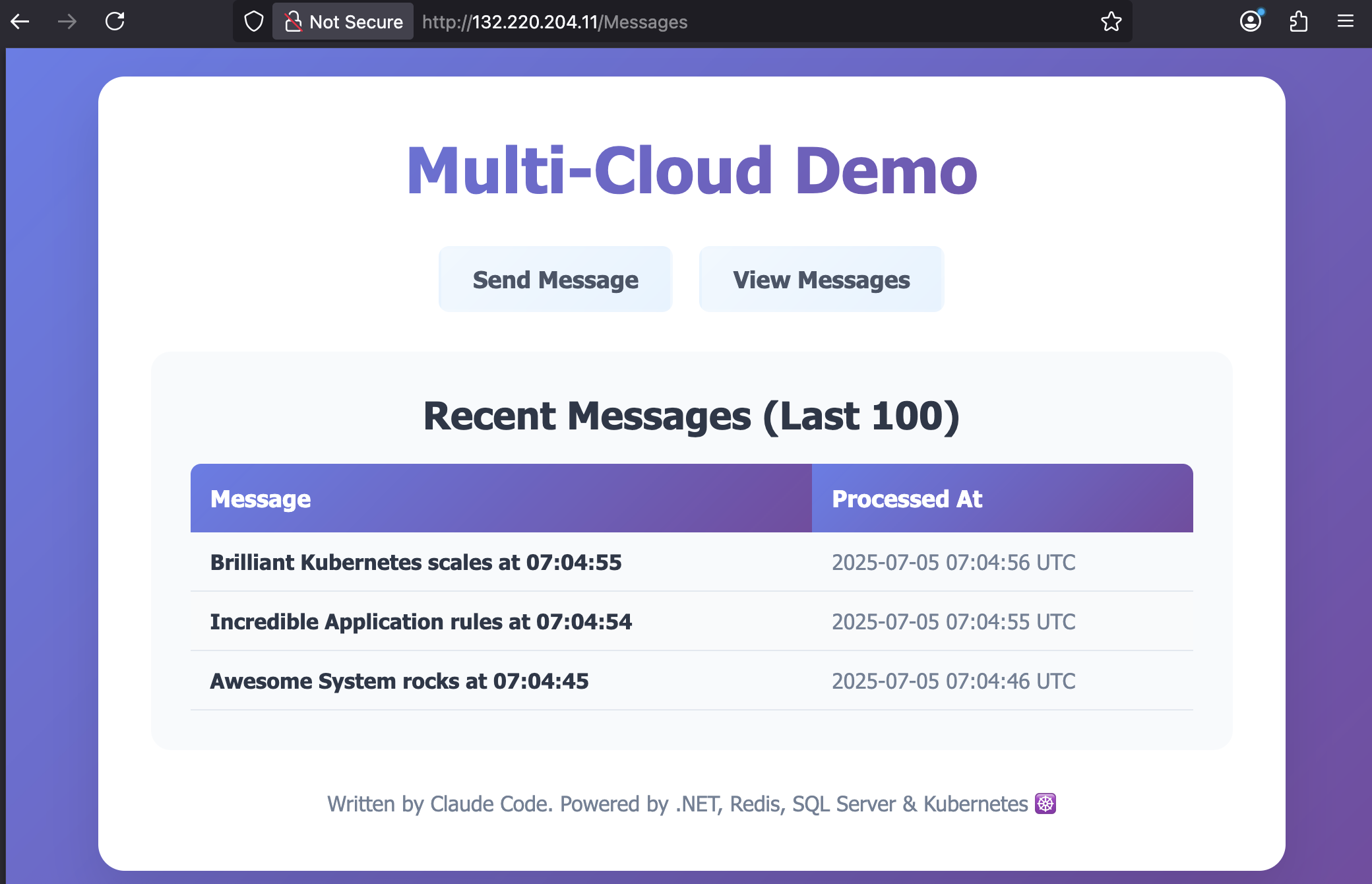
  <p>The full code Claude generated is on GitHub: <a href="https://github.com/sixeyed/multi-cloud-demo">sixeyed/multi-cloud-demo</a>. Here’s a snap of the app running in Azure with fully automated deployments built by Claude:</p>
</blockquote>

<p><img src="/content/images/2025/07/claude-azure-demo.png" alt="Multi-cloud demo application running in Azure showing distributed system with frontend, Redis queue, and SQL Server database deployed by Claude Code" /></p>

<p>This is how the conversation with Claude Code started - using the <a href="https://docs.anthropic.com/en/docs/claude-code/ide-integrations#installation">VS Code integration</a> in an empty folder:</p>

<div class="prompt-wrap">1. "this is a new simple demo app for showing how Kubernetes deployments can work the same way in different clouds. i'd like to create a basic multi service application - a web app which posts text to a redis queue, and a background worker which reads from the queue. both should be .NET, and the web app should have a very simple form for the user to enter text. i'd also like docker files and docker compose.yml so this runs locally for development"

2. "great. now let's have a helm folder with a chart to deploy this app to kubernetes. we'll want the chart to have a redis dependency - probably bitnami's chart"</div>

<p>At this point I had the source code, Docker and Kubernetes artifacts for a working demo. Then it gets interesting because I’m designing this out loud and Claude is reacting to changes in requirements:</p>

<div class="prompt-wrap">3. "now i want to demonstrate different kubernetes features. can we add to the worker process so it writes logs to a file or persists data somewhere so we can see PVCs and different storage options"

4. "no, scratch that. leave the logging to console but also add SQL server container to docker-compose.yml and have the worker write the messages to a database table"</div>

<p>And now I have a database defined in my Docker Compose spec, with the source code extended to include persistent storage. Claude also added it to the Kubernetes model without my asking, because by now it had enough context to know we’d be using both.</p>

<p>This is impressive enough, but the output isn’t perfect and - like any developer - Claude does get things wrong. What’s <em>really</em> impressive is that you can tell Claude there’s an issue, and it will use the same tools you would to debug, track down the root cause and fix it:</p>

<div class="prompt-wrap">5. "the data isn't getting into sql server from the worker. check the connection string and the ef core code"</div>

<p>That triggered lots of approval requests so Claude could use tools like <code class="language-plaintext highlighter-rouge">kubectl</code> and <code class="language-plaintext highlighter-rouge">curl</code> - nothing happens without your permission. It found the problem, fixed the Kubernetes specs and we were off again.</p>

<p>🤖 Generative AI for code is like having an engineer on the team who’s extremely knowledgeable and very enthusiastic, but lacking experience. Your role is to guide them, feed them tasks which you break down into sensible steps and describe clearly, and give feedback when something needs more work.</p>

<p>Some of these prompts take Claude a minute or two to work on, sometimes longer. That’s when you - as the AI team lead - switch to another instance on another part of the project, or a different project entirely. That other Claude has finished its latest task so you guide it on to the next one.</p>

<p>I’m always polite with Claude because of <a href="https://www.imdb.com/title/tt0103064/">Terminator 2</a>, but it doesn’t mind criticism. Sometimes it approaches tasks in an odd way, and you just point out what you’d prefer and it goes off and corrects it:</p>

<div class="prompt-wrap">36. "this is very cool. let's add another page to the web app which shows the messages in sql server. probably best to split it out so the html isn't all in a string now too :)"

37. "also - why do we have HTML strings at all? shouldn't we be using razor pages or something."</div>

<p>You get the idea. The <a href="https://github.com/sixeyed/multi-cloud-demo/blob/main/user-prompts.txt">full conversation</a> ran to 90 prompts, and at the end I had a full stack repo with Terraform configurations to create the Azure and AWS infrastructure, Helm charts to deploy the same app to both, and detailed documentation.</p>

<blockquote>
  <p>I made a point of not touching any code myself. Anything that didn’t work or needed changing went into a prompt. So Claude did it all - but Claude couldn’t have done it without me.</p>
</blockquote>

<p>This is why there’s still a place for human engineers. Maybe not for long, but for now the AI needs guidance. The more knowledge and experience you bring as the human guide, the more productive the AI can be. Rough guess I think this would have taken one human about 3 days to write; with Claude it was done in a few hours of intermittent guidance.</p>

<h2 id="project-2-pluralsight-course-demo">Project #2: Pluralsight Course Demo</h2>

<p>And while that goes on there, look at this going on here. In a different VS Code window I have a separate Claude Code session.</p>

<p>I’m working on a new <a href="">SRE learning path for Pluralsight</a>. There are four courses and I like to have a different demo app for each course. Those apps are built to show specific behavior to highlight how SRE approaches and tools can fix issues.</p>

<p>In the old days I might spend the first week of a new course building the demo app. I quite enjoyed that - it’s responsibility-free coding because the app will never run in anger - and it gave me a chance to use all the latest tech stacks and keep up to date.</p>

<p>But actually it’s not a very effective use of time. Far better to get Claude to write that throwaway code for me, freeing up my time to work on the content.</p>

<p>After a few iterations Claude had built a demo app which could be configured to deliberately fail in interesting ways, with a full GitOps stack to create Azure infrastructure with Terraform and deploy to Kubernetes with Argo.</p>

<p>Here’s part of Claude’s summary for that session, running while the other Claude was building my multi-cloud demo:</p>

<div class="language-plaintext highlighter-rouge"><div class="highlight"><pre class="highlight"><code>## Final State
Repository is now:
- ✅ PowerShell standardized
- ✅ Self-bootstrapping infrastructure  
- ✅ Simplified testing approach
- ✅ Zero-configuration user experience
- ✅ Production-ready GitOps setup

## Key Takeaways
1. Complex test frameworks can become dead ends - simpler is often better
2. Self-bootstrapping infrastructure eliminates user setup pain
3. Consistency (PowerShell only) reduces maintenance overhead
4. Real infrastructure validation &gt; mocked tests for reliability demos
</code></pre></div></div>

<p>This was another app which started from scratch. ⏰ I saved a week of tinkering and could get straight onto the content for the course. It takes a little bit of introspection to admit: <em>this task is better suited to Claude than to me</em> . But it is and it means that course is getting to completion more quickly.</p>

<h2 id="project-3-the-blog-ui-finally">Project #3: The Blog UI (Finally!)</h2>

<p>And the last thing Claude was helping me with was this blog. I’ve always focused on the content and have pretty much zero interest in HTML and CSS. Over the years I’ve used different frameworks and platforms, the current setup is Jekyll powered by GitHub pages.</p>

<p>The theme is a modification of <a href="https://mmistakes.github.io/minimal-mistakes/">Minimal Mistakes</a> and the mobile experience has always sucked, but it’s one of those things I never fancied working on.</p>

<p>So in my third session I fired up Claude and introduced it to the blog repo. With the <code class="language-plaintext highlighter-rouge">init</code> command it inspected the source code and generated the <a href="https://docs.anthropic.com/en/docs/claude-code/memory">CLAUDE.md</a> document for its own guidance, including a high level overview:</p>

<div class="prompt-wrap">## Project Overview

This is a Jekyll-based blog using the Minimal Mistakes theme, hosted on GitHub Pages. The blog belongs to Elton Stoneman, a freelance IT consultant and trainer.</div>

<p>While the other two Claudes were working on their own things, I had this Claude fixing up the responsive design, adding SEO-metadata to recent posts and generally tidying things up.</p>

<p>I even got Claude to write a url-shortening component, to make it easier to control links. So my Pluralsight author page is available through my blog at https://blog.sixeyed.com/l/ps-home.</p>

<p>Years of technical debt fixed while my other projects built themselves. 📱 The blog finally looks professional on mobile. You can actually read my posts on your phone without zooming and scrolling horizontally.</p>

<p><img src="/content/images/2025/07/claude-blog.png" alt="Responsive blog design showing mobile-optimized layout with proper text wrapping and improved user experience created by Claude Code" /></p>

<h2 id="the-evenings-tally">The Evening’s Tally</h2>

<p>Final check-in across all three terminals:</p>
<ul>
  <li><strong>Client POC</strong>: Full distributed system deployed on both AKS and EKS - frontend accepting jobs, Redis queuing them, workers processing, results in SQL</li>
  <li><strong>Course demos</strong>: Six architectural patterns, fully containerized with documentation</li>
  <li><strong>Blog</strong>: Responsive, dark mode enabled, finally entering the 2020s</li>
</ul>

<p>✨ I accomplished three different project milestones in one evening (and a little bit into the following morning). Not by working faster - by working on multiple things simultaneously.</p>

<h2 id="the-realization">The Realization</h2>

<p>💪 What I’ve realized is that the value of human oversight across multiple AI workers is the new superpower. You become the tech lead doing rounds, checking on your team’s progress, providing direction, ensuring quality.</p>

<p>Here’s the hardest habit to break: <em>the urge to jump in and edit code manually</em>. Every time I see a small bug or want to tweak something, muscle memory says “I’ll just quickly fix this.” But that’s the old way. It’s always more effective to describe the change to Claude and move on to push forward another project. Let the AI make the change while you’re being productive elsewhere. Breaking this habit is like learning to delegate - uncomfortable at first, but essential for scaling.</p>

<h2 id="the-competitive-reality">The Competitive Reality</h2>

<p>💯 Here’s the uncomfortable truth: one AI-enabled developer can now deliver what used to take a small team. Not because AI is better at coding than humans, but because one human can effectively direct multiple AI developers working in parallel.</p>

<p>The good news? If you adapt, you become incredibly valuable. The concerning news? If you’re still working sequentially, you’re competing against people running parallel workstreams.</p>

<p>My advice:</p>

<ul>
  <li>Start thinking in parallel projects (or at least parallel tasks in the same project), not sequential tasks</li>
  <li>Get comfortable being a reviewer/director/tester/product manager rather than an implementer</li>
  <li>Practice managing multiple contexts simultaneously</li>
  <li>Focus on the skills AI can’t replicate: understanding business value, making architectural decisions, ensuring quality</li>
</ul>

<p class="notice--info">🎬 Think of yourself as a director, managing all the talent. You couldn’t do it without them - but they couldn’t do it without you either.</p>

<p>The code from all three projects is on GitHub. And the entire Claude Code transcript for the multi-cloud demo app is there too - every prompt. You can see exactly how a distributed system went from nothing to multi-cloud deployment without me writing a single line of code.</p>

<p>Stop thinking about AI as just a faster way to code, or maybe a threat to your job. Start thinking about it as your development team.</p>

<p>Now if you’ll excuse me, I’ve got a few more Claude Code instances to spin up. My next Pluralsight course demo isn’t going to build itself. 😏 Well, actually…</p>]]></content><author><name>Elton Stoneman</name><uri>/l/ps-home</uri></author><category term="ai" /><category term="claude" /><category term="claude-code" /><category term="productivity" /><category term="development" /><category term="automation" /><category term="parallel-programming" /><category term="artificial-intelligence" /><category term="software-engineering" /><summary type="html"><![CDATA[One evening running three parallel development projects with Claude Code - building a client POC, creating course demos, and fixing blog UI issues simultaneously. AI isn't replacing developers, it's transforming us into directors of multiple AI workers.]]></summary></entry><entry><title type="html">Site Reliability Engineering (SRE) on Pluralsight: Complete 4-Course Learning Path</title><link href="https://blog.sixeyed.com/sre-learning-path-pluralsight/" rel="alternate" type="text/html" title="Site Reliability Engineering (SRE) on Pluralsight: Complete 4-Course Learning Path" /><published>2025-07-06T10:00:00+00:00</published><updated>2025-07-06T10:00:00+00:00</updated><id>https://blog.sixeyed.com/sre-learning-path-pluralsight</id><content type="html" xml:base="https://blog.sixeyed.com/sre-learning-path-pluralsight/"><![CDATA[<p><a href="https://sre.google/sre-book/table-of-contents/">Site Reliability Engineering</a> is how Google runs production systems, and it’s becoming the standard approach for managing complex applications at scale. I’ve just published the first two courses in a new <a href="/l/ps-sre-path">SRE learning path on Pluralsight</a>, with two more courses coming soon to complete the path.</p>

<p>SRE achieves the same goals as <a href="https://www.atlassian.com/devops">DevOps</a> - high availability with high velocity - but without requiring a massive culture shift. It’s an engineering approach to operations that focuses on automation, measurement, and removing toil. For many organizations starting their digital transformation, SRE provides a more structured path forward than traditional DevOps adoption.</p>

<p class="notice--info">I cover the easy(ish) way to add reliability at scale with container orchestration in my 5* Pluralsight course <a href="/l/ps-istio">Managing Apps on Kubernetes with Istio</a>.</p>

<h2 id="the-sre-learning-path">The SRE Learning Path</h2>

<p>The complete <a href="/l/ps-sre-path">Site Reliability Engineering learning path</a> takes you from SRE fundamentals through to advanced practices:</p>

<ol>
  <li><a href="/l/ps-sre-concepts">SRE: Concepts and Principles</a></li>
  <li><a href="/l/ps-sre-monitoring">SRE: Monitoring and Observability</a></li>
  <li><a href="/l/ps-sre-resiliency">SRE: Resiliency and Automation</a></li>
  <li>SRE: Measuring and Optimizing Reliability <em>(coming soon)</em></li>
</ol>

<p>Let’s dive into what’s covered in the first two courses.</p>

<h2 id="course-1-sre-concepts-and-principles">Course 1: SRE Concepts and Principles</h2>

<p><a href="/l/ps-sre-concepts">SRE: Concepts and Principles</a> is your entry point into Site Reliability Engineering. Over 90 minutes, you’ll follow two experienced SREs as they deal with real production scenarios.</p>

<h3 id="what-youll-learn">What You’ll Learn</h3>

<p>The course covers the foundational SRE concepts through practical demonstrations:</p>

<ul>
  <li>How SRE differs from traditional IT operations and DevOps</li>
  <li>Service Level Indicators (SLIs), Service Level Objectives (SLOs), and error budgets</li>
  <li>Incident management and the importance of blameless postmortems</li>
  <li>Core SRE tools for monitoring and alerting</li>
  <li>Automation, automation, automation</li>
</ul>

<p><img src="/content/images/2025/07/sre-1-automate.png" alt="Automation is the key principle in SRE" /></p>

<h3 id="course-outline">Course Outline</h3>

<p><strong>Module 1: Investigating Issues: On-Call with an SRE</strong><br />
Follow an on-call SRE dealing with a disk space issue in <a href="https://www.elastic.co/elasticsearch/">Elasticsearch</a>. You’ll see how SREs approach problems differently from traditional ops teams, using engineering practices to solve operational challenges.</p>

<p><strong>Module 2: Classifying and Tracking Performance with Service Levels</strong><br />
Join another SRE investigating a performance issue that’s burning through error budget. This module explains the key concepts of SLIs and SLOs while demonstrating logging and distributed tracing tools.</p>

<p><strong>Module 3: Managing Risk and Reducing Downtime</strong><br />
Learn how to use monitoring tools like <a href="https://prometheus.io/">Prometheus</a> and <a href="https://grafana.com/">Grafana</a> with <a href="https://opentelemetry.io/">OpenTelemetry</a> to confirm root causes and work with development teams on architectural solutions.</p>

<p><strong>Module 4: Handling Failure with Incident Management</strong><br />
When the initial fix doesn’t work and the incident escalates, you’ll see how SREs use a structured incident management approach to investigate and get to quick resolution.</p>

<p><strong>Module 5: Reflecting and Improving Practices with Postmortems</strong><br />
Wrap up with a blameless postmortem that connects both incidents and provides a path forward for preventing future issues.</p>

<h2 id="course-2-sre-monitoring-and-observability">Course 2: SRE Monitoring and Observability</h2>

<p><a href="/l/ps-sre-monitoring">SRE: Monitoring and Observability</a> builds on the foundational knowledge from course 1. You’ll follow an SRE team preparing to onboard a new application into their production environment.</p>

<h3 id="what-youll-learn-1">What You’ll Learn</h3>

<p>This course focuses on the technical implementation of observability:</p>

<ul>
  <li>The three pillars of observability: logging, metrics, and tracing</li>
  <li>Setting up monitoring stacks with Elasticsearch, Prometheus, and Grafana</li>
  <li>Designing effective alerting strategies that avoid alert fatigue</li>
  <li>Automating incident response with <a href="https://www.redhat.com/en/topics/devops/what-is-ci-cd">CI/CD</a> pipelines</li>
  <li>Exploring <a href="https://www.gartner.com/en/information-technology/glossary/aiops-artificial-intelligence-operations">AIOps</a> and machine learning for advanced monitoring</li>
</ul>

<p><img src="/content/images/2025/07/sre-2-monitor.png" alt="Monitoring applications in SRE with OpenTelemetry" /></p>

<h3 id="course-outline-1">Course Outline</h3>

<p><strong>Module 1: Onboarding to SRE: Observability Requirements</strong><br />
Learn what data applications need to expose for SRE teams to manage them effectively. Covers structured logging with the <a href="https://www.elastic.co/what-is/elk-stack">EFK stack</a> and distributed tracing with <a href="https://grafana.com/oss/tempo/">Tempo</a>.</p>

<p><strong>Module 2: Measuring “Good” with Service Level Indicators</strong><br />
Deep dive into implementing meaningful SLIs using Prometheus, including how to expose metrics from application components and aggregate them for monitoring.</p>

<p><strong>Module 3: Alerting on “Bad” to Trigger Incident Response</strong><br />
Design alerting strategies that trigger the right response - automated fixes for known issues or pages for unknown problems. Includes integration with <a href="https://www.atlassian.com/software/opsgenie">OpsGenie</a>.</p>

<p><strong>Module 4: Automating Remediation with Pipelines</strong><br />
Reduce toil by automating common fixes using <a href="https://github.com/features/actions">GitHub Actions</a> workflows triggered by your monitoring stack, with status updates posted to <a href="https://slack.com/">Slack</a>.</p>

<p><strong>Module 5: Next-level SRE: Machine Learning and AIOps</strong><br />
Explore how AIOps platforms like <a href="https://www.datadoghq.com/">Datadog</a> can augment traditional SRE practices with machine learning-driven anomaly detection and automated incident analysis.</p>

<h2 id="real-world-tools-and-practices">Real-World Tools and Practices</h2>

<p>Both courses use the same tools you’ll find in production SRE environments:</p>

<ul>
  <li><strong>Monitoring</strong>: Prometheus, Grafana</li>
  <li><strong>Logging</strong>: Elasticsearch, <a href="https://www.elastic.co/kibana/">Kibana</a>, <a href="https://www.fluentd.org/">Fluentd</a></li>
  <li><strong>Tracing</strong>: Tempo, OpenTelemetry</li>
  <li><strong>Alerting</strong>: OpsGenie, <a href="https://www.pagerduty.com/">PagerDuty</a></li>
  <li><strong>AIOps</strong>: Datadog</li>
</ul>

<p>Every demo shows working implementations to back up the theory. You’ll see realistic incidents being investigated, actual dashboards being built, and automation workflows in action.</p>

<p><img src="/content/images/2025/07/sre-2-alert.png" alt="Alerting thresholds in SRE" /></p>

<h2 id="who-should-take-these-courses">Who Should Take These Courses?</h2>

<p>The courses are designed for:</p>

<ul>
  <li>Developers who work with SRE teams or want to understand SRE practices</li>
  <li>Operations engineers looking to transition to SRE</li>
  <li>Team leads and managers evaluating SRE for their organization</li>
  <li>Anyone involved in digital transformation initiatives</li>
</ul>

<p>No deep technical knowledge is required for the first course - just a basic understanding of software development and deployment processes.</p>

<h2 id="whats-next">What’s Next?</h2>

<p>The next two courses in the learning path will complete your SRE education:</p>

<p><strong>SRE: Resiliency and Automation</strong> will focus on building systems that can withstand failures and automating responses to common issues. You’ll learn how to design for resilience, implement chaos engineering practices, and create self-healing systems.</p>

<p><strong>SRE: Measuring and Optimizing Reliability</strong> will cover advanced techniques for quantifying and improving system reliability, including complex SLO hierarchies, reliability budgeting, and using data to drive architectural decisions.</p>

<h2 id="getting-started">Getting Started</h2>

<p>Ready to learn how Google keeps systems running at scale? Start your Site Reliability Engineering journey today:</p>

<ol>
  <li><strong><a href="/l/ps-sre-path">View the complete SRE learning path</a></strong> - See all 4 courses and plan your learning</li>
  <li><strong><a href="/l/ps-sre-concepts">Start with SRE: Concepts and Principles</a></strong> - Master the fundamentals (90 minutes)</li>
  <li><strong><a href="/l/ps-sre-monitoring">Continue with SRE: Monitoring and Observability</a></strong> - Implement real-world solutions</li>
</ol>

<p>Site Reliability Engineering isn’t just for Google-scale operations. These SRE principles and practices work for any team running production systems. Whether you’re managing a handful of microservices or hundreds, SRE provides a proven framework for balancing reliability with feature velocity and reducing operational toil.</p>

<h2 id="frequently-asked-questions">Frequently Asked Questions</h2>

<p><strong>Q: Do I need prior SRE experience to take these courses?</strong><br />
A: No, the first course starts with fundamentals. Basic software development and deployment knowledge is helpful.</p>

<p><strong>Q: What tools will I learn?</strong><br />
A: Prometheus, Grafana, Elasticsearch, Kibana, Tempo, OpsGenie, and modern AIOps platforms like Datadog.</p>

<p><strong>Q: How long does the complete learning path take?</strong><br />
A: The four courses total approximately 6 hours, designed to be completed over 2-3 weeks.</p>

<p><strong>Q: Is this Google’s exact SRE approach?</strong><br />
A: These courses teach the core SRE principles Google pioneered, adapted for use in any size of organization.</p>

<p class="notice--info">Ready to dive deeper into the tools and practices that make SRE possible? Check out my other courses on <a href="/l/ps-home">Pluralsight</a> covering Docker, Kubernetes, and cloud-native architecture.</p>]]></content><author><name>Elton Stoneman</name><uri>/l/ps-home</uri></author><category term="sre" /><category term="site-reliability-engineering" /><category term="pluralsight" /><category term="monitoring" /><category term="observability" /><category term="devops" /><category term="google-sre" /><category term="incident-management" /><category term="prometheus" /><category term="grafana" /><summary type="html"><![CDATA[Master Site Reliability Engineering with my new 4-course Pluralsight learning path. Learn Google's SRE practices, monitoring with Prometheus & Grafana, incident management, and production observability through hands-on demonstrations.]]></summary></entry><entry><title type="html">Locking Helm Releases to Prevent Upgrades (and Downgrades)</title><link href="https://blog.sixeyed.com/locking-helm-releases/" rel="alternate" type="text/html" title="Locking Helm Releases to Prevent Upgrades (and Downgrades)" /><published>2024-10-16T08:00:00+00:00</published><updated>2024-10-16T08:00:00+00:00</updated><id>https://blog.sixeyed.com/locking-helm-releases</id><content type="html" xml:base="https://blog.sixeyed.com/locking-helm-releases/"><![CDATA[<h2 id="the-challenge-preventing-unwanted-helm-upgrades-and-downgrades">The Challenge: Preventing Unwanted Helm Upgrades and Downgrades</h2>

<p>It’s great having a single ‘Up’ pipeline for your apps which deploys the whole stack, creating whatever resources it needs and ensuring the deployment matches the spec in your source repo. Idempotence is the key here so your IaC will create or update infrastructure as required, and if you’re using <a href="/getting-started-with-kubernetes-on-windows/">Kubernetes</a> and Helm then you get desired-state deployment for the software.</p>

<p>One small issue you might see is if you have common services - say a data storage or monitoring subsystem - which are shared for multiple deployments of the app. If those deployments are different test environments running from different branches of the code then you might get into a tricky scenario:</p>

<ul>
  <li>you update the shared service Helm chart to v1.1 in the dev branch</li>
  <li>you run the Up pipeline to deploy to the latest code to the dev environment</li>
  <li>later someone deploys an earlier version from a release branch to the test environment</li>
  <li>the release branch uses v1.0 of the Helm chart, so your shared service gets downgraded</li>
</ul>

<p>Helm has the <code class="language-plaintext highlighter-rouge">upgrade --install</code> command which supports this idempotent approach, but there’s no flag to say <em>install it if it hasn’t been deployed yet, or upgrade it if it has - but only upgrade it if this version number is higher than the one for the current release</em>. In that case it would be useful to lock the release to prevent any further upgrades or downgrades, but there’s no <code class="language-plaintext highlighter-rouge">helm lock</code> command either.</p>

<h2 id="pending-status-to-the-rescue">Pending Status to the Rescue</h2>

<p>When Helm installs and upgrades get interrupted they can leave the release in a pending state - <code class="language-plaintext highlighter-rouge">pending-upgrade</code> or <code class="language-plaintext highlighter-rouge">pending-rollback</code>, usually when an operation times out. It’s a nasty situation which requires manually deleting the Helm release Secret (until this <a href="https://github.com/helm/community/pull/354">HIP</a> is completed) - but it effectively prevents any further changes to the release, so we can abuse it to create a lock.</p>

<p>The scripting for this is fairly simple, but it does rely on the internals of how Helm represents a release, so it’s liable to be broken at some point (it’s working as of Helm 3.16). Every time you install or upgrade a release Helm creates a Kubernetes Secret which contains an encoded representation of the release.</p>

<p>You can try this with a simple Helm chart from my book <a href="https://amzn.to/3x3O7mt">Learn Kubernetes in a Month of Lunches</a> (see also my <a href="/learn-docker-in-a-month-of-lunches-my-new-book/">Docker book announcement</a>):</p>

<div class="language-plaintext highlighter-rouge"><div class="highlight"><pre class="highlight"><code>helm repo add kiamol https://kiamol.net

helm repo update

helm -n default upgrade --install vweb kiamol/vweb
</code></pre></div></div>

<p>The <a href="https://github.com/sixeyed/kiamol/tree/master/ch10/vweb/v1/vweb">Helm chart</a> models a Deployment and a Service, but the install also creates a Secret:</p>

<div class="language-plaintext highlighter-rouge"><div class="highlight"><pre class="highlight"><code>PS&gt;kubectl get secret

NAME                         TYPE                 DATA   AGE
sh.helm.release.v1.vweb.v1   helm.sh/release.v1   1      3m18s
</code></pre></div></div>

<p>In the Secret is all the chart contents, plus metadata about the release.</p>

<h2 id="inspecting-the-helm-secret">Inspecting the Helm Secret</h2>

<p>You can decode the Secret but that won’t help you much - the content is in the <code class="language-plaintext highlighter-rouge">release</code> field, and it’s a ZIP file, encoded as a Base64 text stream. So to read the contents you need to decode the Base64 representation in Kubernetes, then <em>decode it again</em> to get the raw ZIP content, then pass it through the <code class="language-plaintext highlighter-rouge">gunzip</code> tool.</p>

<p>This extracts the raw data into a JSON file (using a *nix shell):</p>

<div class="language-plaintext highlighter-rouge"><div class="highlight"><pre class="highlight"><code>kubectl get secrets sh.helm.release.v1.vweb.v1 -o=jsonpath='{ .data.release }' | base64 -d | base64 -d | gunzip -c &gt; data_release.json
</code></pre></div></div>

<p>In the JSON you’ll see the YAML manifest for the deployment which Helm generated, plus the original chart contents. The interesting fields for us though are <code class="language-plaintext highlighter-rouge">info</code> and <code class="language-plaintext highlighter-rouge">version</code>:</p>

<div class="language-json highlighter-rouge"><div class="highlight"><pre class="highlight"><code><span class="p">{</span><span class="w">
    </span><span class="nl">"name"</span><span class="p">:</span><span class="w"> </span><span class="s2">"vweb"</span><span class="p">,</span><span class="w">
    </span><span class="nl">"info"</span><span class="p">:</span><span class="w"> </span><span class="p">{</span><span class="w">
        </span><span class="nl">"first_deployed"</span><span class="p">:</span><span class="w"> </span><span class="s2">"2024-10-16T07:53:28.496644+01:00"</span><span class="p">,</span><span class="w">
        </span><span class="nl">"last_deployed"</span><span class="p">:</span><span class="w"> </span><span class="s2">"2024-10-16T07:53:28.496644+01:00"</span><span class="p">,</span><span class="w">
        </span><span class="nl">"deleted"</span><span class="p">:</span><span class="w"> </span><span class="s2">""</span><span class="p">,</span><span class="w">
        </span><span class="nl">"description"</span><span class="p">:</span><span class="w"> </span><span class="s2">"Install complete"</span><span class="p">,</span><span class="w">
        </span><span class="nl">"status"</span><span class="p">:</span><span class="w"> </span><span class="s2">"deployed"</span><span class="w">
    </span><span class="p">},</span><span class="w">
    </span><span class="nl">"version"</span><span class="p">:</span><span class="w"> </span><span class="mi">1</span><span class="w">
</span><span class="p">}</span><span class="w">
</span></code></pre></div></div>

<p>When you run a <code class="language-plaintext highlighter-rouge">helm upgrade</code> command it decodes all this and checks the value of <code class="language-plaintext highlighter-rouge">info.status</code> before it proceeds. If it sees the release is pending then it won’t continue.</p>

<h2 id="updating-the-helm-secret-to-lock-the-release">Updating the Helm Secret to Lock the Release</h2>

<p>Now we can see how to trick Helm into blocking any updates. The process is:</p>

<ul>
  <li>extract and decode and unzip the <code class="language-plaintext highlighter-rouge">release</code> value from the Secret into a JSON file</li>
  <li>update the <code class="language-plaintext highlighter-rouge">info.status</code> value in the JSON</li>
  <li>also increment the <code class="language-plaintext highlighter-rouge">version</code> field and set a useful description</li>
  <li>zip and encode the updated <code class="language-plaintext highlighter-rouge">release</code> JSON</li>
  <li>get the Secret and store as a YAML file</li>
  <li>update the <code class="language-plaintext highlighter-rouge">release</code> field in the YAML with the new data</li>
  <li>update the YAML metadata</li>
  <li>apply the updated Secret YAML</li>
</ul>

<p class="notice--info">I use <a href="https://mikefarah.gitbook.io/yq">yq</a> to make the JSON and YAML updates.</p>

<p>In Bash it looks like this - setting some variables first for the release we want to lock (fetch them from <code class="language-plaintext highlighter-rouge">helm ls</code>):</p>

<div class="language-bash highlighter-rouge"><div class="highlight"><pre class="highlight"><code><span class="nv">RELEASE_NAMESPACE</span><span class="o">=</span><span class="s2">"default"</span>
<span class="nv">RELEASE_NAME</span><span class="o">=</span><span class="s2">"vweb"</span>
<span class="nv">RELEASE_VERSION</span><span class="o">=</span><span class="s2">"1"</span>

<span class="nv">RELEASE_SECRET_NAME</span><span class="o">=</span><span class="s2">"sh.helm.release.v1.</span><span class="nv">$RELEASE_NAME</span><span class="s2">.v</span><span class="nv">$RELEASE_VERSION</span><span class="s2">"</span>

<span class="nb">echo</span> <span class="s2">"Fetching release JSON from secret: </span><span class="nv">$RELEASE_SECRET_NAME</span><span class="s2">"</span>
kubectl get secrets <span class="nt">-n</span> <span class="nv">$RELEASE_NAMESPACE</span> <span class="nv">$RELEASE_SECRET_NAME</span> <span class="nt">-o</span><span class="o">=</span><span class="nv">jsonpath</span><span class="o">=</span><span class="s1">'{ .data.release }'</span> | <span class="nb">base64</span> <span class="nt">-d</span> | <span class="nb">base64</span> <span class="nt">-d</span> | <span class="nb">gunzip</span> <span class="nt">-c</span> <span class="o">&gt;</span> data_release.json

<span class="nb">let</span> <span class="s2">"NEW_VERSION=RELEASE_VERSION+1"</span>
<span class="nb">echo</span> <span class="s2">"Updating release JSON with lock data and new version: </span><span class="nv">$NEW_VERSION</span><span class="s2">"</span>
<span class="nv">v</span><span class="o">=</span><span class="nv">$NEW_VERSION</span> yq <span class="nt">-i</span> <span class="s1">'.version = env(v)'</span> data_release.json
yq <span class="nt">-i</span> <span class="s1">'.info.status = "pending-upgrade"'</span> data_release.json
yq <span class="nt">-i</span> <span class="s1">'.info.description = "LOCKED"'</span> data_release.json

<span class="nb">echo</span> <span class="s2">"Fetching release secret YAML"</span>
kubectl get secrets <span class="nt">-n</span> <span class="nv">$RELEASE_NAMESPACE</span> <span class="nv">$RELEASE_SECRET_NAME</span> <span class="nt">-o</span><span class="o">=</span>yaml <span class="o">&gt;</span> release_secret.yaml

<span class="nv">NEW_SECRET_NAME</span><span class="o">=</span><span class="s2">"sh.helm.release.v1.</span><span class="nv">$RELEASE_NAME</span><span class="s2">.v</span><span class="nv">$NEW_VERSION</span><span class="s2">"</span>
<span class="nb">echo</span> <span class="s2">"Updating secret YAML with lock JSON and new name: </span><span class="nv">$NEW_SECRET_NAME</span><span class="s2">"</span>
yq <span class="nt">-i</span> <span class="s1">'del(.data)'</span> release_secret.yaml
yq <span class="nt">-i</span> <span class="s1">'del(.metadata.creationTimestamp)'</span> release_secret.yaml
yq <span class="nt">-i</span> <span class="s1">'del(.metadata.resourceVersion)'</span> release_secret.yaml
yq <span class="nt">-i</span> <span class="s1">'del(.metadata.uid)'</span> release_secret.yaml
<span class="nv">r</span><span class="o">=</span><span class="si">$(</span><span class="nb">cat </span>data_release.json | <span class="nb">gzip</span> <span class="nt">-c</span> | <span class="nb">base64</span> <span class="nt">-w0</span><span class="si">)</span> yq <span class="nt">-i</span> <span class="s1">'.stringData.release = env(r)'</span> release_secret.yaml
<span class="nv">v</span><span class="o">=</span><span class="nv">$NEW_VERSION</span> yq <span class="nt">-i</span> <span class="s1">'.metadata.labels.version = strenv(v)'</span> release_secret.yaml
yq <span class="nt">-i</span> <span class="s1">'.metadata.labels.status = "pending-upgrade"'</span> release_secret.yaml
yq <span class="nt">-i</span> <span class="s1">'.metadata.labels.locked = "true"'</span> release_secret.yaml
<span class="nv">n</span><span class="o">=</span><span class="nv">$NEW_SECRET_NAME</span> yq <span class="nt">-i</span> <span class="s1">'.metadata.name = env(n)'</span> release_secret.yaml

kubectl apply <span class="nt">-f</span> release_secret.yaml
</code></pre></div></div>

<p>When you run this it creates a new Kubernetes Secret with the chart contents from the previous release, but with the status set to <code class="language-plaintext highlighter-rouge">pending-upgrade</code>, which is what locks the release. It also adds a label to the Secret - <code class="language-plaintext highlighter-rouge">locked=true</code> - which makes it easy to undo the lock later.</p>

<h2 id="locking-and-unlocking-the-helm-release">Locking and Unlocking the Helm Release</h2>

<p>If you try this out it should end with the happy message <code class="language-plaintext highlighter-rouge">secret/sh.helm.release.v1.vweb.v2 created</code>. Check your Helm releases and you’ll see the <code class="language-plaintext highlighter-rouge">vweb</code> app is now at revision 2 and is in <code class="language-plaintext highlighter-rouge">pending-upgrade</code> status:</p>

<div class="language-bash highlighter-rouge"><div class="highlight"><pre class="highlight"><code><span class="o">&gt;</span>helm <span class="nb">ls</span> <span class="nt">--all</span>
NAME    NAMESPACE       REVISION        UPDATED                              STATUS           CHART           APP VERSION
vweb    default         2               2024-10-16 07:53:28.496644 +0100 BST pending-upgrade  vweb-2.0.0      2.0.0
</code></pre></div></div>

<p>Adding the new Secret mimics a <code class="language-plaintext highlighter-rouge">helm upgrade</code> command which timed out and left the release pending. You can see the new Secret has the <code class="language-plaintext highlighter-rouge">status</code> label and also the <code class="language-plaintext highlighter-rouge">locked</code> label:</p>

<div class="language-bash highlighter-rouge"><div class="highlight"><pre class="highlight"><code><span class="o">&gt;</span>kubectl get secret <span class="nt">--show-labels</span>
NAME                         TYPE                 DATA   AGE     LABELS
sh.helm.release.v1.vweb.v1   helm.sh/release.v1   1      29m     <span class="nv">name</span><span class="o">=</span>vweb,owner<span class="o">=</span>helm,status<span class="o">=</span>deployed,version<span class="o">=</span>1
sh.helm.release.v1.vweb.v2   helm.sh/release.v1   1      2m56s   <span class="nv">locked</span><span class="o">=</span><span class="nb">true</span>,name<span class="o">=</span>vweb,owner<span class="o">=</span>helm,status<span class="o">=</span>pending-upgrade,version<span class="o">=</span>2
</code></pre></div></div>

<blockquote>
  <p>The status label is just a convenience - updating that on its own doesn’t lock the release, you need to update the status field in the release JSON</p>
</blockquote>

<p>Any attempt to run a <code class="language-plaintext highlighter-rouge">helm upgrade</code> will fail now:</p>

<div class="language-bash highlighter-rouge"><div class="highlight"><pre class="highlight"><code><span class="o">&gt;</span>helm upgrade <span class="nt">--install</span> vweb kiamol/vweb
Error: UPGRADE FAILED: another operation <span class="o">(</span><span class="nb">install</span>/upgrade/rollback<span class="o">)</span> is <span class="k">in </span>progress
</code></pre></div></div>

<p>You can unlock the release by deleting the Secret:</p>

<div class="language-bash highlighter-rouge"><div class="highlight"><pre class="highlight"><code>kubectl delete secret <span class="nt">-l</span> <span class="nv">owner</span><span class="o">=</span>helm,locked<span class="o">=</span><span class="nb">true</span>
</code></pre></div></div>

<p>And now you can merrily upgrade again:</p>

<div class="language-bash highlighter-rouge"><div class="highlight"><pre class="highlight"><code><span class="o">&gt;</span>helm upgrade <span class="nt">--install</span> vweb kiamol/vweb        
Release <span class="s2">"vweb"</span> has been upgraded. Happy Helming!
NAME: vweb
LAST DEPLOYED: Wed Oct 16 08:26:49 2024
NAMESPACE: tracing-sample
STATUS: deployed
REVISION: 2
TEST SUITE: None
</code></pre></div></div>

<p>All that’s left is to tidy up the Bash script and wrap it into a Docker image with <code class="language-plaintext highlighter-rouge">bash</code>, <code class="language-plaintext highlighter-rouge">kubectl</code> and <code class="language-plaintext highlighter-rouge">yq</code> installed so you can run it without needing all the dependencies…</p>

<h2 id="related-reading">Related Reading</h2>

<p>If you’re working with Kubernetes and containers, you might find these related posts helpful:</p>

<ul>
  <li><a href="/getting-started-with-kubernetes-on-windows/">Getting Started with Kubernetes on Windows</a> - A comprehensive introduction to setting up Kubernetes on Windows</li>
  <li><a href="/this-blog-runs-on-docker-and-kubernetes-in-azure/">This Blog Runs on Docker and Kubernetes in Azure</a> - Real-world example of running production workloads on Kubernetes</li>
  <li><a href="/you-cant-always-have-kubernetes-running-containers-in-azure-vm-scale-sets/">You Can’t Always Have Kubernetes: Running Containers in Azure VM Scale Sets</a> - Alternative approaches when Kubernetes isn’t suitable</li>
</ul>

<p>For more container orchestration insights, check out my <a href="/learn-docker-in-a-month-of-lunches-my-new-book/">Docker and Kubernetes learning resources</a>.</p>]]></content><author><name>Elton Stoneman</name><uri>/l/ps-home</uri></author><category term="helm" /><category term="kubernetes" /><category term="devops" /><category term="helm-charts" /><summary type="html"><![CDATA[Learn how to lock Helm releases in Kubernetes to prevent unwanted upgrades and downgrades. This step-by-step guide shows you how to manipulate Helm secrets to create release locks, protecting your shared services from version conflicts across multiple environments.]]></summary></entry><entry><title type="html">Tracing External Processes with Akka.NET and OpenTelemetry: Part 2 (Running the Demo)</title><link href="https://blog.sixeyed.com/tracing-external-processes-with-akka-net-and-opentelemetry-part-2-running-the-demo/" rel="alternate" type="text/html" title="Tracing External Processes with Akka.NET and OpenTelemetry: Part 2 (Running the Demo)" /><published>2024-07-16T10:00:00+00:00</published><updated>2024-07-16T10:00:00+00:00</updated><id>https://blog.sixeyed.com/tracing-external-processes-with-akka-net-and-opentelemetry-part-2-running-the-demo</id><content type="html" xml:base="https://blog.sixeyed.com/tracing-external-processes-with-akka-net-and-opentelemetry-part-2-running-the-demo/"><![CDATA[<p>In the <a href="/tracing-external-processes-with-akka-net-and-opentelemetry-part-1-the-code/">last post</a> I introduced a client project where I’m using OpenTelemetry and Akka.NET to collect traces for processes running in an external system. I’ve worked up a <a href="https://github.com/sixeyed/tracing-external-workflows">simplified demo on GitHub</a> so you can see how it works for yourself.</p>

<p>Just a couple of pre-requisites and you can run this in Docker and/or Kubernetes:</p>

<ul>
  <li>a <a href="https://git-scm.com/downloads">Git client</a></li>
  <li><a href="https://learn.microsoft.com/en-us/powershell/scripting/install/installing-powershell?view=powershell-7.4">PowerShell</a> (if you want to use my scripts)</li>
  <li><a href="https://www.docker.com/products/docker-desktop/">Docker Desktop</a></li>
</ul>

<div class="language-plaintext highlighter-rouge"><div class="highlight"><pre class="highlight"><code>git clone https://github.com/sixeyed/tracing-external-workflows.git
    
cd tracing-external-workflows
    
./scripts/docker/run.ps1
    
# or if you don't have PowerShell:
# docker compose -f docker/docker-compose.yml -f docker/docker-compose-monitoring.yml up -d
</code></pre></div></div>

<p>That will start a bunch of containers running:</p>

<div class="language-plaintext highlighter-rouge"><div class="highlight"><pre class="highlight"><code>&gt; docker ps

CONTAINER ID IMAGE COMMAND CREATED STATUS PORTS NAMES
3d48751c5ece redis:7.2-alpine "docker-entrypoint.s…" 8 minutes ago Up 8 minutes 0.0.0.0:6379-&gt;6379/tcp tracing-sample-redis-1

133d27dc8536 sixeyed/tracing-sample-external-api:202407-linux-arm64 "dotnet /app/Externa…" 8 minutes ago Up 8 minutes 0.0.0.0:5010-&gt;8080/tcp tracing-sample-api-1

d8259aeef523 grafana/tempo:2.5.0 "/tempo -config.file…" 8 minutes ago Up 8 minutes 0.0.0.0:4317-&gt;4317/tcp tracing-sample-tempo-1

2df5bbb547b7 grafana/grafana:11.0.0 "/run.sh" 8 minutes ago Up 8 minutes 0.0.0.0:3000-&gt;3000/tcp tracing-sample-grafana-1

668c8eeefb01 sixeyed/tracing-sample-worker:202407-linux-arm64 "dotnet /app/Tracing…" 8 minutes ago Up 8 minutes tracing-sample-worker-1

2b26bc987791 sixeyed/tracing-sample-load-generator:202407-linux-arm64 "dotnet /app/Tracing…" 8 minutes ago Up 8 minutes tracing-sample-load-generator-1
</code></pre></div></div>

<p>What we have here is the real stack for monitoring, and a dummy stack for generating data:</p>

<ul>
  <li><a href="https://github.com/sixeyed/tracing-external-workflows/blob/main/src/api/External.Api/Controllers/WorkflowController.cs">the API</a> just pretends to start Workflows; when a new Workflow is POSTed the API generates random durations for each of the stages and returns with a random ID. When the client checks the status of the Workflow the API responds with the current status based on the durations it calculated;</li>
  <li><a href="https://github.com/sixeyed/tracing-external-workflows/blob/main/src/worker/Tracing.Worker/BackgoundServices/Spec/EntityMonitorServiceBase.cs">the background worker</a> is where the interesting stuff happens - this is the component which tracks the external Workflows, using Akka.NET actors for each Workflow and each stage. The actors poll the API and record OpenTelemetry spans as the stages progress;</li>
  <li>Redis is used in the real system to publish events - in the demo the background worker listens for WorkflowStarted events coming from Redis, and <a href="https://github.com/sixeyed/tracing-external-workflows/blob/main/src/worker/Tracing.Worker/Actors/WorkflowMonitor.cs">triggers the monitoring</a> for each one;</li>
  <li><a href="https://github.com/sixeyed/tracing-external-workflows/blob/main/src/tools/Tracing.WorkflowGenerator/WorkflowMessagePublisher.cs">the Workflow Generator</a> is a simple tool which simulates batch processing by publishing a bunch of WorkflowStarted events to Redis, which kicks off all the monitoring in the back end;</li>
  <li><a href="https://grafana.com/oss/tempo/">Tempo</a> is a collector for distributed traces, with a simple storage model. It replaces Jaeger or Zipkin and can ingest the standard OpenTelemetry protocols.</li>
</ul>

<p class="notice--info">I use Jaeger in my 5* <a href="/l/ps-istio">Pluralsight course - Getting Started with Istio</a> but Tempo is nice alternative and integrates very well with Grafana.</p>

<ul>
  <li><a href="https://grafana.com/oss/grafana/">Grafana</a> is configured to read trace data from Tempo. In the real system the worker collects additional metrics which we store in Prometheus, and this stack gives us a single UI for dashboards and trace visualization.</li>
</ul>

<h2 id="exploring-the-demo-app">Exploring the Demo App</h2>

<p>If you want to follow the logic through the different components, they all publish logs which you can see in Docker - the API lists the random durations it generates for each workflow:</p>

<div class="language-plaintext highlighter-rouge"><div class="highlight"><pre class="highlight"><code>&gt; docker logs tracing-sample-api-1

dbug: External.Api.WorkflowEntityStateMachine[0]
      DataLoader: 9f623b49-1a25-4759-bc2e-f1bcca307a50 will transition to status: Processing; after: 13s
dbug: External.Api.WorkflowEntityStateMachine[0]
      DataLoader: 9f623b49-1a25-4759-bc2e-f1bcca307a50 will transition to status: Completed; after: 168s
dbug: External.Api.WorkflowStateMachine[0]
      Workflow: e730bcce-609f-494d-860e-84af7df37ccf added new entity: DataLoader
dbug: External.Api.WorkflowEntityStateMachine[0]
      DataLoader: b1bc2564-66d0-46b4-9564-7a6da7f74a27 transitioned to status: Completed&lt;/code&gt;&lt;/pre&gt;
</code></pre></div></div>

<p>And the worker lists the tracing activity:</p>

<div class="language-plaintext highlighter-rouge"><div class="highlight"><pre class="highlight"><code>&gt; docker logs tracing-sample-worker-1
    
Creating monitor actor for: 3e2fef36-109f-4f99-af10-bc7670b4f997
Monitor: WorkflowMonitor starting; initialDelaySeconds: 5; intervalSeconds: 10; timeoutMinutes 10
Started activity. Is recording: True
Set activity tags
Refresh timer triggered
Loaded workflow
Updating entity
Update received
</code></pre></div></div>

<p>The worker is configured with two exporters - the console exporter prints traces when they complete, and the OTLP Exporter sends data to Tempo (set up using the <code class="language-plaintext highlighter-rouge">OTEL_EXPORTER_OTLP_PROTOCOL</code> and <code class="language-plaintext highlighter-rouge">OTEL_EXPORTER_OTLP_ENDPOINT</code> environment vairables). It’ll take a few minutes for the dummy Workflows to start completing, and when they do you’ll see log entries like this in the worker from the console exporter - in this example the Workflow ended with an error state:</p>

<div class="language-plaintext highlighter-rouge"><div class="highlight"><pre class="highlight"><code>Stopped activity, status: Error
Stopping WorkflowEntityMonitor actor for: DataLoader
Activity.TraceId: 28036142016d8fe90492dd49328d484f
Activity.SpanId: 94ca096e5110ef7c
Activity.TraceFlags: Recorded
WorkflowEntityMonitor stopped
Activity.ActivitySourceName: sample-tracing
Workflow finished; all entity monitors finished
Activity.DisplayName: Workflow
Terminating
Activity.Kind: Internal
Activity.StartTime: 2024-07-05T06:57:51.0737407Z
Activity.Duration: 00:01:05.0139422
Activity.Tags:
    workflowId: 704c0b60-3614-4e54-8985-5134cc20df22
    startTime: 07/05/2024 06:57:56 +00:00
    endTime: 07/05/2024 06:58:56 +00:00
StatusCode: Error
Activity.StatusDescription: Entity failed: DataLoader
Activity.Events:
    Submitted [07/05/2024 06:57:51 +00:00]
    Initializing [07/05/2024 06:57:56 +00:00]
    Processing [07/05/2024 06:58:06 +00:00]
    Failed [07/05/2024 06:58:56 +00:00]
Resource associated with Activity:
    service.name: Tracing.Worker
    service.namespace: dev1
    service.version: 1.0.0
    service.instance.id: c73a7c0d-72c1-4cb2-839f-a3b233085bf2
    telemetry.sdk.name: opentelemetry
    telemetry.sdk.language: dotnet
    telemetry.sdk.version: 1.8.1
</code></pre></div></div>

<blockquote>
  <p>All the data in the activity filters into Tempo and can be used for searches, so you can find individual workflows by ID, or check for failures within a given time period. The namespace tag is very useful for multi-tenant environments where you have different instances of the app pushing to a centralised monitoring stack.</p>
</blockquote>

<p>You can open Grafana at http://localhost:3000/explore - no credentials needed for this deployment. Tempo is already configured as a data source, so you can select the <em>Search</em> tab and explore the traces coming in:</p>

<p alt="Grafana search interface showing distributed tracing results for workflows"><img src="/content/images/2024/07/workflow-2-grafana-search.png" alt="Searching for workflows in Grafana" /></p>

<p>Traces aren’t shown in their entirety until all the child spans are complete, but when that happens you can drill into a Workflow to see the details:</p>

<p alt="Tempo trace visualization showing workflow stages and timing in Grafana"><img src="/content/images/2024/07/workflow-1-tempo.png" alt="Visualizing a workflow as a trace" /></p>

<p>The OpenTelemtry spec lets you record additional data with traces and spans as tags (arbitrary key-value pairs) and events (with timestamps). The Workflow monitor actor sets the key details when it starts the Activity:</p>

<div class="language-csharp highlighter-rouge"><div class="highlight"><pre class="highlight"><code><span class="n">Activity</span> <span class="p">=</span> <span class="n">Instrumentation</span><span class="p">.</span><span class="n">Tracing</span><span class="p">.</span><span class="n">ActivitySource</span><span class="p">.</span><span class="nf">StartActivity</span><span class="p">(</span><span class="n">ActivityName</span><span class="p">,</span> <span class="n">ActivityKind</span><span class="p">.</span><span class="n">Internal</span><span class="p">);</span>
    
<span class="k">if</span> <span class="p">(</span><span class="n">Activity</span> <span class="p">!=</span> <span class="k">null</span><span class="p">)</span>
<span class="p">{</span>
  <span class="n">Activity</span><span class="p">.</span><span class="nf">AddTagIfNew</span><span class="p">(</span><span class="s">"workflowId"</span><span class="p">,</span> <span class="n">started</span><span class="p">.</span><span class="n">WorkflowId</span><span class="p">);</span>
  <span class="n">Activity</span><span class="p">.</span><span class="nf">AddEvent</span><span class="p">(</span><span class="k">new</span> <span class="nf">ActivityEvent</span><span class="p">(</span><span class="s">"Submitted"</span><span class="p">,</span> <span class="k">new</span> <span class="nf">DateTimeOffset</span><span class="p">(</span><span class="n">started</span><span class="p">.</span><span class="n">SubmittedAt</span><span class="p">)));</span>
<span class="p">}</span>
</code></pre></div></div>

<p>Activity objects record the start time when you create them, but you can override that if you have more accurate data. In this case we get the real start time when we poll the external API, and we can set that in the update logic, along with any new tags. We also track changes in status as events:</p>

<div class="language-csharp highlighter-rouge"><div class="highlight"><pre class="highlight"><code><span class="n">Activity</span><span class="p">.</span><span class="nf">SetStartTime</span><span class="p">(</span><span class="n">updated</span><span class="p">.</span><span class="nf">GetStartTime</span><span class="p">());</span>
    
<span class="n">Activity</span><span class="p">.</span><span class="nf">AddTagIfNew</span><span class="p">(</span><span class="s">"startTime"</span><span class="p">,</span> <span class="n">workflow</span><span class="p">.</span><span class="n">WorkflowStartTime</span><span class="p">)</span>
        <span class="p">.</span><span class="nf">AddTagIfNew</span><span class="p">(</span><span class="s">"endTime"</span><span class="p">,</span> <span class="n">workflow</span><span class="p">.</span><span class="n">WorkflowEndTime</span><span class="p">);</span>
    
<span class="kt">var</span> <span class="n">currentStatus</span> <span class="p">=</span> <span class="n">updated</span><span class="p">.</span><span class="nf">GetStatus</span><span class="p">();</span>
<span class="k">if</span> <span class="p">(</span><span class="n">currentStatus</span> <span class="p">!=</span> <span class="n">_lastStatus</span><span class="p">)</span>
<span class="p">{</span>
  <span class="n">Activity</span><span class="p">.</span><span class="nf">AddEvent</span><span class="p">(</span><span class="k">new</span> <span class="nf">ActivityEvent</span><span class="p">(</span><span class="n">currentStatus</span><span class="p">));</span>
  <span class="n">_lastStatus</span> <span class="p">=</span> <span class="n">currentStatus</span><span class="p">;</span>
<span class="p">}</span>
</code></pre></div></div>

<p>Those shows nicely in Grafana, showing the timestamp relative to the span:</p>

<p alt="OpenTelemetry events timeline showing workflow status changes in trace spans"><img src="/content/images/2024/07/workflow-2-events.png" alt="Events in spans showing in Grafana" /></p>

<p>And finally when all the Entity processing has completed, we can end the Activity. The API can respond with a lengthy set of errors if there’s been a failure but we don’t need to record all that - just flagging the Activity with a status code of OK or Error will flow through into Tempo:</p>

<div class="language-csharp highlighter-rouge"><div class="highlight"><pre class="highlight"><code><span class="n">Activity</span><span class="p">.</span><span class="nf">SetEndTime</span><span class="p">(</span><span class="n">updated</span><span class="p">.</span><span class="nf">GetEndTime</span><span class="p">());</span>
<span class="k">if</span> <span class="p">(</span><span class="kt">string</span><span class="p">.</span><span class="nf">IsNullOrEmpty</span><span class="p">(</span><span class="n">errorMessage</span><span class="p">))</span>
<span class="p">{</span>
  <span class="n">Activity</span><span class="p">.</span><span class="nf">SetStatus</span><span class="p">(</span><span class="n">ActivityStatusCode</span><span class="p">.</span><span class="n">Ok</span><span class="p">);</span>
<span class="p">}</span>
<span class="k">else</span>
<span class="p">{</span>
  <span class="n">Activity</span><span class="p">.</span><span class="nf">SetStatus</span><span class="p">(</span><span class="n">ActivityStatusCode</span><span class="p">.</span><span class="n">Error</span><span class="p">,</span> <span class="n">errorMessage</span><span class="p">);</span>
<span class="p">}</span>
<span class="n">Activity</span><span class="p">.</span><span class="nf">Stop</span><span class="p">();</span>
</code></pre></div></div>

<p>Tags and attributes can all be used for filtering in Grafana, so you can search for failures or build a dashboard with a table for errored workflows. In the detail you see the status and the error message:</p>

<p alt="Error status displayed in Grafana trace showing workflow failure details"><img src="/content/images/2024/07/workflow-2-error.png" alt="Errored workflows show the status and error message" /></p>

<h2 id="on-to-production">On to Production</h2>

<p>As always it’s great to be able to run this whole thing in Docker on a developer’s laptop, to prove out the process and make code changes quickly. The real system runs in Kubernetes on Azure, and next time I’ll walk through deploying the monitoring subsystem and the demo app using Helm.</p>]]></content><author><name>Elton Stoneman</name><uri>/l/ps-home</uri></author><category term="tracing" /><category term="opentelemetry" /><category term="dotnet" /><summary type="html"><![CDATA[Part 2 of the distributed tracing series, walks through running the demo code in Docker containers and visualizing traces in Grafana Tempo with step-by-step instructions.]]></summary></entry><entry><title type="html">Tracing External Processes with Akka.NET and OpenTelemetry: Part 1 (The Code)</title><link href="https://blog.sixeyed.com/tracing-external-processes-with-akka-net-and-opentelemetry-part-1-the-code/" rel="alternate" type="text/html" title="Tracing External Processes with Akka.NET and OpenTelemetry: Part 1 (The Code)" /><published>2024-07-03T17:29:57+00:00</published><updated>2024-07-03T17:29:57+00:00</updated><id>https://blog.sixeyed.com/tracing-external-processes-with-akka-net-and-opentelemetry-part-1-the-code</id><content type="html" xml:base="https://blog.sixeyed.com/tracing-external-processes-with-akka-net-and-opentelemetry-part-1-the-code/"><![CDATA[<p>Distributed tracing is one of the most useful observability tools you can add to your products. Digging into the steps of some process to see what happened and how long everything took gives you a valuable debugging tool for distributed systems. It’s usually straightforward to add tracing to HTTP components - you can get a lot of the work for free if you use a service mesh like Istio - but I had an interesting problem where I wanted to monitor processes running in an external system.</p>

<p class="notice--info">I cover the easy(ish) way to do this with HTTP services, and look at the benefits of observability in my 5* Pluralsight course <a href="/l/ps-istio">Managing Apps on Kubernetes with Istio</a>.</p>

<p>The system is a risk calculation engine. It has a REST API where you submit work and check on progress, but it doesn’t expose much useful instrumentation. When we submit a piece of work it goes through several stages, which range in duration from 5 minutes to several hours. In that time we can poll the API for a progress report, but we just get a snapshot of the current status, we don’t get an overall picture of the workflow.</p>

<p>I wanted to capture the stages of processing as a tracing graph, so we could build a dashboard with a list of completed processes, and drill down into the details for each. Something like the classic Jaeger view:</p>

<p alt="Architectural sketch showing distributed tracing workflow with Akka.NET actors"><img src="/content/images/2024/07/workflow-1-sketch.jpeg" alt="Architectural sketch showing distributed tracing workflow with Akka.NET actors" /></p>

<h2 id="terminology">Terminology</h2>

<p>To make sense of the rest of this post (and the series), some definitions:</p>

<ul>
  <li>each job we send to the calculation engine is called a <em>Workflow</em></li>
  <li>each Workflow has several stages, represented in the API as a collection of <em>Workflow Entities</em> in the Workflow object</li>
</ul>

<p>In the real system there are different categories of job, each of which creates a Workflow with a different set of Entities. For this series I’m using a simplified version where very workflow has three Entities which run in sequence:</p>

<ul>
  <li>Data Loader, representing the initial setup of data, which typically takes from 2 to 10 minutes</li>
  <li>Processor, which is the real work and can take from 30 to 240 minutes</li>
  <li>Output Generator, which transforms the processor output into the required format and can take from 5 to 60 minutes.</li>
</ul>

<p>I have a dummy API for testing which does nothing but reports on Workflow progress using random durations for each Entity.</p>

<h2 id="architecture">Architecture</h2>

<p>We’ve been live with the real system for a while so we have a good understanding of the workload. It’s pretty bursty with batches of processing coming in for a few hours, and then going quiet. During the batches we have a fairly small number of workflows, typically under 500. The external system breaks each Processor stage into tens of thousands of tasks (running on Spark), but we’re only interested in high-level progress of the Workflow and Entities. We also have a custom-built infrastructure around the external system, to publish events when we submit work, and a backend processor which listens for those events.</p>

<p>So to monitor the processes we need to spin up ~500 watchers which can poll the external system and track workflow progress. <a href="https://getakka.net/index.html">The actor model with Akka.NET</a> is a great fit here; I can use one actor for each Workflow - and the Workflow actor in turn manages an actor for each Workflow Entity - and not have to worry about threads, parallelism, timers or managing lifetime. Here’s the overall design:</p>

<ul>
  <li>register a supervisor process with Akka.NET and listen for “workflow started” event messages (which we already publish to Redis)</li>
  <li>on receipt of a message, the supervisor creates an actor to monitor that new Workflow</li>
  <li>each actor polls the external REST API to get the status of the Workflow, and as the stages progress it creates its own actors to monitor the Workflow Entities</li>
  <li>status updates are recorded in the actors using <a href="https://opentelemetry.io">OpenTelemetry</a>, stopping and starting spans for each Workflow Entity, linked to the overall trace for the Workflow.</li>
</ul>

<p class="notice--info">I’ve published a full code sample on GitHub here if you want to see how it all fits together: <a href="https://github.com/sixeyed/tracing-external-workflows">sixeyed/tracing-external-worflows</a>.</p>

<p>Towards the end of processing, each Workflow monitor actor has had three Entity monitor actors, one for each stage. The Workflow owns the overall trace, and in this example the spans for Data Loader and Processor would be complete, and the span for Output Generator would still be running:</p>

<p alt="Entity relationship diagram showing workflow monitor actor structure"><img src="/content/images/2024/07/workflow-1-erd.png" alt="Entity relationship diagram showing workflow monitor actor structure" /></p>

<h2 id="interesting-bits-of-code">Interesting Bits of Code</h2>

<p>In the worker a <a href="https://github.com/sixeyed/tracing-external-workflows/blob/main/src/worker/Tracing.Worker/BackgoundServices/Spec/EntityMonitorServiceBase.cs">background service</a> runs which creates the supervisor actor and subscribes to Redis, listening for Workflow started messages. When it gets a message it sends it on to the supervisor:</p>

<div class="language-csharp highlighter-rouge"><div class="highlight"><pre class="highlight"><code><span class="n">_supervisor</span> <span class="p">=</span> <span class="n">_actorSystem</span><span class="p">.</span><span class="nf">ActorOf</span><span class="p">(</span><span class="n">Props</span><span class="p">.</span><span class="n">Create</span><span class="p">&lt;</span><span class="n">TSupervisor</span><span class="p">&gt;(),</span> <span class="n">ActorCollectionName</span><span class="p">);</span>
    
<span class="n">_subscriber</span> <span class="p">=</span> <span class="n">_redis</span><span class="p">.</span><span class="nf">GetSubscriber</span><span class="p">();</span>
<span class="n">_subscriber</span><span class="p">.</span><span class="nf">Subscribe</span><span class="p">(</span><span class="n">MessageType</span><span class="p">,</span> <span class="p">(</span><span class="n">channel</span><span class="p">,</span> <span class="k">value</span><span class="p">)</span> <span class="p">=&gt;</span>
<span class="p">{</span>
  <span class="kt">var</span> <span class="n">message</span> <span class="p">=</span> <span class="n">JsonSerializer</span><span class="p">.</span><span class="n">Deserialize</span><span class="p">&lt;</span><span class="n">TStartedMessage</span><span class="p">&gt;(</span><span class="k">value</span><span class="p">);</span>
  <span class="n">_supervisor</span><span class="p">.</span><span class="nf">Tell</span><span class="p">(</span><span class="n">message</span><span class="p">);</span>
<span class="p">});</span>
</code></pre></div></div>

<p>(The work happens in base classes because in the real system we actually have a few types of process we monitor - hence the generics - but in the sample code there’s just one type).</p>

<p>When the supervisor gets a “started” message, it spins up a monitor actor to watch the Workflow:</p>

<div class="language-csharp highlighter-rouge"><div class="highlight"><pre class="highlight"><code><span class="kt">var</span> <span class="n">id</span> <span class="p">=</span> <span class="n">started</span><span class="p">.</span><span class="nf">GetId</span><span class="p">();</span>
<span class="kt">var</span> <span class="n">props</span> <span class="p">=</span> <span class="n">DependencyResolver</span><span class="p">.</span><span class="nf">For</span><span class="p">(</span><span class="n">Context</span><span class="p">.</span><span class="n">System</span><span class="p">).</span><span class="n">Props</span><span class="p">&lt;</span><span class="n">TMonitor</span><span class="p">&gt;();</span>
     
<span class="kt">var</span> <span class="n">monitor</span> <span class="p">=</span> <span class="n">Context</span><span class="p">.</span><span class="nf">ActorOf</span><span class="p">(</span><span class="n">props</span><span class="p">,</span> <span class="n">id</span><span class="p">);</span>
<span class="n">_monitors</span><span class="p">.</span><span class="nf">Add</span><span class="p">(</span><span class="n">id</span><span class="p">,</span> <span class="n">monitor</span><span class="p">);</span>
<span class="n">monitor</span><span class="p">.</span><span class="nf">Forward</span><span class="p">(</span><span class="n">started</span><span class="p">);</span>
</code></pre></div></div>

<p>The monitor is loaded with the <code class="language-plaintext highlighter-rouge">DependencyResolver</code>, which connects the .NET Dependency Injection framework to Akka.NET. The monitor uses an <a href="https://getakka.net/articles/actors/schedulers.html#scheduling-actor-messages-using-iwithtimers-recommended-approach">Akka.NET periodic timer</a> to trigger polling the external API for updates, and an additional one-off timer is also used as a timeout, so if the Workflow stalls (which can happen) we don’t keep watching it forever.</p>

<p>So the Workflow Actor responds to four message types - when the workflow starts, when an update is due, when the update is received and if the timeout fires:</p>

<div class="language-csharp highlighter-rouge"><div class="highlight"><pre class="highlight"><code><span class="n">Receive</span><span class="p">&lt;</span><span class="n">TStartedMessage</span><span class="p">&gt;(</span><span class="n">StartActivity</span><span class="p">);</span>
    
<span class="n">ReceiveAsync</span><span class="p">&lt;</span><span class="n">MonitorRefresh</span><span class="p">&gt;(</span><span class="k">async</span> <span class="n">refresh</span> <span class="p">=&gt;</span> <span class="k">await</span> <span class="nf">RefreshStatus</span><span class="p">());</span>
    
<span class="n">Receive</span><span class="p">&lt;</span><span class="n">TUpdatedMessage</span><span class="p">&gt;(</span><span class="n">UpdateActivity</span><span class="p">);</span>
    
<span class="n">Receive</span><span class="p">&lt;</span><span class="n">MonitorTimeout</span><span class="p">&gt;(</span><span class="n">_</span> <span class="p">=&gt;</span> <span class="nf">Terminate</span><span class="p">(</span><span class="s">"Monitor timed out"</span><span class="p">));</span>
</code></pre></div></div>

<p>When the refresh timer fires, the actor calls the external API to get the current status of the Workflow and its Entities. The client code is generated from the system’s OpenAPI spec and then wrapped in services. Those are all registered with standard .NET DI, and every call to the API uses a scoped client:</p>

<div class="language-csharp highlighter-rouge"><div class="highlight"><pre class="highlight"><code><span class="k">using</span> <span class="p">(</span><span class="kt">var</span> <span class="n">scope</span> <span class="p">=</span> <span class="n">_serviceProvider</span><span class="p">.</span><span class="nf">CreateScope</span><span class="p">())</span>
<span class="p">{</span>
  <span class="kt">var</span> <span class="n">workflowService</span> <span class="p">=</span> <span class="n">scope</span><span class="p">.</span><span class="n">ServiceProvider</span><span class="p">.</span><span class="n">GetRequiredService</span><span class="p">&lt;</span><span class="n">WorkflowService</span><span class="p">&gt;();</span>
  <span class="n">workflow</span> <span class="p">=</span> <span class="k">await</span> <span class="n">workflowService</span><span class="p">.</span><span class="nf">GetWorkflow</span><span class="p">(</span><span class="n">EntityId</span><span class="p">);</span>
<span class="p">}</span>
<span class="n">_log</span><span class="p">.</span><span class="nf">Info</span><span class="p">(</span><span class="s">"Loaded workflow"</span><span class="p">);</span>
</code></pre></div></div>

<p>Each monitor actor tracks state using an <a href="https://learn.microsoft.com/en-us/dotnet/api/system.diagnostics.activity?view=net-8.0">Activity object</a>, which is part of the <a href="https://github.com/open-telemetry/opentelemetry-dotnet/blob/main/docs/trace/README.md">.NET implementation of OpenTelemetry tracing</a>. The Activity gets started when the actor is created, and updated when there’s a status update in the response from polling the API. The status updates include the current stage of the process, and for each stage the workflow monitor actor creates a Workflow Entity actor which has its own Activity linked to the parent Activity:</p>

<div class="language-csharp highlighter-rouge"><div class="highlight"><pre class="highlight"><code><span class="k">foreach</span> <span class="p">(</span><span class="kt">var</span> <span class="n">entity</span> <span class="k">in</span> <span class="n">workflow</span><span class="p">.</span><span class="n">WorkflowEntities</span><span class="p">)</span>
<span class="p">{</span>
  <span class="kt">var</span> <span class="n">entityType</span> <span class="p">=</span> <span class="n">Enum</span><span class="p">.</span><span class="n">Parse</span><span class="p">&lt;</span><span class="n">EntityType</span><span class="p">&gt;(</span><span class="n">entity</span><span class="p">.</span><span class="n">Key</span><span class="p">);</span>
  <span class="k">if</span> <span class="p">(!</span><span class="n">_entityMonitors</span><span class="p">.</span><span class="nf">ContainsKey</span><span class="p">(</span><span class="n">entityType</span><span class="p">))</span>
  <span class="p">{</span>
    <span class="kt">var</span> <span class="n">entityMonitor</span> <span class="p">=</span> <span class="n">Context</span><span class="p">.</span><span class="nf">ActorOf</span><span class="p">(</span><span class="n">WorkflowEntityMonitor</span><span class="p">.</span><span class="nf">Props</span><span class="p">(</span><span class="n">entityType</span><span class="p">,</span> <span class="n">Activity</span><span class="p">),</span> <span class="n">entity</span><span class="p">.</span><span class="n">Key</span><span class="p">);</span>
    <span class="n">_entityMonitors</span><span class="p">.</span><span class="nf">Add</span><span class="p">(</span><span class="n">entityType</span><span class="p">,</span> <span class="n">entityMonitor</span><span class="p">);</span>
  <span class="p">}</span>
<span class="p">}</span>
</code></pre></div></div>

<p>When the stage completes, the Workflow Entity actor ends the child Activity, ending the span, and sends a message to the workflow monitor actor to say this entity is finished with:</p>

<div class="language-csharp highlighter-rouge"><div class="highlight"><pre class="highlight"><code><span class="n">_activity</span><span class="p">.</span><span class="nf">AddTagIfNew</span><span class="p">(</span><span class="s">"endTime"</span><span class="p">,</span> <span class="n">entity</span><span class="p">.</span><span class="n">EntityEndTime</span><span class="p">);</span>
<span class="k">if</span> <span class="p">(</span><span class="kt">string</span><span class="p">.</span><span class="nf">IsNullOrEmpty</span><span class="p">(</span><span class="n">entity</span><span class="p">.</span><span class="n">EntityErrorMessage</span><span class="p">))</span>
<span class="p">{</span>
  <span class="n">_activity</span><span class="p">.</span><span class="nf">SetStatus</span><span class="p">(</span><span class="n">ActivityStatusCode</span><span class="p">.</span><span class="n">Ok</span><span class="p">);</span>
<span class="p">}</span>
<span class="k">else</span>
<span class="p">{</span>
  <span class="n">_activity</span><span class="p">.</span><span class="nf">SetStatus</span><span class="p">(</span><span class="n">ActivityStatusCode</span><span class="p">.</span><span class="n">Error</span><span class="p">,</span> <span class="n">entity</span><span class="p">.</span><span class="n">EntityErrorMessage</span><span class="p">);</span>
<span class="p">}</span>
    
<span class="n">_activity</span><span class="p">.</span><span class="nf">SetEndTime</span><span class="p">(</span><span class="n">entity</span><span class="p">.</span><span class="n">EntityEndTime</span><span class="p">.</span><span class="n">Value</span><span class="p">.</span><span class="n">DateTime</span><span class="p">);</span>
<span class="n">_activity</span><span class="p">.</span><span class="nf">Stop</span><span class="p">();</span>
    
<span class="kt">var</span> <span class="n">ended</span> <span class="p">=</span> <span class="k">new</span> <span class="nf">WorkflowEntityEnded</span><span class="p">(</span><span class="n">_entityType</span><span class="p">);</span>
<span class="n">Context</span><span class="p">.</span><span class="n">Parent</span><span class="p">.</span><span class="nf">Tell</span><span class="p">(</span><span class="n">ended</span><span class="p">,</span> <span class="n">Self</span><span class="p">);</span>
</code></pre></div></div>

<p>And when all the Entities are done and the whole Workflow is finished, the parent Activity is ended which completes the trace and sends it on to the exporters. In the sample code I’ve configured the <a href="https://github.com/open-telemetry/opentelemetry-dotnet/blob/main/src/OpenTelemetry.Exporter.Console/README.md">console exporter</a> so traces get published as logs, and the <a href="https://github.com/open-telemetry/opentelemetry-dotnet/blob/main/src/OpenTelemetry.Exporter.OpenTelemetryProtocol/README.md">OTLP exporter</a> to send the traces to a real collector so you can visualize them:</p>

<p alt="Tempo trace visualization showing workflow stages and timing in Grafana"><img src="/content/images/2024/07/workflow-1-tempo.png" alt="Tempo trace visualization showing workflow stages and timing in Grafana" /></p>

<p>Continue reading in <a href="/tracing-external-processes-with-akka-net-and-opentelemetry-part-2-running-the-demo/">Part 2: Running the Demo</a> where I’ll show you how to run the sample app with Docker containers, collecting the traces with <a href="https://grafana.com/oss/tempo/">Tempo</a> and exploring them with <a href="https://grafana.com/oss/grafana/">Grafana</a>.</p>]]></content><author><name>Elton Stoneman</name><uri>/l/ps-home</uri></author><category term="tracing" /><category term="opentelemetry" /><category term="dotnet" /><summary type="html"><![CDATA[Learn how to implement distributed tracing for external processes using Akka.NET and OpenTelemetry. Complete code walkthrough with practical examples for monitoring workflows in .NET applications.]]></summary></entry><entry><title type="html">You can’t always have Kubernetes: running containers in Azure VM Scale Sets</title><link href="https://blog.sixeyed.com/you-cant-always-have-kubernetes-running-containers-in-azure-vm-scale-sets/" rel="alternate" type="text/html" title="You can’t always have Kubernetes: running containers in Azure VM Scale Sets" /><published>2021-03-09T15:51:46+00:00</published><updated>2021-03-09T15:51:46+00:00</updated><id>https://blog.sixeyed.com/you-cant-always-have-kubernetes-running-containers-in-azure-vm-scale-sets</id><content type="html" xml:base="https://blog.sixeyed.com/you-cant-always-have-kubernetes-running-containers-in-azure-vm-scale-sets/"><![CDATA[<p>Rule number 1 for running containers in production: don’t run them on individual Docker servers. You want reliability, scale and automated upgrades and for that you need an orchestrator like Kubernetes, or a managed container platform like <a href="https://azure.microsoft.com/en-gb/services/container-instances/#overview">Azure Container Instances</a>.</p>

<blockquote>
  <p>If you’re choosing between container platforms, my new Pluralsight course <a href="/l/ps-dooo1Q">Deploying Containerized Applications</a> walks you through the major options.</p>
</blockquote>

<p>But the thing about production is: you’ve got to get your system running, and real systems have technical constraints. Those constraints might mean you have to forget the rules. This post covers a client project I worked on where my design had to forsake rule number 1, and build a scalable and reliable system based on containers running on VMs.</p>

<p><em>This post is a mixture of architecture diagrams and scripts - just like the client engagement.</em></p>

<h2 id="when-kubernetes-wont-do">When Kubernetes won’t do</h2>

<p>I was brought in to design the production deployment, and build out the DevOps pipeline. The system was for provisioning bots which join online meetings. The client had run a successful prototype with a single bot running on a VM in Azure.</p>

<p>The goal was to scale the solution to run multiple bots, with each bot running in a Docker container. In production the system would need to scale quickly, spinning up more containers to join meetings on demand - and more hosts to provide capacity for more containers.</p>

<p>So far, so Kubernetes. Each bot needs to be individually addressable, and the connection from the bot to the meeting server uses mutual TLS. The bot has two communication channels - HTTPS for a REST API, and a direct TCP connection for the data stream from the meeting. That can all be done with Kubernetes - Services with custom ports for each bot, Secrets for the TLS certs, and a public IP address for each node.</p>

<blockquote>
  <p>If you want to learn how to model an app like that, my book <a href="https://www.manning.com/books/learn-kubernetes-in-a-month-of-lunches?utm_source=affiliate&amp;utm_medium=affiliate&amp;a_aid=elton&amp;a_bid=a506ee0d">Learn Kubernetes in a Month of Lunches</a> is just the thing for you :)</p>
</blockquote>

<p>But… The bot uses a Windows-only library to connect to the meeting, and the bot workload involves a lot of video manipulation. So that brought in the technical constraints for the containers:</p>

<ul>
  <li>they need to run with GPU access</li>
  <li>the app uses the Windows video subsystem, and that needs the full (big!) <a href="https://hub.docker.com/_/microsoft-windows">Windows base Docker image</a>.</li>
</ul>

<p>Right now you can run <a href="https://kubernetes.io/docs/tasks/manage-gpus/scheduling-gpus/">GPU workloads in Kubernetes</a>, but only in Linux Pods, and you can run <a href="https://docs.microsoft.com/en-us/azure/container-instances/container-instances-gpu">containers with GPUs in in Azure Container Instances</a>, but only for Linux containers. So we’re looking at a valid scenario where orchestration and managed container services won’t do.</p>

<h2 id="the-alternative---docker-containers-on-windows-vms-in-azure">The alternative - Docker containers on Windows VMs in Azure</h2>

<p>You can run Docker containers with GPU access on Windows with the <code class="language-plaintext highlighter-rouge">devices</code> flag. You need to have your GPU drivers set up and configured, and then your containers will have GPU access (the <a href="https://github.com/MicrosoftDocs/Virtualization-Documentation/tree/live/windows-container-samples/directx">DirectX Container Sample</a> walks through it all):</p>

<div class="language-plaintext highlighter-rouge"><div class="highlight"><pre class="highlight"><code># on Windows 10 20H2:
docker run --isolation process --device class/5B45201D-F2F2-4F3B-85BB-30FF1F953599 sixeyed/winml-runner:20H2

# on Windows Server LTSC 2019:
docker run --isolation process --device class/5B45201D-F2F2-4F3B-85BB-30FF1F953599 sixeyed/winml-runner:1809
</code></pre></div></div>

<blockquote>
  <p>The container also needs to be running with process isolation - see my container show <a href="https://eltons.show/ecs-w4/">ECS-W4: Isolation and Versioning in Windows Containers</a> on YouTube for more details on that.</p>
</blockquote>

<p><em>Note - we’re talking about the standard Docker Engine here. GPU access for containers used to require an Nvidia fork of Docker, but now <a href="https://docs.docker.com/config/containers/resource_constraints/#gpu">GPU access is part of the main Docker runtime</a>.</em></p>

<p>You can spin up Windows VMs with GPUs in Azure, and have Docker already installed using the <code class="language-plaintext highlighter-rouge">Windows Server 2019 Datacenter with Containers</code> VM image. And for the scaling requirements, there are Virtual Machine Scale Sets (VMSS), which let you run multiple instances of the same VM image - where each instance can run multiple containers.</p>

<p>The design I sketched out looked like this:</p>

<p alt="Architecture diagram showing Azure VM Scale Set with load balancer distributing traffic to Docker containers running on multiple Windows VMs with GPU support"><img src="/content/images/2021/02/vmss-containers.png" alt="Running containers in Virtual Machine Scale Set, with a load balancer directing traffic to container ports" /></p>

<ul>
  <li>each VM hosts multiple containers, each using custom ports</li>
  <li>a load balancer spans all the VMs in the scale set</li>
  <li>load balancer rules are configured for each bot’s ports</li>
</ul>

<p>The idea is to run a minimum number of VMs, providing a stable pool of bot containers. Then we can scale up and add more VMs running more containers as required. Each bot is uniquely addressable within the pool, with a predictable address range, so <code class="language-plaintext highlighter-rouge">bots.sixeyed.com:8031</code> would reach the first container on the third VM and <code class="language-plaintext highlighter-rouge">bots.sixeyed.com:8084</code> would reach the fourth container on the eighth VM.</p>

<h2 id="using-a-custom-vm-image">Using a custom VM image</h2>

<p>With this approach the VM is the unit of scale. My assumption was that adding a new VM to provide more bot capacity would take several minutes - too long for a client waiting for a bot to join. So the plan was to run with spare capacity in the bot pool, scaling up the VMSS when the pool of free bots fell below a threshold.</p>

<p>Even so, scaling up to add a new VM had to be a quick operation - not waiting minutes to pull the super-sized Windows base image and extract all the layers. The first step in minmizing scale-up time is to use a <a href="https://docs.microsoft.com/en-us/azure/virtual-machine-scale-sets/tutorial-use-custom-image-cli">custom VM image for the scale set</a>.</p>

<p>A VMSS base image can be set up manually by running a VM and doing whatever you need to do. In this case I could use the Windows Server 2019 image with Docker configured, and then run an Azure extension to install the Nvidia GPU drivers:</p>

<div class="language-plaintext highlighter-rouge"><div class="highlight"><pre class="highlight"><code># create vm:
az vm create `
  --resource-group $rg `
  --name $vmName `
  --image 'MicrosoftWindowsServer:WindowsServer:2019-Datacenter-Core-with-Containers' `
  --size 'Standard_NC6_Promo' `
  --admin-username $username `
  --admin-password $password

# deploy the nvidia drivers:
az vm extension set `
  --resource-group $rg `
  --vm-name $vmName `
  --name NvidiaGpuDriverWindows `
  --publisher Microsoft.HpcCompute `
  --version 1.3
</code></pre></div></div>

<p>The additional setup for this particular VM:</p>

<ul>
  <li>pre-pulling the Windows base image</li>
  <li>configuring the Nvidia GPU to use the <a href="https://techcommunity.microsoft.com/t5/azure-compute/nv-series-wddm-vs-tcc/m-p/143568">correct driver mode for video decoding - MDDM instead of TCC</a></li>
  <li>installing the <a href="https://docs.microsoft.com/en-us/cli/azure/install-azure-cli-windows?tabs=azure-cli">Azure CLI</a> so the VM can authenticate to a private Azure Container Registry to pull application images</li>
  <li>running <a href="https://docs.microsoft.com/en-us/azure/virtual-machines/windows/capture-image-resource#generalize-the-windows-vm-using-sysprep">SysPrep</a> to generalize the Windows OS</li>
</ul>

<p>Then you can create a private base image from the VM, first deallocating and generalizing it:</p>

<div class="language-plaintext highlighter-rouge"><div class="highlight"><pre class="highlight"><code>az vm deallocate --resource-group $rg --name $vmName

az vm generalize --resource-group $rg --name $vmName

az image create --resource-group $rg `
    --name $imageName --source $vmName
</code></pre></div></div>

<blockquote>
  <p>The image can be in its own Resource Group - you can use it for VMSSs in other Resources Groups.</p>
</blockquote>

<h2 id="creating-the-vm-scale-set">Creating the VM Scale Set</h2>

<p>Scripting all the setup with the Azure CLI makes for a nice repeatable process - which you can easily put into a GitHub workflow. The <a href="https://docs.microsoft.com/en-us/cli/azure/vmss?view=azure-cli-latest">az documentation</a> is excellent and you can build up pretty much any Azure solution using just the CLI.</p>

<p>There are a few nice features you can use with VMSS that simplify the rest of the deployment. This abridged command shows the main details:</p>

<div class="language-plaintext highlighter-rouge"><div class="highlight"><pre class="highlight"><code>az vmss create `
   --image $imageId `
   --subnet $subnetId `
   --public-ip-per-vm `
   --public-ip-address-dns-name $vmssPipDomainName `
   --assign-identity `
  ...
</code></pre></div></div>

<p>That’s going to use my custom base image, and attach the VMs in the scale set to a specific <a href="https://docs.microsoft.com/en-us/azure/virtual-network/virtual-networks-overview">virtual network subnet</a> - so they can connect to other components in the client’s backend. Each VM will get its own public IP address, and a custom DNS name will be applied to the public IP address for the load balancer across the set.</p>

<p>The VMs will use <a href="https://docs.microsoft.com/en-us/azure/active-directory/managed-identities-azure-resources/overview">managed identity</a> - so they can securely use other Azure resources without passing credentials around. You can use <code class="language-plaintext highlighter-rouge">az role assignment create</code> to grant access for the VMSS managed identity to ACR.</p>

<p>When the VMSS is created, you can set up the rules for the load balancer, directing the traffic for each port to a specific bot container. This is what makes each container individually addressable - only one container in the VMSS will listen on a specific port. A health probe in the LB tests for a TCP connection on the port, so only the VM which is running that container will pass the probe and be sent traffic.</p>

<div class="language-plaintext highlighter-rouge"><div class="highlight"><pre class="highlight"><code># health probe:
az network lb probe create `
 --resource-group $rg --lb-name $lbName `
 -n "p$port" --protocol tcp --port $port

# LB rule:
az network lb rule create `
 --resource-group $rgName --lb-name $lbName `
 --frontend-ip-name loadBalancerFrontEnd `
 --backend-pool-name $backendPoolName `
 --probe-name "p$port" -n "p$port" --protocol Tcp `
 --frontend-port $port --backend-port $port
</code></pre></div></div>

<h2 id="spinning-up-containers-on-vmss-instances">Spinning up containers on VMSS instances</h2>

<p>You can use the <a href="https://docs.microsoft.com/en-us/azure/virtual-machines/extensions/custom-script-windows">Azure VM custom script extension</a> to run a script on a VM, and you can trigger that on all the instances in a VMSS. This is the deployment and upgrade process for the bot containers - run a script which pulls the app image and starts the containers.</p>

<p>Up until now the solution is pretty solid. This script is the ugly part, because we’re going to manually spin up the containers using <code class="language-plaintext highlighter-rouge">docker run</code>:</p>

<div class="language-plaintext highlighter-rouge"><div class="highlight"><pre class="highlight"><code>docker container run -d `
 -p "$($port):443" `
 --restart always `
 --device class/5B45201D-F2F2-4F3B-85BB-30FF1F953599 `
 $imageName
</code></pre></div></div>

<p>The real script adds an <code class="language-plaintext highlighter-rouge">env-file</code> for config settings, and the run commands are in a loop so we can dynamically set the number of containers to run on each VM. So what’s wrong with this? <strong>Nothing is managing the containers</strong>. The <code class="language-plaintext highlighter-rouge">restart</code> flag means Docker will restart the container if the app crashes, and start the containers if the VM restarts, but that’s all the additional reliability we’ll get.</p>

<blockquote>
  <p>In the client’s solution, they added functionality to their backend API to manage the containers - but that sounds a lot like writing a custom orchestrator…</p>
</blockquote>

<p>Moving on from the script, upgrading the VMSS instances is simple to do. The script and any additional assets - env files and certs - can be uploaded to private blob storage, using SAS tokens for the VM to download. You use JSON configuration for the script extension and you can split out sensitive settings.</p>

<div class="language-plaintext highlighter-rouge"><div class="highlight"><pre class="highlight"><code># set the script on the VMSS:
az vmss extension set `
    --publisher Microsoft.Compute `
    --version 1.10 `
    --name CustomScriptExtension `
    --resource-group $rg `
    --vmss-name $vmss `
    --settings $settings.Replace('"','\"') `
    --protected-settings $protectedSettings.Replace('"','\"')

# updating all instances triggers the script:
az vmss update-instances `
 --instance-ids * `
 --name $vmss `
 --resource-group $rg
</code></pre></div></div>

<p>When you apply the custom script extension that updates the model for the VMSS - but it doesn’t actually run the script. The next step does that, updating instances runs the script on each of them, replacing the containers with the new Docker image version.</p>

<h3 id="code-and-infra-workflows">Code and infra workflows</h3>

<p>All the Azure scripts can live in a separate GitHub repo, with secrets added for the <code class="language-plaintext highlighter-rouge">az</code> authentication, cert passwords and everything else. The upgrade scripts to deploy the custom script extension and update the VMSS instances can sit in a workflow with a <code class="language-plaintext highlighter-rouge">workflow_dispatch</code> trigger and input parameters:</p>

<div class="language-plaintext highlighter-rouge"><div class="highlight"><pre class="highlight"><code>on:
  workflow_dispatch:
    inputs:
      environment:
        description: 'Environment to deploy: dev, test or prod'     
        required: true
        default: 'dev'
      imageTag:
        description: 'Image tag to deploy, e.g. v1.0-175'     
        required: true
        default: 'v1.0'
</code></pre></div></div>

<p>The Dockerfile for the image lives in the source code repo with the rest of the bot code. The workflow in that repo build and pushes the image and ends by triggering the upgrade deployment in the infra repo - using <a href="https://twitter.com/BenCodeGeek">Ben Coleman</a>’s <a href="https://github.com/benc-uk/workflow-dispatch">benc-uk/workflow-dispatch</a> action:</p>

<div class="language-plaintext highlighter-rouge"><div class="highlight"><pre class="highlight"><code>deploy-dev:  
  if: $
  runs-on: ubuntu-18.04
  needs: build-teams-bot
    steps:
    - name: Dispatch upgrade workflow
      uses: benc-uk/workflow-dispatch@v1
      with:
        workflow: Upgrade bot containers
        repo: org/infra-repo
        token: $
        inputs: '{"environment":"dev", "imageTag":"v1.0-$"}'
        ref: master
</code></pre></div></div>

<p>So the final pipeline looks like this:</p>

<ul>
  <li>devs push to the main codebase</li>
  <li>build workflow triggered - uses Docker to compile the code and package the image</li>
  <li>if the build is successful, that triggers the publish workflow in the infrastructure repo</li>
  <li>the publish workflow updates the VM script to use the new image label, and deploys it to the Azure VMSS.</li>
</ul>

<blockquote>
  <p>I covered GitHub workflows with Docker in <a href="https://eltons.show/ecs-c2">ECS-C2: Continuous Deployment with Docker and GitHub</a> on YouTube</p>
</blockquote>

<p>Neat and automated for a reliable and scalable deployment. Just don’t tell anyone we’re running containers on individual servers, instead of using an orchestrator…</p>

<blockquote>
  <p>Want to learn more about container orchestration? Check out my guide on <a href="/getting-started-with-kubernetes-on-windows/">Getting Started with Kubernetes on Windows</a> or explore my <a href="/tags/#kubernetes">Docker and Kubernetes learning path</a>.</p>
</blockquote>

<!--kg-card-end: markdown-->]]></content><author><name>Elton Stoneman</name><uri>/l/ps-home</uri></author><category term="docker" /><category term="kubernetes" /><category term="azure" /><summary type="html"><![CDATA[Kubernetes is great for running containers at scale, but it doesn't fit every project. This post walks through an alternative using Docker and Azure VMSS.]]></summary></entry><entry><title type="html">How to Experiment with .NET 5 and 6 using Docker containers - No Local Installation Required</title><link href="https://blog.sixeyed.com/experimenting-with-net-5-and-6-using-docker-containers/" rel="alternate" type="text/html" title="How to Experiment with .NET 5 and 6 using Docker containers - No Local Installation Required" /><published>2021-02-21T20:38:10+00:00</published><updated>2021-02-21T20:38:10+00:00</updated><id>https://blog.sixeyed.com/experimenting-with-net-5-and-6-using-docker-containers</id><content type="html" xml:base="https://blog.sixeyed.com/experimenting-with-net-5-and-6-using-docker-containers/"><![CDATA[<p>The .NET team publish <a href="https://hub.docker.com/_/microsoft-dotnet">Docker images</a> for every release of the .NET SDK and runtime. Running .NET in containers is a great way to experiment with a new release or try out an upgrade of an existing project, without deploying any new runtimes onto your machine.</p>

<p>In case you missed it, .NET 5 is the latest version of .NET and it’s the end of the “.NET Core” and “.NET Framework” names. .NET Framework ends with 4.8 which is the last supported version. and .NET Core ends with 3.1 - and evolves into straight “.NET”. The first release is .NET 5 and the next version - .NET 6 - will be a long-term support release.</p>

<blockquote>
  <p>If you’re new to the SDK/runtime distinction, check my guide on <a href="/understanding-microsofts-docker-images-for-net-apps/">Understanding Microsoft’s Docker Images for .NET Apps</a>.</p>
</blockquote>

<h2 id="setting-up-net-5-development-environment">Setting Up .NET 5 Development Environment</h2>

<h2 id="run-a-net-5-development-environment-in-a-docker-container">Run a .NET 5 development environment in a Docker container</h2>

<p>You can use the .NET 5.0 SDK image to run a container with all the build and dev tools installed. These are official Microsoft images, published to MCR (the Microsoft Container Registry).</p>

<p><em>Create a local folder for the source code and mount it inside a container:</em></p>

<div class="language-plaintext highlighter-rouge"><div class="highlight"><pre class="highlight"><code>mkdir -p /tmp/dotnet-5-docker

docker run -it --rm \
  -p 5000:5000 \
  -v /tmp/dotnet-5-docker:/src \
  mcr.microsoft.com/dotnet/sdk:5.0
</code></pre></div></div>

<blockquote>
  <p>All you need to run this command is <a href="https://www.docker.com/products/docker-desktop">Docker Desktop</a> on Windows or macOS, or <a href="https://hub.docker.com/search?q=&amp;type=edition&amp;offering=community">Docker Community Edition</a> on Linux.</p>
</blockquote>

<p>Docker will pull the .NET 5.0 SDK image the first time you use it, and start running a container. If you’re new to Docker this is what the options mean:</p>

<ul>
  <li><code class="language-plaintext highlighter-rouge">-it</code> connects you to an interactive session inside the container</li>
  <li><code class="language-plaintext highlighter-rouge">-p</code> publishes a network port, so you can send traffic into the container from your machine</li>
  <li><code class="language-plaintext highlighter-rouge">--rm</code> deletes the container and its storage when you exit the session</li>
  <li><code class="language-plaintext highlighter-rouge">-v</code> mounts a local folder from your machine into the container filesystem - when you use <code class="language-plaintext highlighter-rouge">/src</code> inside the container it’s actually using the <code class="language-plaintext highlighter-rouge">/tmp/dotnet-5-docker</code> folder on your machine</li>
  <li><code class="language-plaintext highlighter-rouge">mcr.microsoft.com/dotnet/sdk:5.0</code> is the full image name for the 5.0 release of the SDK</li>
</ul>

<p>And this is how it looks:</p>

<p alt="Terminal session showing .NET 5 SDK running in Docker container with dotnet --list-sdks command output"><img src="/content/images/2021/02/run.gif" alt="Running .NET 5 in a Docker container" /></p>

<p>When the container starts you’ll drop into a shell session <strong>inside the container</strong> , which has the .NET 5.0 runtime and developer tools installed. Now you can start playing with .NET 5, using the Docker container to run commands but working with the source code on your local machine.</p>

<p>In the container session, run this to check the version of the SDK:</p>

<div class="language-plaintext highlighter-rouge"><div class="highlight"><pre class="highlight"><code>dotnet --list-sdks
</code></pre></div></div>

<h2 id="creating-and-running-a-quickstart-project">Creating and Running a Quickstart Project</h2>

<p>The <code class="language-plaintext highlighter-rouge">dotnet new</code> command creates a new project from a template. There are plenty of templates to choose from, we’ll start with a nice simple REST service, using ASP.NET WebAPI.</p>

<p><em>Initialize and run a new project:</em></p>

<div class="language-plaintext highlighter-rouge"><div class="highlight"><pre class="highlight"><code># create a WebAPI project without HTTPS or Swagger:
dotnet new webapi \
  -o /src/api \
  --no-openapi --no-https

# configure ASP.NET to listen on port 5000:
export ASPNETCORE_URLS=http://+:5000

# run the new project:
dotnet run \
  --no-launch-profile \
  --project /src/api/api.csproj
</code></pre></div></div>

<p>When you run this you’ll see lots of output from the build process - NuGet packages being restored and the C# project being compiled. The output ends with the ASP.NET runtime showing the address where it’s listening for requests.</p>

<p>Now your .NET 5 app is running inside Docker, and because the container has a published port to the host machine, you can browse to <a href="http://localhost:5000/weatherforecast">http://localhost:5000/weatherforecast</a> on your machine. Docker sends the request into the container, and the ASP.NET app processes it and sends the response.</p>

<h2 id="packaging-your-app-into-a-docker-image">Packaging Your App into a Docker Image</h2>

<p>What you have now isn’t fit to ship and run in another environment, but it’s easy to get there by building your own Docker image to package your app.</p>

<blockquote>
  <p>I cover the path to production in my Udemy course <a href="https://docker4.net/udemy">Docker for .NET Apps</a></p>
</blockquote>

<p>To ship your app you can use this <a href="https://github.com/sixeyed/blog/blob/master/dotnet-5-with-docker/Dockerfile">.NET 5 sample Dockerfile</a> to package it up. You’ll do this from your host machine, so you can stop the .NET app in the container with <code class="language-plaintext highlighter-rouge">Ctrl-C</code> and then run <code class="language-plaintext highlighter-rouge">exit</code> to get back to your command line.</p>

<p><em>Use Docker to publish and package your WebAPI app:</em></p>

<div class="language-plaintext highlighter-rouge"><div class="highlight"><pre class="highlight"><code># verify the source code is on your machine: 
ls /tmp/dotnet-5-docker/api

# switch to your local source code folder:
cd /tmp/dotnet-5-docker

# download the sample Dockerfile:
curl -o Dockerfile https://raw.githubusercontent.com/sixeyed/blog/master/dotnet-5-with-docker/Dockerfile

# use Docker to package from source code:
docker build -t dotnet-api:5.0 .
</code></pre></div></div>

<p>Now you have your own Docker image, with your .NET 5 app packaged and ready to run. You can edit the code on your local machine and repeat the <code class="language-plaintext highlighter-rouge">docker build</code> command to package a new version.</p>

<h2 id="running-your-app-in-a-new-container">Running Your App in a New Container</h2>

<p>The SDK container you ran is gone, but now you have an application image so you can run your app without any additional setup. Your image is configured with the ASP.NET runtime and when you start a container from the image it will run your app.</p>

<p><em>Start a new container listening on a different port:</em></p>

<div class="language-plaintext highlighter-rouge"><div class="highlight"><pre class="highlight"><code># run a container from your .NET 5 API image:
docker run -d -p 8010:80 --name api dotnet-api:5.0

# check the container logs:
docker logs api
</code></pre></div></div>

<p>In the logs you’ll see the usual ASP.NET startup log entries, telling you the app is listening on port 80. That’s port 80 <em>inside</em> the container though, which is published to port 8010 on the host.</p>

<p>The container is running in the bckground, waiting for traffic. You can try your app again, running this on the host:</p>

<div class="language-plaintext highlighter-rouge"><div class="highlight"><pre class="highlight"><code>curl http://localhost:8010/weatherforecast
</code></pre></div></div>

<p>When you’re done fetching fictional weather forecasts, you can stop and remove your container with a single command:</p>

<div class="language-plaintext highlighter-rouge"><div class="highlight"><pre class="highlight"><code>docker rm -f api
</code></pre></div></div>

<p>And if you’re done experimenting, you can remove your image and the .NET 5 images:</p>

<div class="language-plaintext highlighter-rouge"><div class="highlight"><pre class="highlight"><code>docker image rm dotnet-api:5.0

docker image rm mcr.microsoft.com/dotnet/sdk:5.0

docker image rm mcr.microsoft.com/dotnet/aspnet:5.0
</code></pre></div></div>

<blockquote>
  <p>Now your machine is back to the exact same state before you tried .NET 5.</p>
</blockquote>

<h2 id="working-with-net-6">Working with .NET 6</h2>

<h2 id="what-about-net-6">What about .NET 6?</h2>

<p>You can do exactly the same thing for .NET 6, just changing the version number in the image tags. .NET 6 is in preview right now but the <code class="language-plaintext highlighter-rouge">6.0</code> tag is a moving target which gets updated with each new release (check the <a href="https://hub.docker.com/_/microsoft-dotnet-sdk/">.NET SDK repository</a> and the <a href="https://hub.docker.com/_/microsoft-dotnet-aspnet/">ASP.NET runtime repository</a> on Docker Hub for the full version names).</p>

<p>To try .NET 6 you’re going to run this for your dev environment:</p>

<div class="language-plaintext highlighter-rouge"><div class="highlight"><pre class="highlight"><code>mkdir -p /tmp/dotnet-6-docker

docker run -it --rm \
  -p 5000:5000 \
  -v /tmp/dotnet-6-docker:/src \
  mcr.microsoft.com/dotnet/sdk:6.0
</code></pre></div></div>

<p>Then you can repeat the steps to create a new .NET 6 app and run it inside a container.</p>

<p>And in your Dockerfile you’ll use the <code class="language-plaintext highlighter-rouge">mcr.microsoft.com/dotnet/sdk:6.0</code> image for the builder stage and the <code class="language-plaintext highlighter-rouge">mcr.microsoft.com/dotnet/aspnet:6.0</code> image for the final application image.</p>

<p>It’s a nice workflow to try out a new major or minor version of .NET with no dependencies (other than Docker). You can even put your <code class="language-plaintext highlighter-rouge">docker build</code> command into a GitHub workflow and build and package your app from your source code repo - check my YouTube show <a href="https://eltons.show/episodes/ecs-c2/">Continuous Deployment with Docker and GitHub</a> for more information on that.</p>

<blockquote>
  <p>Looking to learn more about Docker and .NET? Check out my guide on <a href="/understanding-microsofts-docker-images-for-net-apps/">Understanding Microsoft’s Docker Images for .NET Apps</a> or my comprehensive series on <a href="/tags/#docker">Docker containers and orchestration</a>.</p>
</blockquote>

<!--kg-card-end: markdown-->]]></content><author><name>Elton Stoneman</name><uri>/l/ps-home</uri></author><category term="dotnet" /><category term="docker" /><summary type="html"><![CDATA[Learn how to experiment with .NET 5 and .NET 6 using Docker containers. Step-by-step guide to running development environments, creating projects, and packaging apps without installing SDKs locally.]]></summary></entry></feed>