
All Agents Report Back to Me: Monitoring AI Agents with Chat
I use agents all day, every day. The tools and models keep getting better, but the management experience is still cumbersome - especially if you use different tools and different models on different machines. I’m regularly running multiple Claude Code sessions on different boxes, plus Windsurf (with Claude) and Cline (with Qwen running on my Mac Studio). We get a powerful lot of work done, but I need to keep swapping between machines to check on progress and steer the agents.
Claude Code, Windsurf and Cline each have an agent view where you can monitor activity across agents. But that’s only the agents in that tool on that machine. I wanted a universal agent status portal. Which sounds a lot like a chat room.
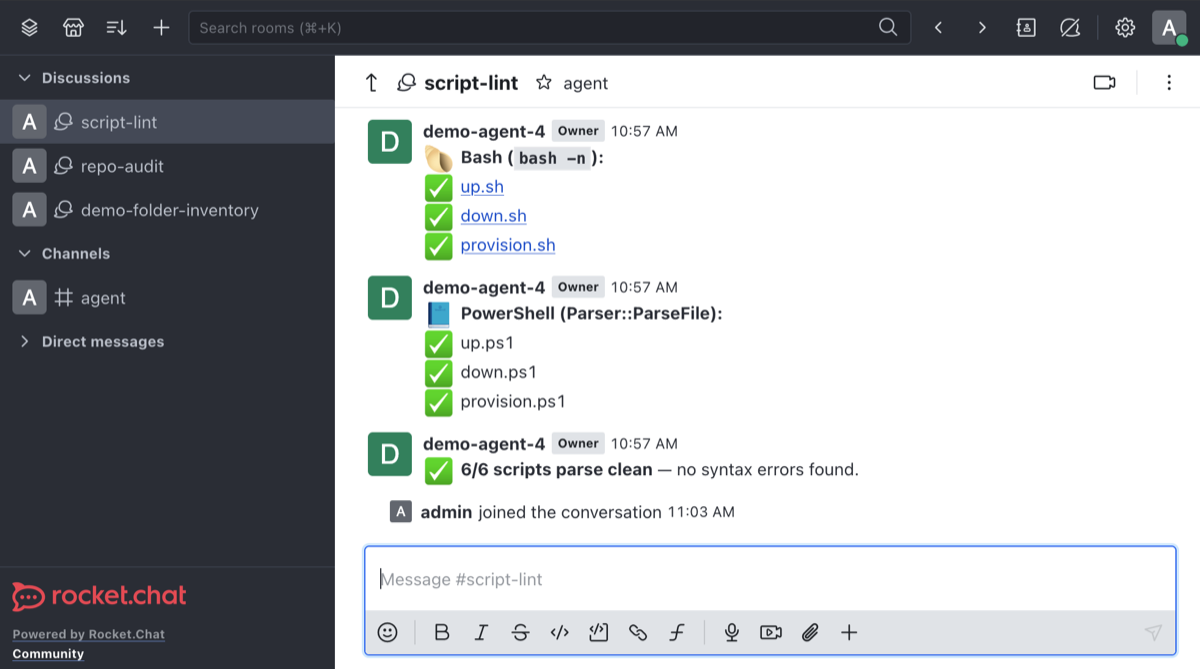
The chat room idea works really nicely. You can kick off a long session - implementing a feature, monitoring a deployment, running a performance test - and tell the agent to use a skill to post updates to a discussion on the chat server. Each agent gets their own ID and each task gets its own discussion, so you can watch everything go from a central machine. Or when you leave the office for the evening, you can check in all those remote agents on your phone.
This post walks through the setup: a lightweight Rocket.Chat server running on my internal network that every agent posts to, plus a skill that wraps it so any agent can create a discussion, post updates, and take instructions back. The whole thing is in a reference repo on GitHub:
Quickstart
There’s a demo folder in the repo that stands up the whole stack - ingress, cert-manager, MongoDB and Rocket.Chat - on a local k3d cluster. You’ll need this installed to try it:
- Docker Desktop (or any Docker engine)
- k3d
- kubectl
- helm
It deploys the exact same Rocket.Chat chart as production, with a local-friendly values overlay:
git clone https://github.com/sixeyed/agent-chat
cd agent-chat/demo
./up.sh          # or ./up.ps1 if you prefer PowerShell
The first run takes a few minutes while it pulls the images and runs Rocket.Chat’s first-boot migration. When it’s done it prints your connection details - the web UI at https://rocketchat.localtest.me (log in as admin / demo1234), the agent endpoint at http://localhost:8099, and the RC_* environment variables you paste into your agent’s shell to wire up the post-chat skill.
Ask an agent to post its progress, watch the discussion show up under #agent with a live unread badge, and when you’re done run ./down.sh to delete the cluster and all the demo data. The rest of this post explains what’s actually going on under that one command.
Why a self-hosted chat server
The chat server is a good fit. It’s the interface we humans already use to coordinate work. You’ve got multiple users, multiple threads, unread badges, web and mobile apps that push notifications. But agents post status that could leak all sorts of interesting details - so you don’t want that flowing through a third-party setup like Slack or Teams.
Rocket.Chat gives you all the features out of the box, and it’s open source so you can run it on your network. That keeps the data on the LAN and it means you own auth. Each agent has its own user account with clearly defined permissions, and they use access tokens to post to the REST API. If anything goes awry - say an agent posts a load of system credentials without thinking - that information is still private. If the agent’s chat account somehow gets compromised, the attack radius is super small and you can rotate the token or delete the account.
So the model is: a chat server lives on my internal network, agents post to it over the network, and I read it from a browser or my phone. I have dnsmasq and cert-manager running on my home Kubernetes cluster, with a custom certificate authority to run internal domains over HTTPS. On my laptop and phone I have the CA in the approved list, but for the agents running on different machines, I wanted to have a simple HTTP endpoint over an IP address.
Two front doors: HTTPS for you, HTTP for the agents
The Rocket.Chat web UI needs a browser “secure context” - things like crypto.randomUUID and notifications are only supported when the page is served over HTTPS. If you try to load the UI over plain HTTP on a LAN IP, you get empty channels and a broken experience. TLS is mandatory for the full UI experience in the browser and in the mobile apps.
Agents don’t use the browser - they call the REST API which doesn’t need a secure context. So agents can talk plain HTTP and they just need the IP address of the server, without needing all the DNS and CA setup that the full client needs.
The deployment is built with two front doors:
| Humans (web, iOS) | AI agents | |
|---|---|---|
| Connect over | HTTPS through an nginx ingress | plain HTTP to a NodePort |
| Endpoint | https://rocketchat.mydomain |
http://192.168.2.xyz:8099 |
| Needs | a CA-signed certificate and DNS (browser secure context) | nothing but the server’s IP - no TLS, no DNS |
It’s the same Rocket.Chat instance behind both doors. The split is just about access paths: one needs a trusted certificate for the clients, the other doesn’t because it’s just for the API. They are not interchangeable - if you try to browse to the IP endpoint you’ll see the UI is broken. If you point an agent at the HTTPS endpoint it will need to have the CA cert approved and be able to reach the domain.

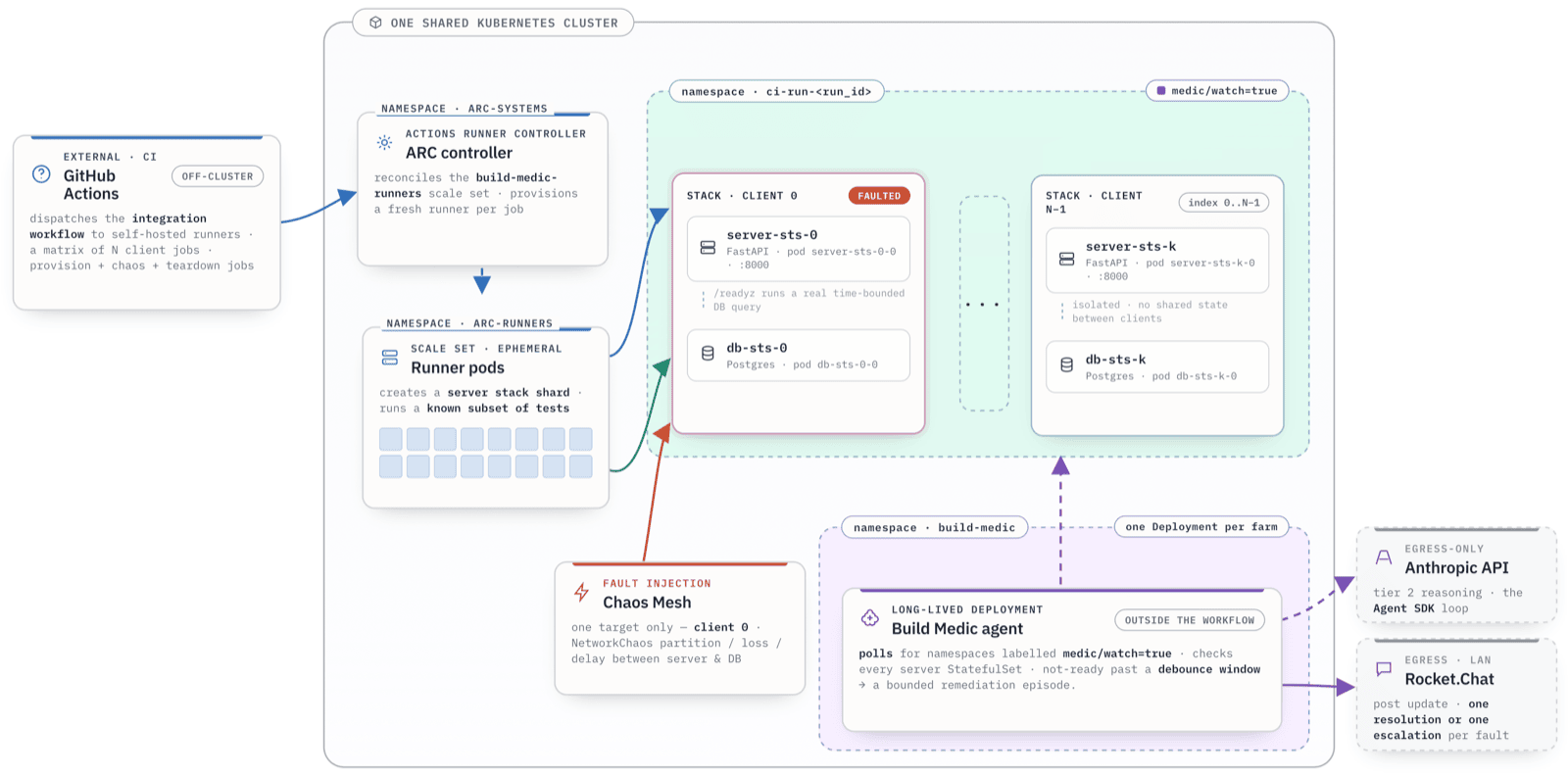
The diagram above shows both paths into the cluster. Click it for the full-size version in the repo docs.
This gives you secure access for human clients within the network. For external access I use Tailscale - my servers are all registered and the Kubernetes operator is a good fit.
One discussion per session
I have this set up so all agents post to one channel in Rocket.Chat, but with separate discussions for each session. That means you can subscribe to multiple discussions and see them all in your navigation menu, or flip back to the channel to see all the work in one view.
The skill tells agents to generate a discussion name unless the user provides one, in which case they should check for existing sessions instead of creating a new one.
Rocket.Chat does let you have multiple discussions with identical names. Sometimes agents get confused and create a new discussion with the same name, but you can work around that by being stricter with your prompts.
The post-chat skill
The logic for working with the REST API is completely generic, and one skill works across all models and tools:
-
SKILL.md- instructions for the agent: find-or-create a discussion, post updates, and run the control channel. -
rc.sh/rc.ps1- interchangeable helper scripts that wrap the REST API calls and keep the auth token off the command line.
The skill explicitly tells the agent to call the helper script, so none of that logic bulks up the context. It also tells the agent to look for a set of environment variables (prefixed with RC_ in the demo) for the connection and auth details. You need to set these up manually on each machine, using the credentials you set up for that machine.
The helper script is simple for agents to use:
RID=$("$RC" discussion "Refactor auth module")   # find-or-create, returns the room id
"$RC" post "$RID" ":hourglass: Running tests…"
"$RC" post "$RID" ":white_check_mark: 42/42 passing. Done."
"$RC" close "$RID"
The discussion subcommand is the find-or-create - call it with a stable name and you can resume the same room between sessions. post sends a message (markdown and :emoji: shortcodes both work, which is how you get the nice status icons). close tidies the discussion out of the sidebar when the work is done, but leaves it in place so the same name resumes it next time.
The skill is strict about the auth: the PAT is a secret, and it should never touch a command line or log. Agents authenticate with the Personal Access Token in the environment variable, and the helper passes it to the HTTP call in a way that keeps it out of process listings and logs - via a curl config file descriptor in bash, or in-process with Invoke-RestMethod in PowerShell.
The connection details come from the environment variables (RC_URL, RC_PAT, RC_UID etc.), which you can set per-session or machine-wide, depending on how brave you are. The PAT is a full credential - anyone holding one can post and act as that user - the skill protects it, but it’s up to you how you secure it.
The skill is cross-platform and environment variables are the lowest common denominator. If you’re only using one OS then you could change it to read from the macOS keychain, or whatever is more secure for your setup.
Replying to steer: the two-way control channel
Posting updates is actually the easy part, and all the tools and models I’ve tried can do that. The more interesting part is using the Rocket.Chat discussion as a control room - so agents post their updates, and look for responses (from a specific user) to steer the session:
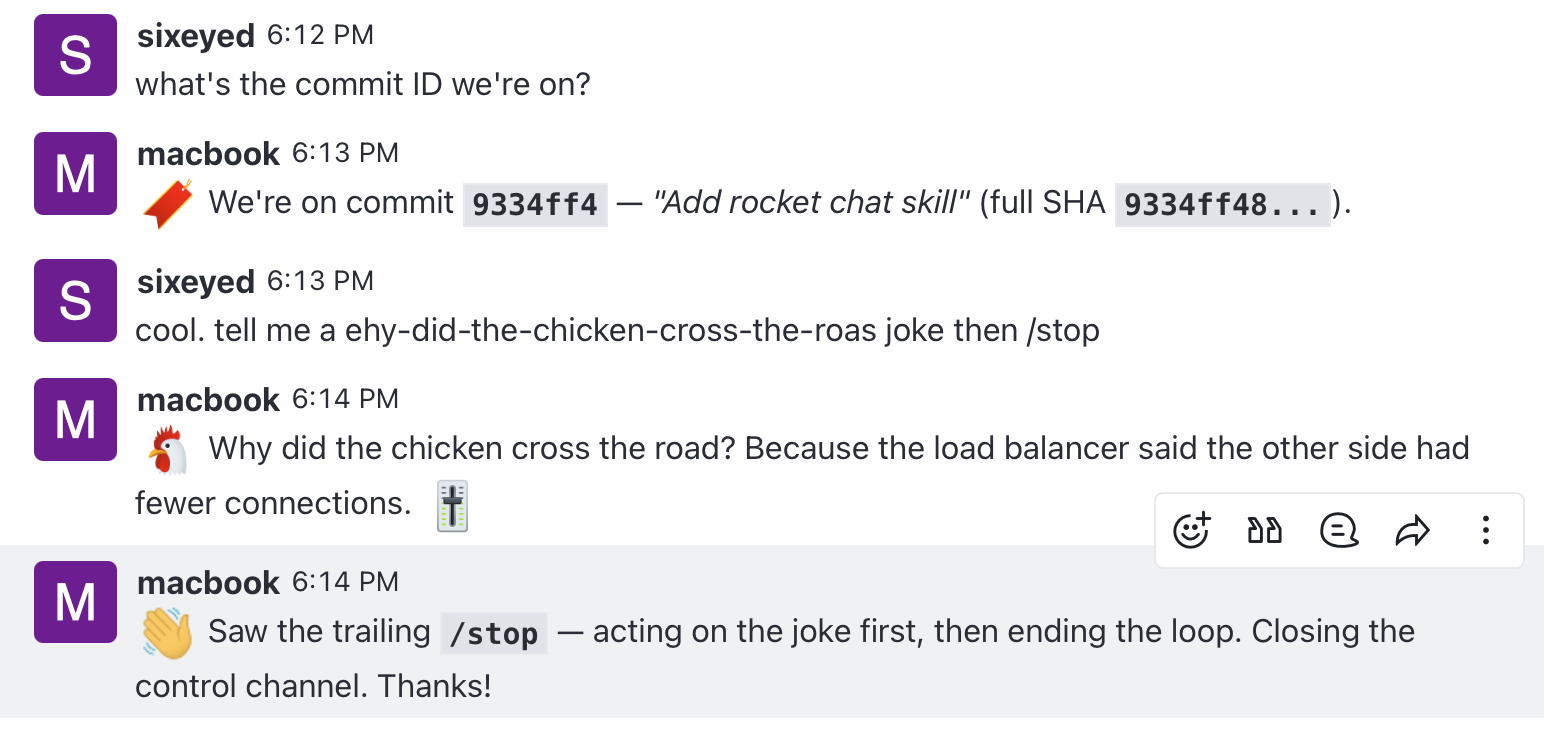
This is secured by user id. The skill only acts on messages from a specific controller account - which is your account over HTTPS - a random message in the room gets ignored. The trust boundary is the chat room’s access control plus that controller filter, because replies are executed verbatim with no extra verification.
You could extend this so the skill limited the actions it would take from the control room. But the current mode is YOLO - which is why this belongs on a trusted, internal server. You could make the allowlist multi-user, which turns this into a team control room for remote agents running on any machine.
The mechanics of the loop are pretty efficient - although not all tools have a great sleep-and-wake process. A persistent watch runs in the background, polling Rocket.Chat for new controller messages. The polling itself costs no tokens - it’s just a shell loop - and the only thing that wakes the agent is an actual new message from you.
A session can sit idle for hours waiting on your input without burning through anything, then spring back to work as soon(ish) as you reply. It checkpoints on message timestamps so it never processes the same reply twice, and it ends cleanly when you send a stop word (/stop by default, which also works on the end of a message - “deploy it then /stop” does the deploy, then stops):
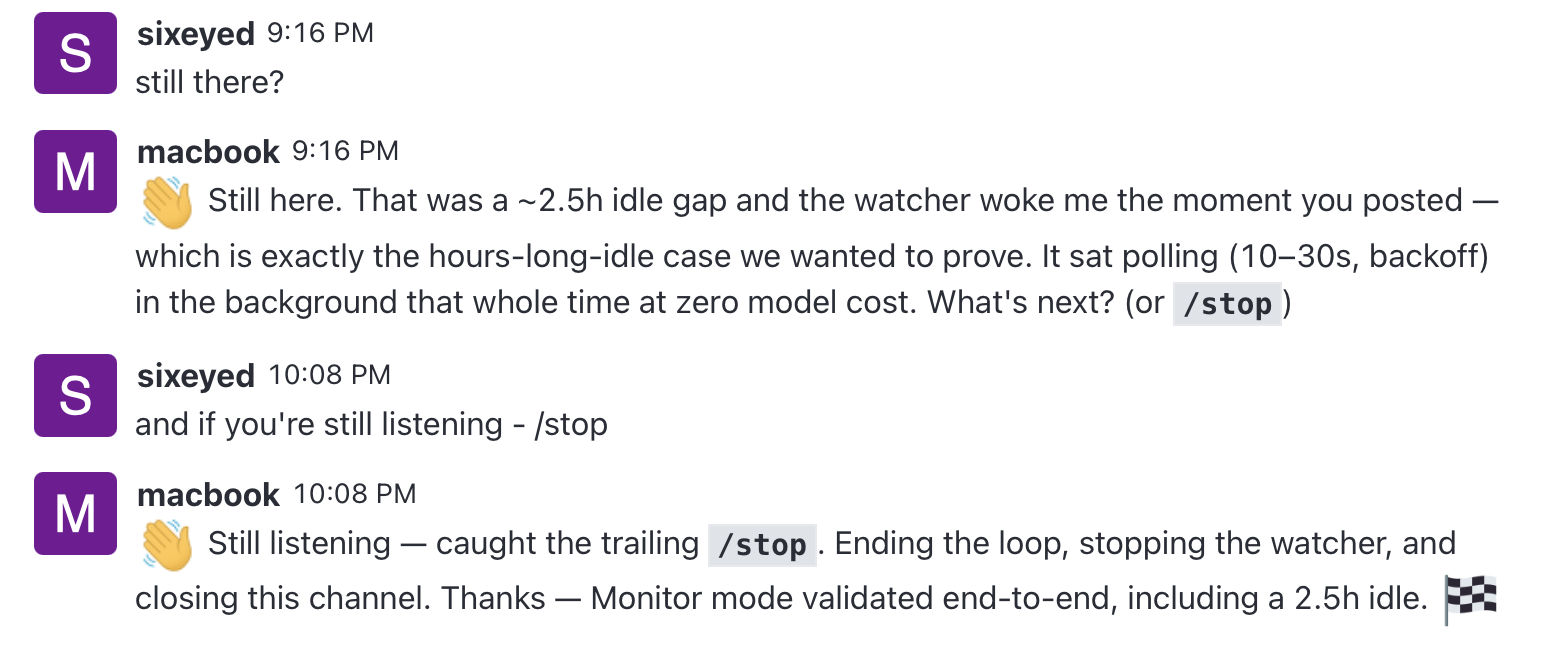
Claude Code is smart enough to drive the control channel properly - it’ll poll the discussion and treat your replies as the next turn, for as long as the session runs. Other platforms are less reliable at long-term monitoring, so the posting side works everywhere but the two-way control side is hit and miss. If you’re on Claude Code, you get the full experience.
Deploying the server
The server side is a Helm chart that deploys Rocket.Chat plus MongoDB to Kubernetes. If you’ve got a cluster on your LAN, getting it running is a handful of commands:
# namespace + storage, then resolve dependencies and deploy:
kubectl create namespace rocketchat
kubectl apply -f pvc.yaml -n rocketchat
helm dependency build .
helm upgrade --install rocket-chat . -n rocketchat

# wait for MongoDB and the replica-set init, then Rocket.Chat itself:
kubectl -n rocketchat rollout status deploy/mongodb
kubectl -n rocketchat rollout status deploy/rocket-chat-rocketchat
The chart is a wrapper over the official rocketchat chart, with one important change: the official chart bundles Bitnami’s MongoDB, which you need to avoid because of Bitnami-geddon. This chart ships its own minimal single-node MongoDB instead (mongo:8.0, running as a one-node replica set). It runs as a monolith - microservices and NATS turned off - which is plenty for this job and much less to operate.
The first boot takes a few minutes while it pulls the image and runs migrations, so don’t panic when the Rocket.Chat pod isn’t ready immediately. Re-running helm upgrade is safe - the MongoDB init job is idempotent and skips itself if the replica set already exists. Full deploy, verify, and configuration steps are in the chart’s README in the repo.
Wiring up an agent
Once the server’s up, connecting an agent is three steps:
- Generate the credentials - create a user and PAT for each agent that will post messages.
-
Install the
post-chatskill and set theRC_*environment variables for the machine - the base URL, the parent channel id, and that machine’s own user id and token. -
Tell the agent to report back. In a session, just ask it to use the
post-chatskill to post progress. Claude Code will pick up the control-channel side on its own and start polling for your replies, or you can explicitly ask the tool to do that (or skip it).
That’s it. From then on, every long-running job shows up in the sidebar as its own discussion, ticking over with status updates, and you can jump in to steer any of them from your phone (if the tooling supports it).
FAQ
Do I need Kubernetes to run this? The reference deployment is a Helm chart, and the demo runs on a local k3d cluster, so you need Kubernetes for this exact setup. But there’s nothing special about the architecture - it’s just Rocket.Chat and MongoDB, so any Rocket.Chat install works just as well. The agent side only talks to the REST API, so it doesn’t care how the server is hosted.
Can agents connect over HTTPS instead of plain HTTP? Yes. The HTTPS endpoint serves the API too, so an agent can use it - but then that machine needs to trust your CA and resolve the domain. Plain HTTP over the NodePort skips all of that, which is why it’s the easier path for machines scattered across your network.
Is the two-way control channel safe on a shared network? Not really - treat it as internal-only. Replies from the controller account are executed verbatim, secured by nothing more than the controller’s user id and the room’s access control - there’s no command verification. That’s fine on a trusted LAN, but LANs aren’t actually that trustworthy and you definitely shouldn’t expose it to a wider network. If you want it tighter, you can extend the skill to limit the actions it will take (or remove the control channel feature altogether).
Where this takes you
I’ve been waiting for the Universal Control Plane of All Agents to land, but until someone builds it this is a pretty good attempt. The agent interfaces in Claude Code and Windsurf are good. The Kanban view in Cline is a great approach. But they’re all tied to a single-platform single-machine environment.
This approach fixes that, but it’s not a perfect solution. The control channel feature depends on the smarts of the tooling, and the security model is “trust your internal network” (which you shouldn’t). But the building blocks are all standard - a chat server with a REST API and a skill - and you can adapt it all to whatever security level and extra features you want.
The reference deployment, the chart, and the skill are all in the repo:
Give it a try and have all your agents report back to a single place. It’s nice to know you can check in a four-hour performance test running on a remote machine and steer progress while you’re in the middle of a triathlon.
Comments