Exploring Nscale’s Fleet Operations - in a Home Lab
Nscale wrote up some interesting blog posts about Fleet Operations, their internal system for bringing GPU nodes online at scale. They use Temporal to orchestrate the automation workflows, Slurm and Kubernetes for burn-in testing, and Grafana for observability. The posts walk through how a node goes from racked hardware to validated, customer-facing capacity:
There are parts of the stack I’m very familiar with from production systems, plus some equivalents I’ve used at home (MAAS, OpenStack), and some I haven’t used at all (Temporal). It looked like a good learning opportunity, so I spent a couple of weeks with Claude researching and building out my own implementation which is here on GitHub:
sixeyed/fleet-lab - fleet provisioning for a home lab
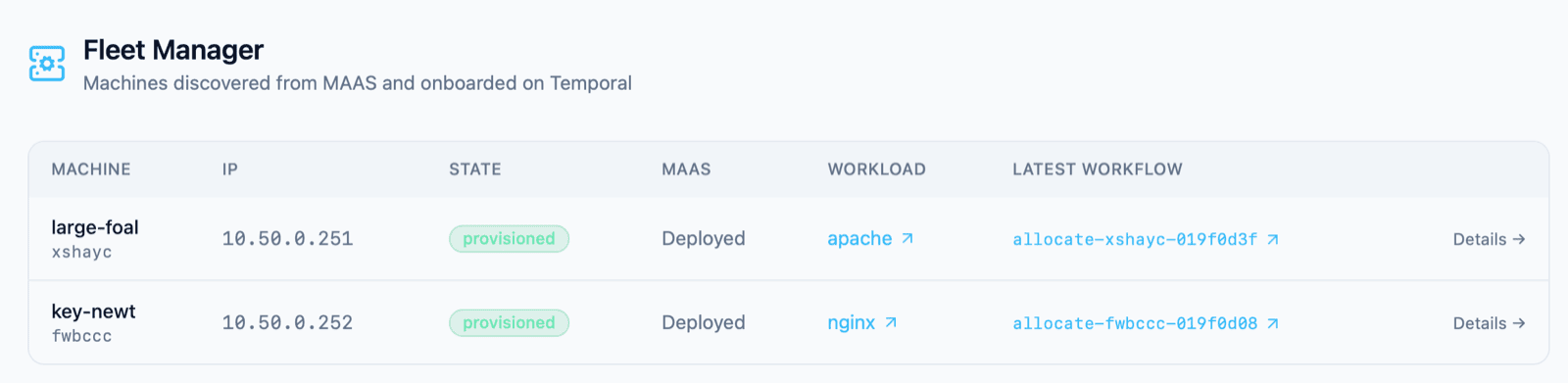
What does it do? There’s a local k3d version you can run which stubs out the integration points but uses real Temporal workflows, so you can test the lifecycle of a fake node. The real version deploys to my local Kubernetes cluster and does the real thing: I can plug a new machine into the provisioning network and it gets automatically deployed, burn-in tested and enrolled, and ends up running an Nginx workload which I can switch out to Apache at a click.
TL;DR: I built an approximation of Nscale’s Fleet Operations node lifecycle as a home lab. The Python Fleet Manager drives the node lifecycle via Temporal workflows for a real-world neocloud-in-your-own-home experience. Plug in a box → MAAS PXE-provisions the OS and configures networking → Slurm runs a burn-in stress test → OpenStack enrols it as a compute host and launches a workload VM. The UI shows the lifecycle and all workflows and event logs.
The physical architecture
If you want to try this out yourself, the big requirement is a network which you can partition into separate segments. The control plane runs on Kubernetes in your normal network range, but MAAS needs to own DHCP to allocate IP addresses for new machines - so you sit that in a separate range or it would interfere. And OpenStack also needs an IP range so it can allocate addresses for workloads. I use UniFi kit everywhere; the tiny USW-Flex-Mini is a managed switch, so you can configure different segments for different ports. I have multiple NICs on my boxes (I use old Intel NUCs as the “fleet”):
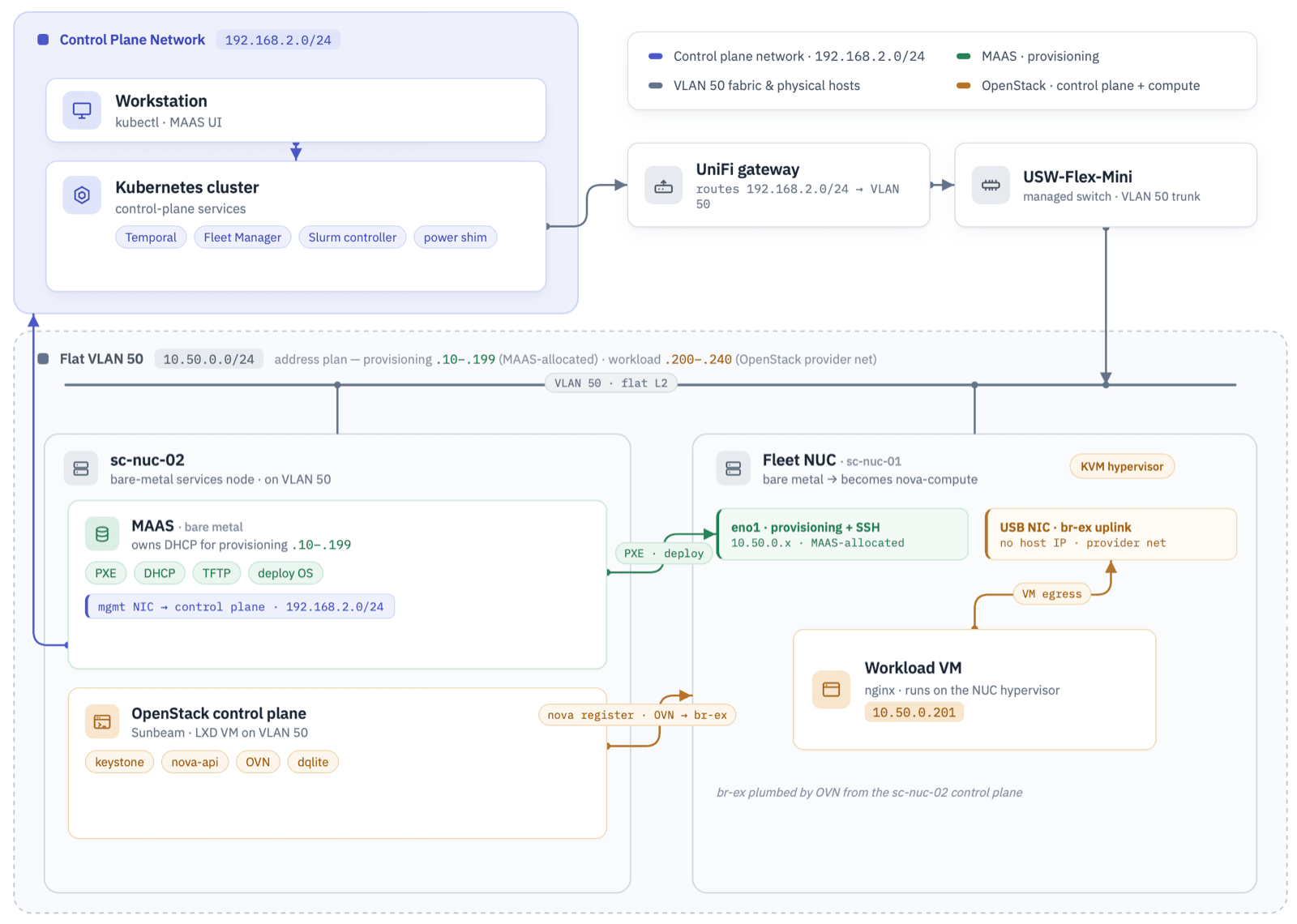
So there are three network ranges. The control plane sits on my normal LAN (192.168.2.0/24) where the Kubernetes cluster runs. Everything else lives on a single flat VLAN 50 (10.50.0.0/24), which carries two ranges that don’t overlap: MAAS owns DHCP and hands out the provisioning addresses (.10-.199), and OpenStack allocates workload VMs from a reserved provider range (.200-.240). Each fleet NUC has two NICs on that VLAN - one for PXE and management, and a USB NIC is the uplink for OpenStack’s external bridge. The UniFi network routes between the LAN and VLAN 50.
The control plane is separate from the fleet - you don’t want your orchestration layer running on OpenStack alongside customer workloads, because if there’s an outage you lose your management layer too. In my lab, the control plane runs on an existing Kubernetes cluster on my LAN: Temporal and its Postgres database, the Fleet Manager app, the Slurm controller, and the power-shim. MAAS and OpenStack run on a separate machine which bridges the control plane and provisioning networks.
Mapping a data centre onto two NUCs
You don’t need exotic kit to run this, but there are parts of an industrial data centre you won’t have at home. Here’s how each piece of the lifecycle maps across - with my best guess at how Nscale runs it, pieced together from their blog posts and industry standards.
| Function | Real data centre (Nscale) | Home lab |
|---|---|---|
| Compute nodes | Racks of GPU servers | 2× Intel NUCs on my desk |
| Power & boot control | Redfish on each node’s BMC | Smart plug + power-shim API + one-time BIOS settings |
| Bare-metal provisioning | Autonomous PXE enrolment (Ironic / Metal³ / Tinkerbell?) | MAAS |
| Burn-in / validation | gpu-burn + DCGM via Slurm and Kubernetes |
Slurm running stress-ng (CPU/memory/disk) |
| Workload / capacity | Validated node joins the scheduling pool (Kubernetes / OpenStack?) | OpenStack - NUC enrolled as a nova-compute host |
| Orchestration | Temporal | Temporal |
| Observability | Grafana - Mimir, Loki, Tempo | Temporal Web UI + Fleet Manager UI |
| Reclaim / remediation | Automated workflows + Radar fault events | UI-initiated ReleaseMachine / ReprovisionMachine workflows |
I don’t have racks of GPUs (those are all in my Mac Studio boxes), so the burn-in is just a quick CPU, memory and disk stress rather than gpu-burn. The NUCs don’t have BMC (the always-on remote management chip), so I can’t remotely tell a machine to reboot. Instead I control the mains with a smart plug and a simple REST API which MAAS can call to turn it on or off. Before provisioning I set each NUC’s BIOS to PXE-boot first, and to power on whenever it gets mains power.
The enrolment part is the lowest fidelity. Once the node is provisioned, burnt-in and enrolled as a compute instance in OpenStack I have two workloads it can run - either Nginx or Apache VMs. Those are lightweight and fast to start, and they prove connectivity through the network segments.
The lifecycle in Temporal workflows
Temporal is a powerful project for workflow management. It has built-in primitives for handling long-running tasks and managing failures. Workflows are defined in code using the Temporal SDK, where you define the orchestration steps. The real work happens in activities - also defined in code - which you execute from the workflow:
-
workflows need to be deterministic - producing the same output from the same input, with no side-effects. Temporal works by recording all activity in its event history. A workflow can be running but not active, if it’s waiting on an external event. When it activates again, it is loaded into a worker which runs a replay: executing the whole workflow again, but serving completed activities from the event history, before continuing with the next activity. If there are any inconsistencies from the replay Temporal throws
NondeterminismError. -
activities need to be idempotent - producing the same outcome if they are run repeatedly. Activities are automatically retried on failure by default (you can configure that in the workflow with
RetryPolicy), so they need to be repeatable.
This is the simple workflow for commissioning a new machine in MAAS. This instructs MAAS to inventory the hardware and enrol the machine as ready for OS deployment:
@workflow.defn
class CommissionMachine:
    @workflow.run
    async def run(self, system_id: str) -> str:
        await _mark(system_id, "provisioning")
        await workflow.execute_activity("commission", system_id, start_to_close_timeout=_ACT)
        await _await_status(system_id, "Ready")
        await _mark(system_id, "new")  # Ready in MAAS; not yet FM-provisioned
        return "ready"
The _mark function is a helper that records the state of the workflow; _await_status checks the machine status with a poll-and-sleep loop. The real work happens in the commission activity which calls into the MAAS API to commission the machine:
@activity.defn
async def commission(system_id: str, force: bool = False) -> None:
    m = await _ctx.maas.machine(system_id)
    if m.status in ("Commissioning", "Testing"):
        return
    if not force and m.status in ("Ready", "Deployed"):
        return
    await _ctx.maas.commission(system_id)
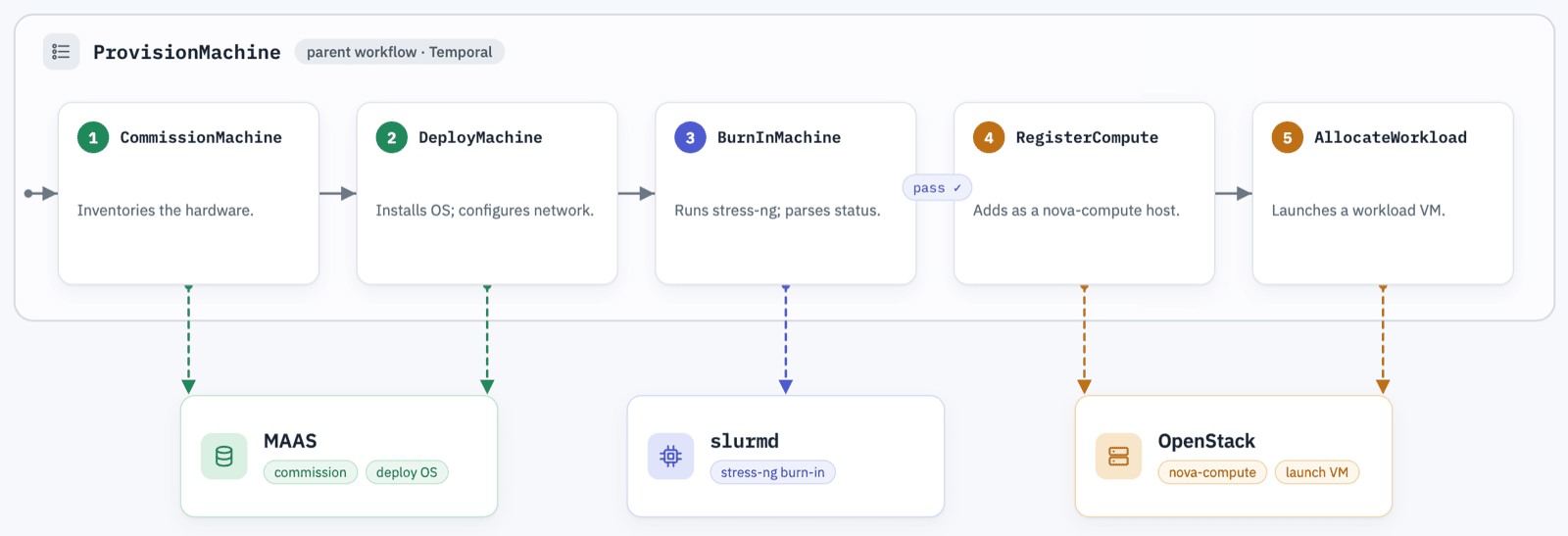
The CommissionMachine workflow gets called as a child workflow of ProvisionMachine, which co-ordinates the full machine onboarding:
ProvisionMachine
 ├── CommissionMachine   # MAAS - enrol machine (skip if done)
 ├── DeployMachine       # MAAS - install OS, configure network
 ├── BurnInMachine       # Slurm - run stress-ng, logs posted to Fleet Manager
 ├── RegisterCompute     # OpenStack - add the node as a nova-compute host
 └── AllocateWorkload    # OpenStack - launch a workload VM
All workflows in Temporal are durable - the event history stores everything (backed by Postgres in my lab, swappable for Cassandra at ultra-scale). That powers reliability because failures can be recovered at pretty much any level, providing the state store survives. It also supports long-running workflows - you can call workflow.sleep for a week if you need to. In my lab, deploying the OS can take 5 minutes, burn-in another 5, registration with OpenStack nearly 10. The full provisioning of a new machine takes about 25 minutes. The event history also powers observability:
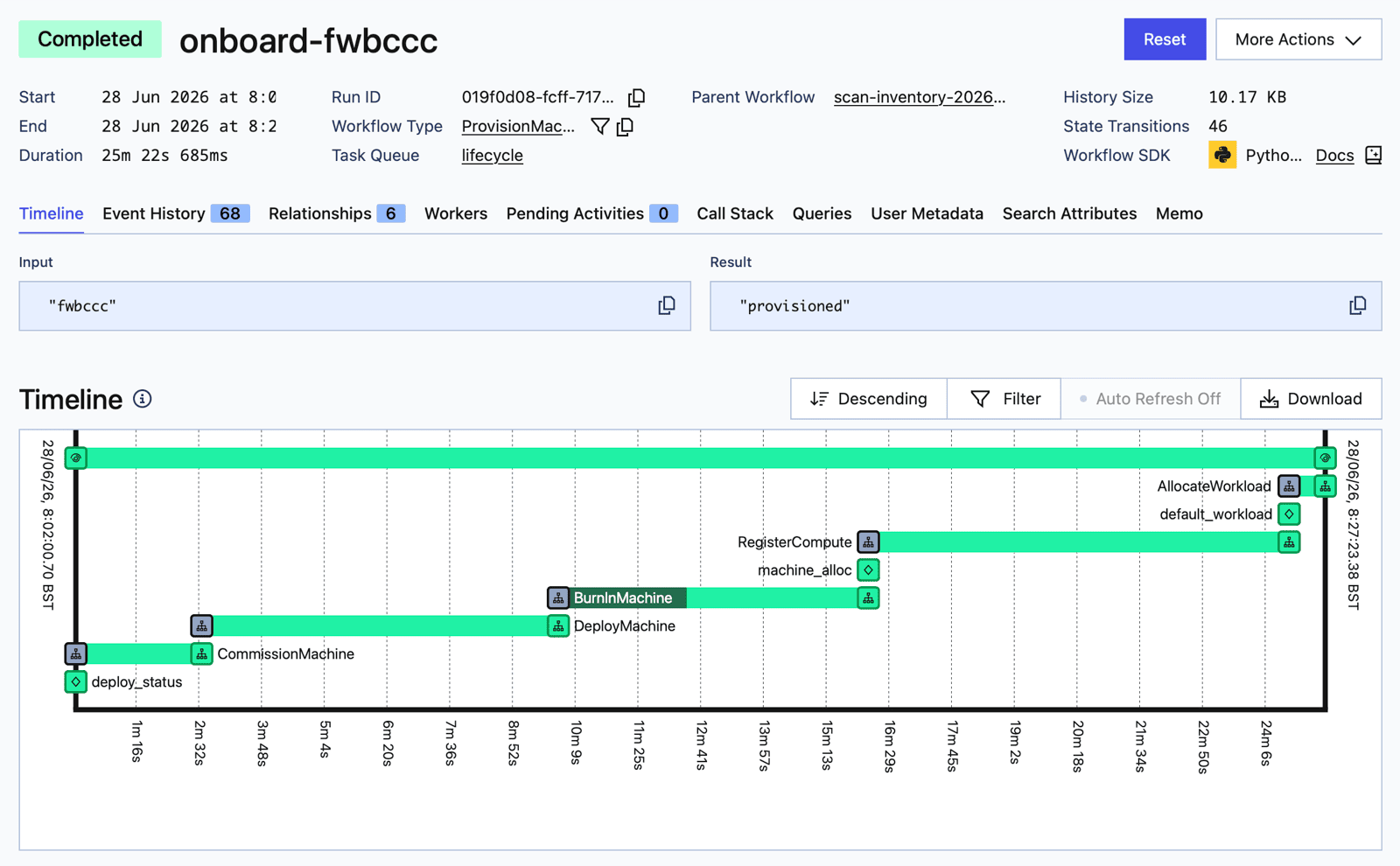
The end state is fully automated: plug in a NUC which is set for PXE boot and start on power cycle, and it gets managed from enrolment to running a workload, with no manual intervention.
Scaling Temporal workers
Activities are custom code, run by workers which register in Temporal task queues. My worker is a single Docker image which has the logic to run any activity, but the workload is split by queue to support independent scaling. The Fleet Manager runs on Kubernetes, with KEDA to scale workers with the Temporal scaler, with different configurations per queue:
| Queue | Logic | Scale |
|---|---|---|
scan |
schedule to check for new machines | scale-to-zero, pulses 0→1→0 each tick |
lifecycle |
machine workflows + short MAAS calls | scale-to-zero between jobs |
ops |
long backend activities (burn-in, register, deploy workload) | always-on, fixed at 1 |
Keeping the ops queue always-on lets the lifecycle worker(s) scale to zero. A lifecycle workflow hands off the slow work - like the ~5m burn-in - to the ops queue, then waits on a Temporal timer rather than staying active in a worker. During the long waits there’s nothing sitting on the lifecycle queue, and KEDA scales to zero. If there’s lots of work queued in Temporal, KEDA will scale up more worker Pods - any Pod can pick up any workflow, replay it and continue execution.
The learning points
I ran my Fleet Manager over a couple of weeks, iterating first on a single NUC to get the provisioning workflow fully reliable. Then plugging in the second NUC to prove the full hands-off provisioning. There were a few interesting problems, some were down to the lab hardware, some took experimentation on the workflow stages, others were implementation issues.
Activity idempotency. FM auto-commissions a node with MAAS as soon as it enrols. The commission activity needs to skip if the node is already commissioning or ready - otherwise a Temporal retry could land during a brief Ready window and re-commission the node, so you get into an endless commission loop. Same with deploy: the API itself isn’t idempotent, so the activity has to tolerate an HTTP 409 (“already deploying”) or a retry-after-success blocks the workflow. In durable orchestration at scale you can assume all the activity logic will be retried eventually, so you need to code for any initial state. You’ll only uncover edge cases with lots of testing.
Exiting cleanly. Another edge case from testing - pulling a provisioned node out of OpenStack so it can be recommissioned (for hardware changes or drift correction). I deploy OpenStack with Canonical’s Sunbeam, which keeps its control-plane state in a dqlite cluster - the Sunbeam microcluster. I run a single control node, but each fleet NUC also joins the microcluster, and dqlite makes it a voting member to maintain quorum. A failed or partial removal of a NUC leaves a stale voter behind, which breaks the quorum, and then the whole Sunbeam control plane stops responding. You can’t tell dqlite that certain classes of node should never be voters, so the fix is to ensure clean removal before MAAS wipes the disk and redeploys. That’s actually three steps: tear down the Juju machine first, then remove the node from the Sunbeam microcluster, then delete the stale compute record from Nova. That took experimentation too - when I’d thought reclaim would be the easiest part of the lifecycle.
Token expiration. This was a good one. I left the system alone for a couple of days with a fully provisioned NUC, then came back and tried to reallocate the workload. This is a UI-triggered workflow which uses the OpenStack API to remove the running instance (which was Nginx) and deploy a replacement (Apache). I had tested all this before, but this time the workflow sat without progress for a long time, then the activity failed, then retried, then went into the same loop. Temporal records activity events but it doesn’t surface the logs - for that you need to dig into the worker logs. I found the Juju credentials had expired and the activity was waiting on a password prompt that was never going to be answered. The fix was to store the credentials in Juju’s accounts.yaml on the OpenStack node, so it stayed authenticated and didn’t prompt the activity for auth. The classic sort of day-2 ops issue you only find with longitudinal testing.
More NICs please. My NUCs only have one onboard NIC, which is wired to the provisioning network and owned by MAAS. When OpenStack allocates a workload VM it sets it up with a real IP address on the same VLAN - but there’s no way to route to that, because the only NIC is already taken with the MAAS DHCP address. I experimented for a while with trying to set up a bridge but that was a dead end: both OpenStack and MAAS need to own the network config. This was a hardware fix - adding the USB NIC to get a separate network route which OpenStack could own as the provider uplink, with no host IP configured. Even then the config is fiddly: the openstack-hypervisor snap needs to set up the NIC through its own config otherwise it deletes changes from other processes.
The not-so-smart plug. My plugs are simple Tapo P100 units which don’t have power sensing, so we can tell if the plug is on (via Home Assistant) but not if the NUC itself is on. MAAS does soft resets during commissioning and deployment - effectively running shutdown - which leaves the plug ON but the machine OFF. Ask the plug to turn on and it reports “already on” and does nothing, while the NUC is still off. The fix is a hack in the power-shim API - the on endpoint does an AC cycle - off, pause, on. That ensures the box is running when the plug is powered on (at the cost of resetting if it is already on). The deploy and commission workflows check if we’ve had no activity from MAAS for a suspicious period and then do the power cycle to ensure the box is running again. Sounds nasty but works reliably.
Testing with a new machine
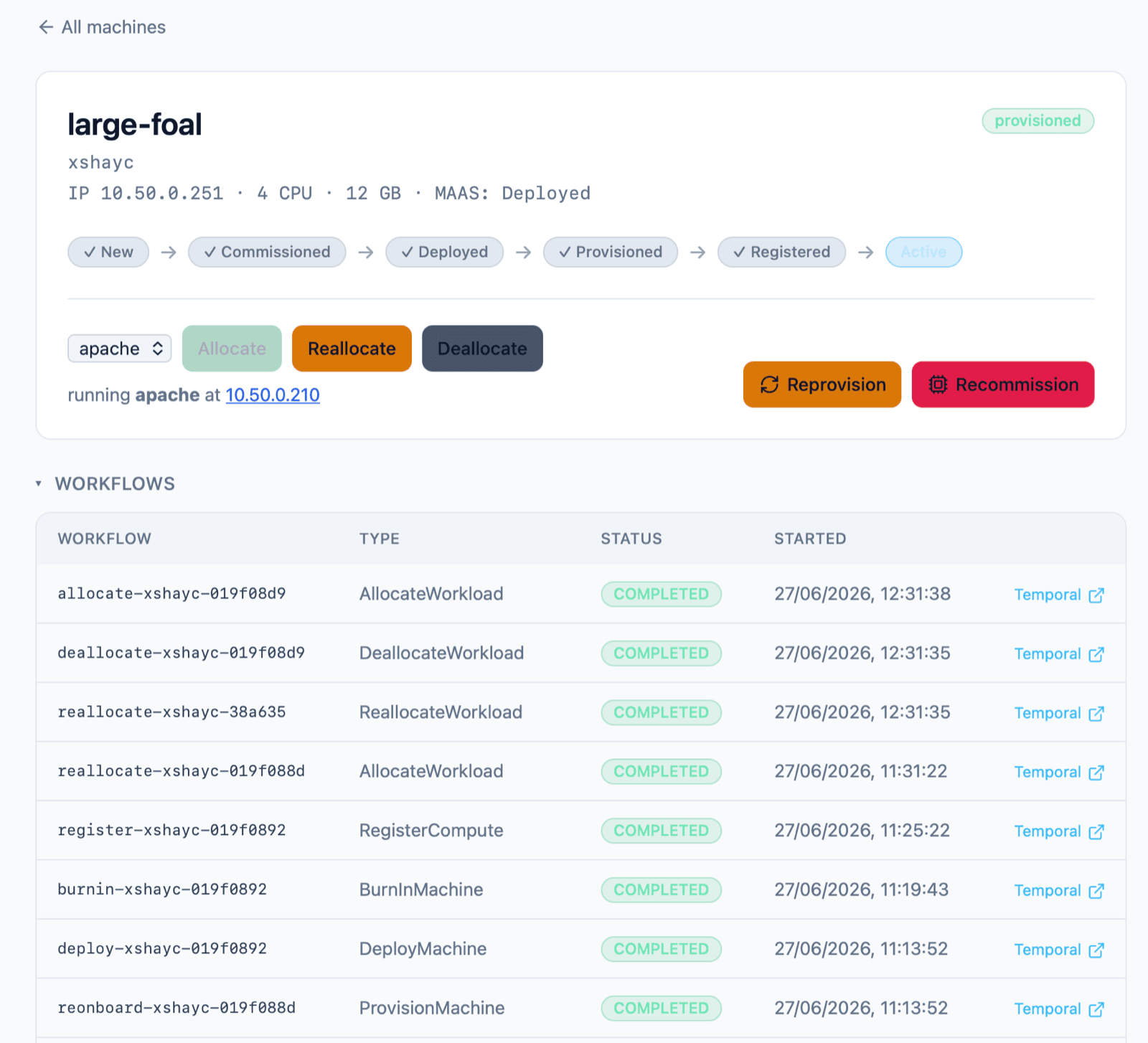
After ironing out all of the edge cases on large-foal (MAAS chooses the name), I plugged in a second NUC with the BIOS configured, and the MAC address already set in the power-shim API. It took a minute or so for the new unit to show in Fleet Manager - but the scheduled scan workflow ran, found the machine and started onboarding.
The full cycle ran fully automated and gave me an Nginx site running on key-newt, which I could reach at the OpenStack-allocated IP address on the VLAN, from a machine on my normal network:
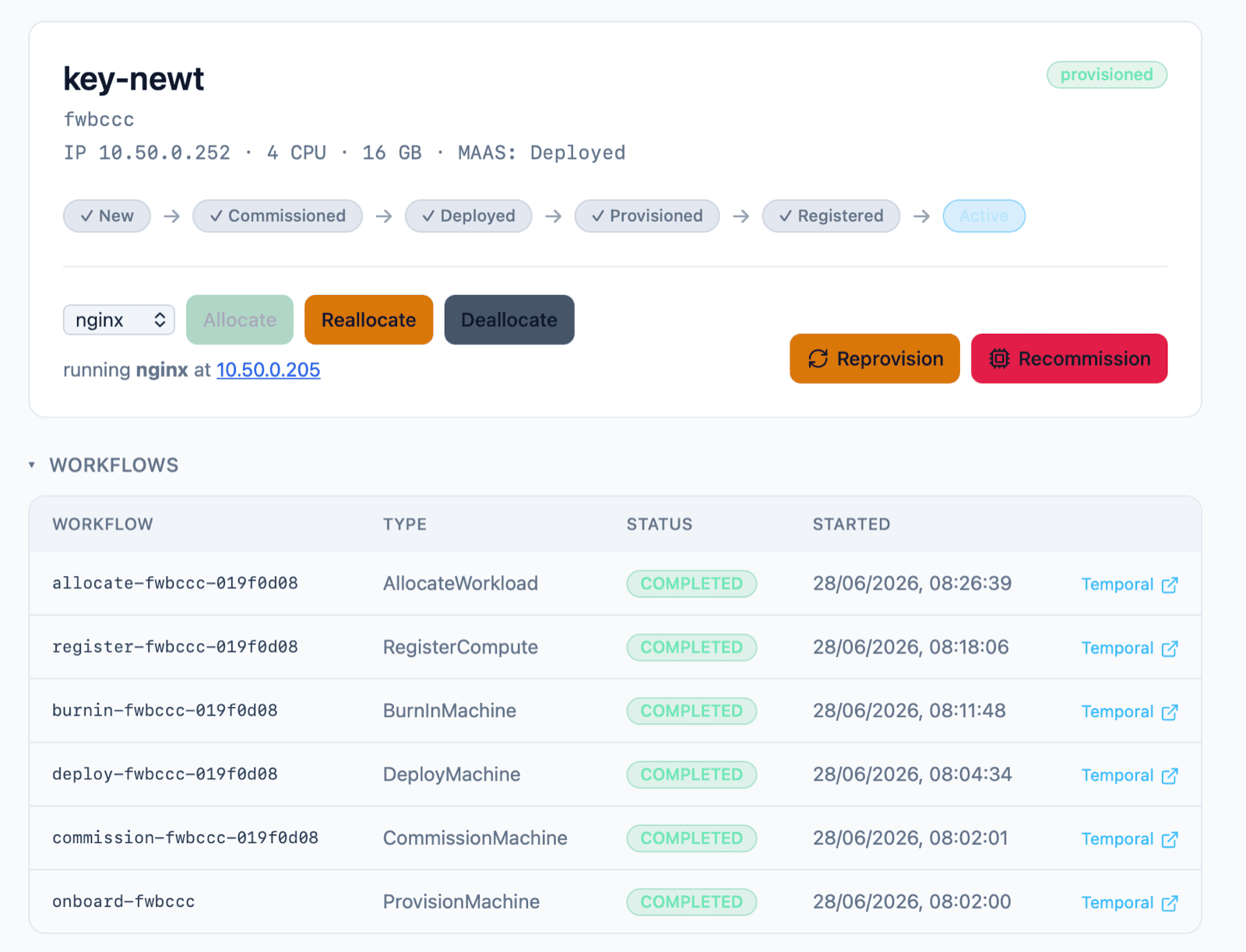
This screenshot is snipped after the workflows table (which links to all workflows for the machine). The full UI also shows tables for OpenStack, MAAS and Slurm showing the event history and logs of the provisioning process.
Next steps
This was a nice exploration of Temporal. The integration side is built as adapters which are fairly standard - using the REST API for MAAS and the Python SDK for OpenStack. Coding the Temporal activities to make them idempotent and the workflows to make them deterministic was new for me, and it’s a really nice approach. Having run Temporal for a couple of weeks now I can see a couple of projects where it might be a nice fit.
The next step for the home lab would be to deploy node-exporter and register new nodes with Prometheus during provisioning, so when the onboarding is done the new machines show up in my usual Grafana dashboards. But really OpenStack is too heavy for my workloads. Good to experiment with it (my Ansible setup deploys it as an LXD VM for easy setup and cleanup), but it really needs multiple control plane nodes and I prefer to run my own workloads in Kubernetes.
So I could swap out the final RegisterCompute workflow with an equivalent set of steps to join my Kubernetes cluster. But I think I’ll stop here for now :)
The whole project is on GitHub. That’s the Python code, Helm charts, Ansible playbooks and infrastructure setup (the k3d part is reusable - the sixeyed part is my own cluster, but left there for reference). And the docs show the evolution of the build with the phased approach and the design docs for each component:
You can check out the stubbed version with only Docker and k3d (and Python) as dependencies:
# create k3d cluster, deploy Temporal etc.
python ./infrastructure/k3d/setup.py

# build local Docker images, import to k3d and deploy the app:
python ./infrastructure/k3d/deploy.py --build
Then browse to the app on http://localhost:8088/, open the Simulator page and add a new machine. You can track all the workflows in Temporal at http://localhost:8233.
FAQ
Can I use this for my neocloud startup if I buy $500M of compute?
My repo is MIT-licensed, so you’re welcome to try. The orchestration pattern is the same whether the node is a $50K GPU server or a 4-core Intel NUC - you would replace stress-ng in the burn-in activity with gpu-burn and your final compute enrolment. In theory MAAS, Temporal, Slurm and OpenStack would work but you might need to tweak some of my code…
What does each tool in the stack do?
MAAS is the bare-metal provisioner - it takes control of the machine when it does a network boot, then enrols, commissions and deploys an OS. Temporal runs the durable lifecycle workflows that drive everything else. Slurm runs the burn-in stress test. OpenStack turns a burned-in node into compute capacity and launches a workload VM on it. A custom Python app - the Fleet Manager - ties them together.
Why use smart plugs instead of Redfish and BMC?
Reality. A real server has a baseboard management controller (BMC) that speaks Redfish (or IPMI) for remote power and boot control. Consumer NUCs have none of that, so I use a Tapo smart plug as the power control and a one-time BIOS setting to make each NUC PXE-boot on power-on. The plug gives me power on/off/query, which is enough for the lifecycle - with that AC cycle hack.
Can you demo the lifecycle without any hardware?
Yes - that’s the k3d part. It deploys the real Fleet Manager app and Temporal to a new k3d cluster, with stub adapters for MAAS, Slurm and OpenStack. You can test and prove the durable onboarding and reprovision loop and see the lifecycle without a fleet.
Why orchestrate with Temporal instead of cron jobs or scripts?
Provisioning a node is a long, failure-prone, multi-step process - deploy, burn-in, register, allocate - 25m if all goes well, but it could fail at any step. Temporal gives you durable execution: a workflow survives restarts, retries activities, and you can see every step in the web UI.
Can you change a node’s workload without reprovisioning?
Yes. The workload runs as a VM on the node and is managed independently of the provisioning lifecycle, so a Reallocate action swaps it in place - it removes the running instance (say Nginx) and deploys a replacement (Apache) without wiping or re-onboarding the node. Reprovisioning is the heavier path that wipes the disk and runs the whole lifecycle again.
Comments