
Claude at Work: My New Book
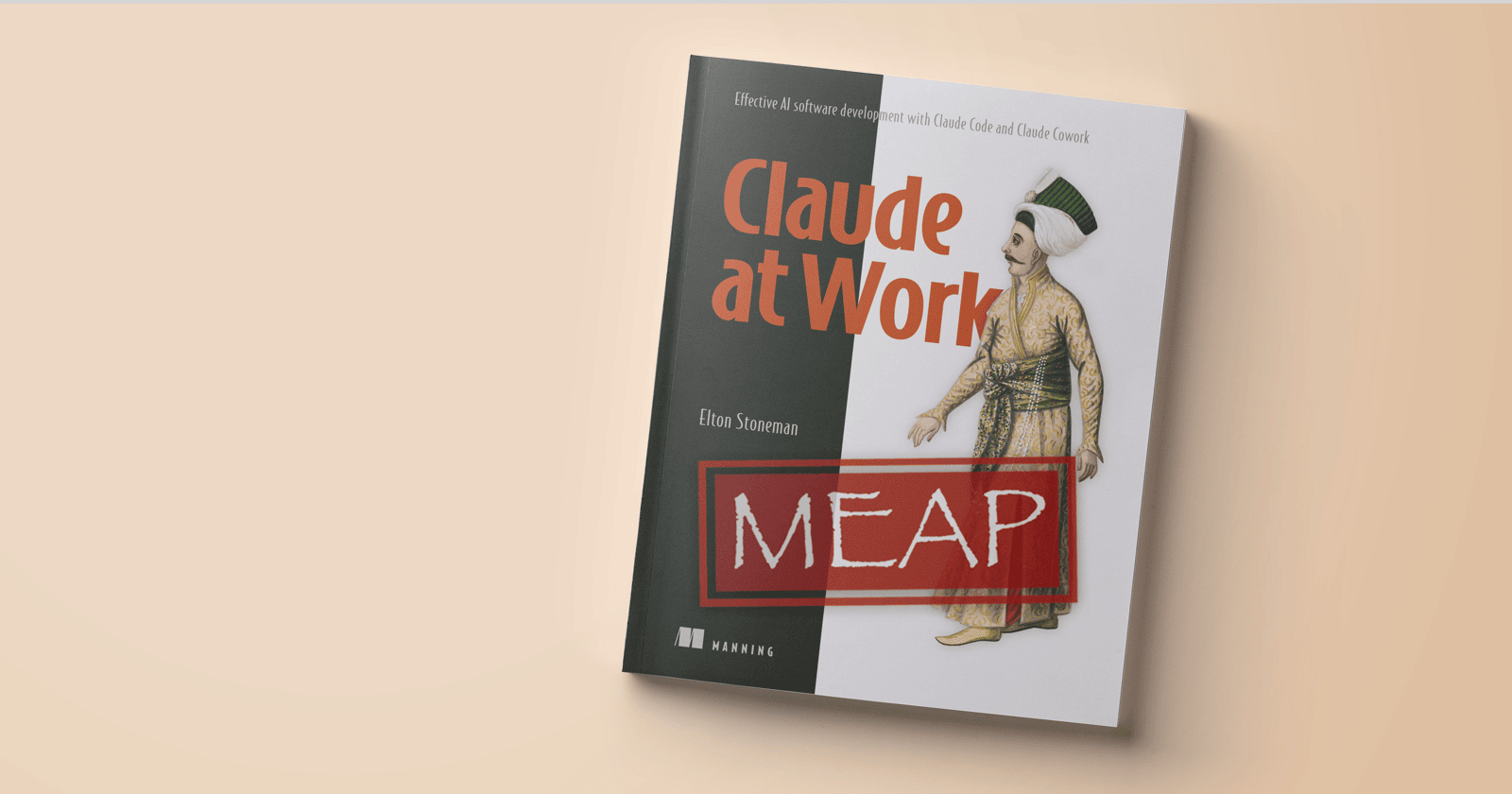
My new book Claude at Work is available now on the Manning Early Access Program. It’s a hands-on exploration of the whole Claude platform, covering the web and mobile interfaces, Claude Desktop and Claude Code and the Agent SDK:
You can sign up for the MEAP and get the first six chapters now. You’ll get new chapters as soon as they’ve been written and reviewed. And you get a direct feedback loop to ask questions and suggest improvements.
Who needs to read a book about AI?
AI couldn’t be easier to use. You work with Claude in conversations that feel completely natural. Ask a question and you get an answer. Ask it to do something and it goes off and does it. So why should you read (and worse: pay for) a book that helps you do that? Two reasons.
First, if you’re a newcomer to AI or an AI-sceptic, you’re probably in the capability gap zone. Until you really put AI to work on real projects and real problems, you don’t have a good sense of what it can do. And you won’t make the most of it because you’re assuming it has limitations which it really does not.
Second, if you’re already a daily AI user you’re probably in the volume overload zone. You’re either struggling with your workload, trying to figure out how to split up and delegate tasks to keep your agents busy. Or you’re struggling with their workload, lost in huge code reviews or endless checking-in questions.
This book helps you to become a calm and efficient director of AI agents. The Claude platform is incredibly capable. It can work through complex tasks over hours and produce results of extremely high quality. Claude at Work teaches you to use it effectively, running your agents like a team, delivering more than you ever could as an individual.
The first chapter introduces the core themes where Claude complements your own work:
Productivity - writing code and tests, deploying and monitoring applications, debugging. Claude is faster and less error-prone than you, provided you can manage its workload.
Capability - you might be a full-stack developer, but even you have limits. Claude broadens your specialization, adding an ops side to developers and a dev side to SREs.
Creativity - you can tell Claude what to do, but you can also ask it how to approach a problem. Claude has a much wider range of knowledge than you, and it can bring some novel ideas.
A snippet from chapter 1
It’s different when you scale with Claude. Each team member can be the owner of their workstream, with a team of agents doing the work. The owner stays in charge and sets the direction, various Claudes do the execution, and the owner reviews. There’s no handoff delay, no misunderstanding of features, no waiting for someone to come back online. The admin burden diminishes so you can focus on the work itself, although — as you are realizing — the meaning of “work” has changed.
This change to how you work and what your work means is a challenge. A lot of engineers thrive in the zone: headphones on, fully focused, writing code to fix a performance hotspot or troubleshooting a complex production failure. It’s a different world when you hand that space over to Claude and your practical work is flipping between sessions to steer the progress of a set of agents. You have to embrace that new approach if you’re going to get on well together.
Reassess where your value lies. If you think your main contribution is writing code or debugging services, Claude is going to disrupt that. It’s faster than you, more accurate in more languages, more current with APIs and frameworks, and it draws on a wider range of patterns and tools than you know. But that’s not a threat. It means your value shifts to the things Claude can’t do: understanding the business problem, making architectural decisions, and prioritizing the customer experience. You won’t be working in the lowest level of detail, so you have more room in your head for the higher levels — and that gives you much broader scope and impact.
Learn to multitask. If you use Claude for one thing at a time — send a prompt, wait for the response, review it, move on — you’re getting a speed improvement, but you’re missing the real gain. That comes from scaling up and running in parallel. You can have one Claude generating code while another Claude writes the tests for that code. A third Claude is drafting documentation, and you’re in conversation with a fourth, planning for a different project. It takes practice to manage multiple streams of work, especially when there’s no universal overview of all your sessions (which there isn’t yet). But when you get there and you’re effortlessly powering through work with a team of agents — that’s your new zone.
Stay in control. Claude is AI, and it makes mistakes. An LLM is fundamentally a random word generator. Model designs are incredibly sophisticated and they are trained on enormous amounts of curated input so they can guess what should come next with impressive accuracy, but it’s still guessing. Claude’s models are about the best available: they’re the least sycophantic, they don’t have obvious political bias, and Anthropic has invested heavily in making them safe, honest, and helpful. But all AI is dependent on training data and the philosophy of the company building them. Claude does get things wrong — it’s rare, but it’s just as plausible and confident with a mistake as it is with a correct response. The goal is to help you learn to evaluate the output, not just accept it. The skill you’re building isn’t just how to work with Claude, it’s how to work with an alien intelligence that’s powerful but imperfect.
The first six chapters
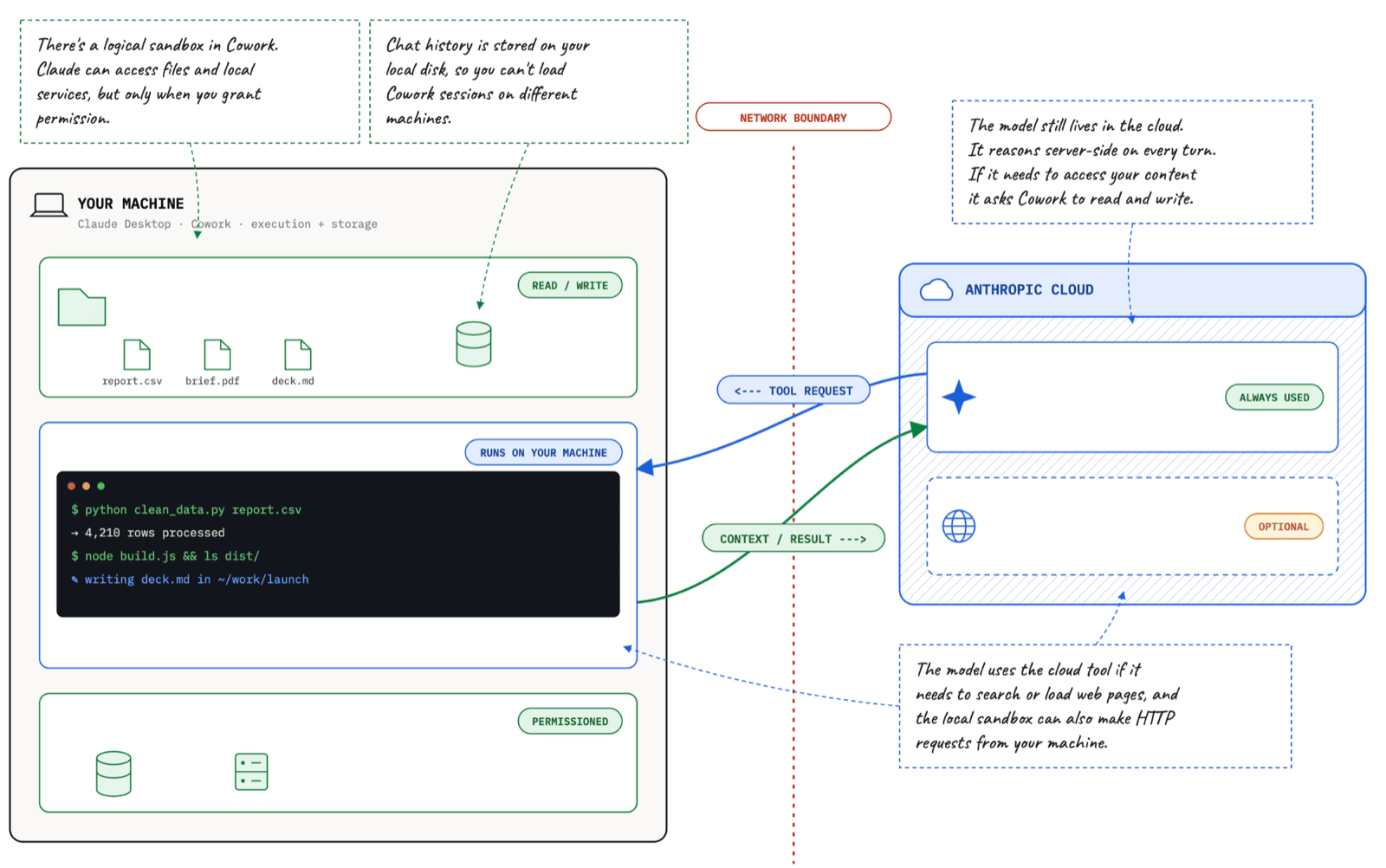
Claude at Work is split over three phases. Phase 1 covers the web, mobile and desktop apps and gets you used to working with Claude, optimizing your requests to get the best results, and understanding where the different parts of the platform run and what access they have:
We start planning the application here, using Claude to design the architecture and the implementation.
- Meet Claude - Introducing the platform and core concepts - the models, token usage, and adopting a critical dialogue approach.
- Your Side of the Conversation - Building your register for talking with Claude and understanding what runs in Anthropic’s cloud.
- Using Claude Desktop and Cowork - What you can do with the desktop app, which runs in a sandbox that can access your local data.
- Maximizing Productivity with Skills and Schedules - Writing skills for repetitive tasks and running them on schedules.
Phase 2 introduces Claude Code and gets you building out the application we designed in Phase 1. Each chapter drills into specific features of the platform, coupled with practices for trying out different workflows:
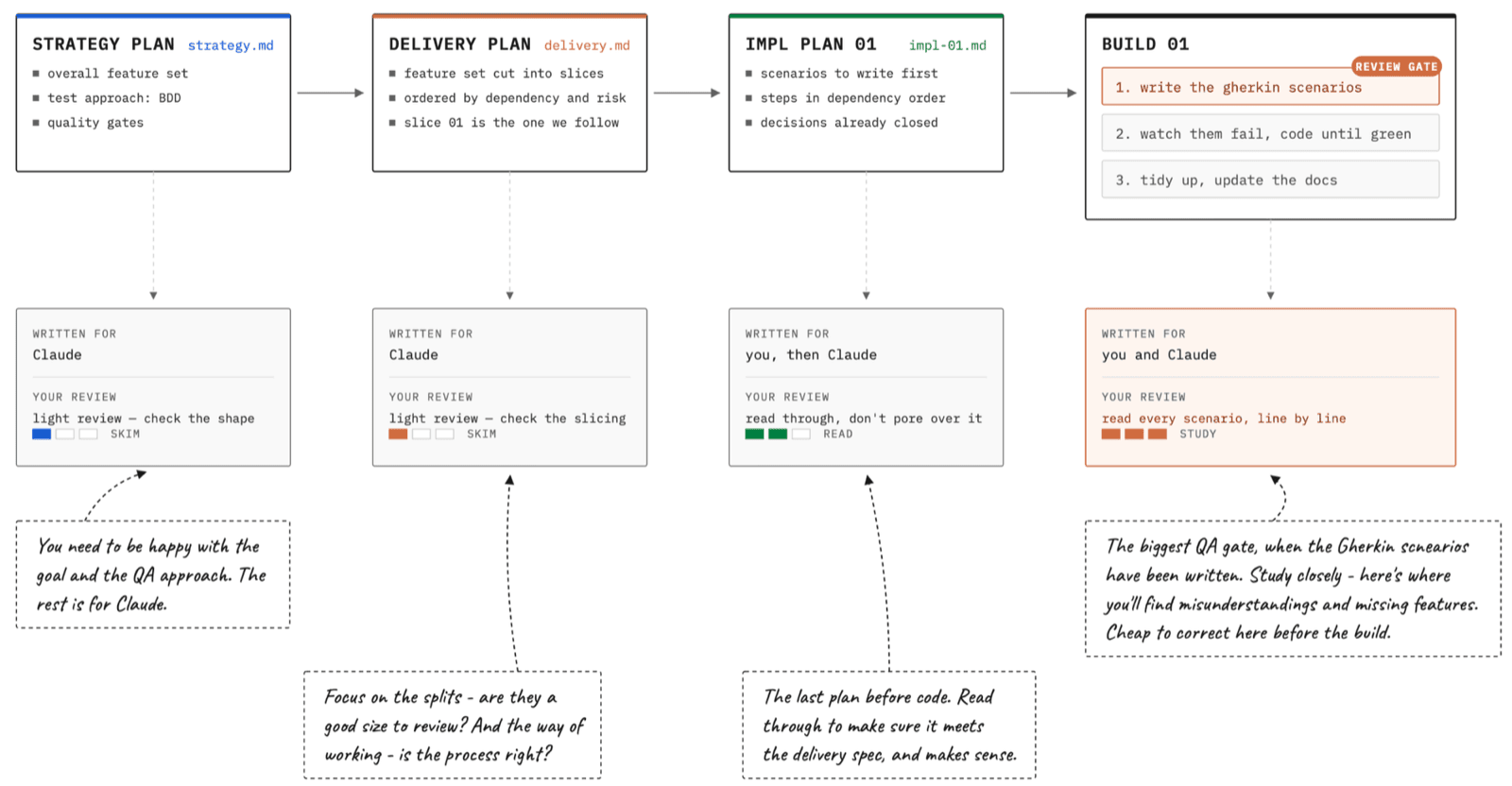
The first two chapters are available in the MEAP:
- Getting started with Claude Code - Introduces the command line tool and gets you to explore hands-off coding where Claude does it all.
- Planning and building in stages with BDD - Working in a more controlled way, with Claude building designs and implementing features with a behavior-driven approach.
I’m working on chapter 7 now, which is all about enforcing quality standards and managing multiple Claude Code sessions in parallel with Remote Control.
Why I wanted to write this book
I was hovering around AI, occasionally poking at ChatGPT and Perplexity but not really convinced it was good enough for real work. Then I had a genuine reason to give Claude a trial. One of my consulting clients asked if the big complex app I had running in Kubernetes was really portable - could we lift it from Azure to AWS? I wanted to build a quick demo to show them and spent an evening with Claude building it out, with code, Dockerfiles, Kubernetes manifests, Terraform provisioning for EKS and AKS - and I didn’t write a single line.
Then I was hooked. It was the lightbulb moment with Claude Code: that it can run commands for you. So it’s not just generating code, it can also write scripts and execute them, and run ad-hoc commands to deploy your application or debug it. Claude can integrate with anything that has a CLI or a REST API, and it uses your logged-in identity so it has all your permissions.
You need to spend time with any technology to get comfortable with what it can do. Especially so for AI - I think you really need to keep pushing it with bigger and more difficult pieces of work before you get a real sense of its capabilities and how you unlock them. I was lucky there: I had a whole bunch of Pluralsight courses to write, and they all needed a demo app. This is a perfect learning ground for Claude, building functional apps with best practices for observability and scale - which will never go live.
Claude at Work takes the same approach. In the book I use Claude to design and build a complex distributed application. You can follow along with me and build your own version of the same app, or you can bring your own idea and just follow my process. Either way you’ll spend dozens of hours building a real app with Claude, experimenting with different approaches and learning what suits you.
GitHub projects
There are three projects on GitHub which go along with the book:
-
sixeyed/claude-at-work - supplemental materials. This is where I record the full transcripts of my sessions with Claude, so if you want to see exactly how we worked through the MVP delivery of authentication and authorization in chapter 5 you can read it all.
-
sixeyed/claude-at-work-project - my own app, built by Claude. You can clone this and run the app for yourself to see how it looks. There are tags for each section in each chapter, so you can move back and forth and see what we built at each point.
-
sixeyed/claude-at-work-skills - a public marketplace with some sample skills that Claude and I build in chapter 4. These are for productivity with GitHub - getting Claude to create issues, work on features and submit PRs.
FAQ
What is Claude at Work?
It’s your hands-on guide to the full Claude platform: focused on getting Claude to do useful work. It takes you through all the tools and their features, and gets you to experience different approaches to working with Claude. You’ll design and build an entire project through the book, from an initial whiteboard sketch through to handing it over to agents to deploy and manage it.
Who is the audience - is it for developers?
Yes and no. I wrote it to appeal to technical professionals generally. Phase 1 is all about effective conversations and understanding what Claude can do in the cloud and on your desktop - I think even a non-technical person would get something from chapters 1-4. Phase 2 is Claude Code and we start building an app for real. I use Python and Kubernetes, but you’ll build your own app and you can use whatever technology you’re happy with. You won’t have to write any code - Claude will do it all - but if you’re from a development background you’ll want to read the code to see how Claude does it.
Do I need a background in AI or ML?
Not at all. I don’t go into the details of how Large Language Models work or how Claude might be trained and served. We approach Claude purely as consumers, learning how to use it to help us with our own work.
Do I need to pay for a Claude plan to follow along?
Yes. Some features - and the best models - are only available on a paid plan. You don’t need to buy the most expensive Max plan though, you can start on Pro and see how you get on. There are usage limits on all the plans, and you have to take a pause when you hit one of your limits, so complex tasks will take longer on a lower plan. But you can move up and down easily, so you could bump to Max while you work on the code in Phase 2 and then back down to Pro (or free). The autonomous agents we’ll build in Phase 3 are billed separately from your plan, but we will see how to cap expenditure.
Can I build my own project instead of copying yours?
Yes! A book about AI isn’t like other technical books - Claude is not deterministic. I can’t show you a screenshot and say yours should look like this (which I do in my Docker and Kubernetes books). Claude at Work is goal-driven instead: for each practical exercise I state what we’re looking to achieve. Then I show you my prompt and Claude’s initial response, and then summarize how the conversation went. You can build something completely different to me, but follow the same structure.
Won’t the book be out of date by the time I read it?
Some things will be, for sure. Claude moves at a ridiculous pace. The mobile apps are slowed down by Apple’s release process, but the desktop app can go through multiple releases in a week. I focus on working patterns in the book, and they’ll still apply as the platform evolves. But the MEAP is not the finished product - sign up now and you can see me wrestling with chapter rewrites as big features change :)
What is a MEAP and when do I get the whole book?
It’s the Manning Early Access Program. You get chapters delivered as they’re written (after my editor’s initial review). It means you don’t have to wait until the final release, and you get the liveBook experience so you can make comments and ask for clarifications - and generally help to make the book better. It’s taking me about 2-3 weeks to write each chapter, so I think we’re looking at December(?) for the full thing.
Can’t I learn it all from Anthropic’s documentation?
I don’t think so. The docs are good but they’re reference material - how the feature works and what you can do with it. Claude at Work is much more of a learning path, guiding you through the platform and introducing you to different workflows so you can find what works best for you.
Can I use it with some other AI platform?
Not really. OpenAI’s tools are closest to the Claude platform with Codex and ChatGPT Work, but they’re not a complete match on feature set. You can follow along with the approach using ChatGPT but you’ll lose out on the specifics of Claude. But the great thing about AI is that you can just ask: “Elton says to do this with Claude, how do I do that in ChatGPT?”.
What’s Next
Chapter 7 is coming soon.
Subscribe to my Substack for updates.
Comments